
Join the Conversation
- Find Answers
- :
- Splunk Administration
- :
- Getting Data In
- :
- Re: How to monitor Powershell Command Line history...
- Subscribe to RSS Feed
- Mark Topic as New
- Mark Topic as Read
- Float this Topic for Current User
- Bookmark Topic
- Subscribe to Topic
- Mute Topic
- Printer Friendly Page
- Mark as New
- Bookmark Message
- Subscribe to Message
- Mute Message
- Subscribe to RSS Feed
- Permalink
- Report Inappropriate Content

I enabled the powershell logging function on WinServer2k8 or Winserver2012 in following steps
create a default profile:
C:\Windows\System32\WindowsPowerShell\v1.0\Profile.ps1
Add these to default profile.ps1 file
$LogCommandHealthEvent  =   $true
$LogCommandLifecycleEvent   =   $true
Then I try executing a powershell command in powershell window,I can see this record in the event viewer.
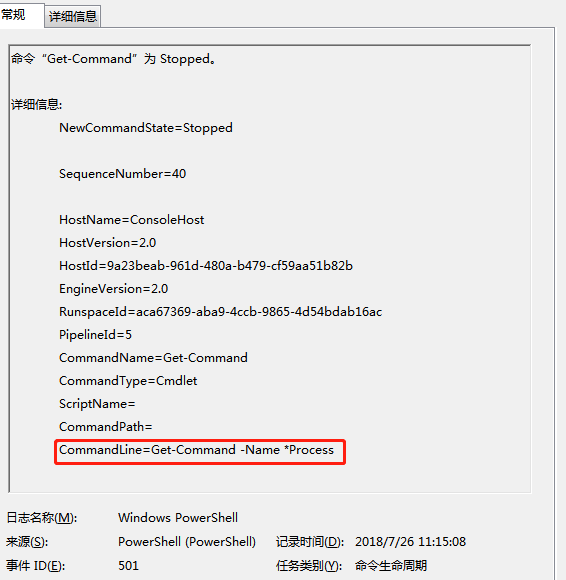
Now ,I will use splunk forwarder push that to splunk , I created following inputs.conf stanza:
c:\program files\splunk forwarder\apps\splunk_TA_Windows\local\inputs.conf
[WinEventLog://Windows Powershell]
disabled=0
`
I also tried the following inputs
 [WinEventLog://Microsoft-Windows-Powershell/Operational]
disabled=0
Splunk can't receive the PowerShell log,However, I can receive Windows Security log, so I think I might input Invalid stanza in inputs.conf and I can't find an error that related inputs from internal log
Who can tell me how to create inputs stanza correctly?
- Mark as New
- Bookmark Message
- Subscribe to Message
- Mute Message
- Subscribe to RSS Feed
- Permalink
- Report Inappropriate Content
I've solved this problem. I found doc related it: http://docs.splunk.com/Documentation/Splunk/6.0.1/Data/MonitorWindowsdata#Configure_remote_event_log...
Note: Use the log properties' "Full Name:" to index. For example, to monitor Task Scheduler in Microsoft> Windows > TaskScheduler >Operational, right click on Operational and select properties. Use the "Full Name" to append to WinEventLog:// stanza:
So the correct configuration should is:
[WinEventLog://Windows PowerShell]
disabled = 0
index=wineventlog
I'm used to search wineventlog index, but these events are default indexed into the index main if you do not configure the index name.So
- Mark as New
- Bookmark Message
- Subscribe to Message
- Mute Message
- Subscribe to RSS Feed
- Permalink
- Report Inappropriate Content
I've solved this problem. I found doc related it: http://docs.splunk.com/Documentation/Splunk/6.0.1/Data/MonitorWindowsdata#Configure_remote_event_log...
Note: Use the log properties' "Full Name:" to index. For example, to monitor Task Scheduler in Microsoft> Windows > TaskScheduler >Operational, right click on Operational and select properties. Use the "Full Name" to append to WinEventLog:// stanza:
So the correct configuration should is:
[WinEventLog://Windows PowerShell]
disabled = 0
index=wineventlog
I'm used to search wineventlog index, but these events are default indexed into the index main if you do not configure the index name.So



Join the Splunk Community Slack to learn, troubleshoot, and make connections with fellow Splunk practitioners in real time!
Join Splunk User Groups to connect and learn in-person by region or remotely by topic or industry.
A Four-Part Event Series: Full Stack Observability For the AI Era
SOC4Kafka - New Kafka Connector Powered by OpenTelemetry
Event Series: Level up your SOC: Advancing with Splunk Enterprise Security
