
Join the Conversation
- Find Answers
- :
- Splunk Administration
- :
- Getting Data In
- :
- How to index a CSV file from a local machine?
- Subscribe to RSS Feed
- Mark Topic as New
- Mark Topic as Read
- Float this Topic for Current User
- Bookmark Topic
- Subscribe to Topic
- Mute Topic
- Printer Friendly Page
- Mark as New
- Bookmark Message
- Subscribe to Message
- Mute Message
- Subscribe to RSS Feed
- Permalink
- Report Inappropriate Content
How to index a CSV file from a local machine?

Hi,
I have 2 CSV files which are on the local machine. I would like to add these files and index them.
I followed these steps to index, but I see an issue with Path settings.
Data inputs->Local Input ->Files and Directories-> New--> Browse
When I try browsing the path, I don't see any src listed.
Thanks
Arati
- Mark as New
- Bookmark Message
- Subscribe to Message
- Mute Message
- Subscribe to RSS Feed
- Permalink
- Report Inappropriate Content

hi,
The Add Data page
After you log into Splunk Enterprise, the Home page appears:
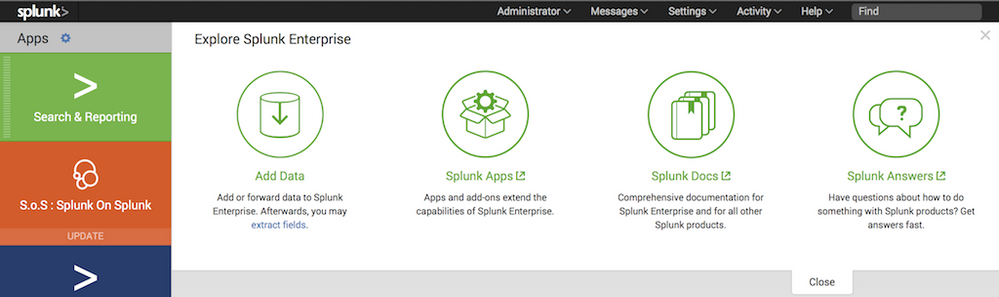
To add data, click the green Add Data button (to the right of the list of apps.) The Add Data page appears.
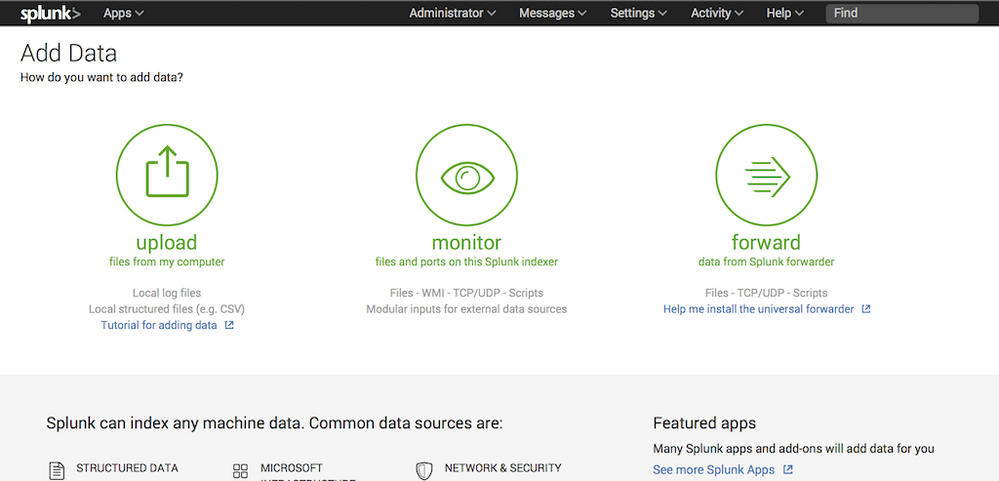
There are three options for getting data into your Splunk Enterprise instance with Splunk Web: Upload, Monitor, and Forward.
The Upload option lets you upload a file or archive of files into Splunk Enterprise for indexing. When you click Upload, Splunk Enterprise goes to a page that starts the upload process.
for more informations, follow this link:
http://docs.splunk.com/Documentation/Splunk/6.3.3/Data/Howdoyouwanttoadddata
- Mark as New
- Bookmark Message
- Subscribe to Message
- Mute Message
- Subscribe to RSS Feed
- Permalink
- Report Inappropriate Content


If you click the blue '>' icon do subdirectories and files appear?
If this reply helps you, Karma would be appreciated.




Join the Splunk Community Slack to learn, troubleshoot, and make connections with fellow Splunk practitioners in real time!
Join Splunk User Groups to connect and learn in-person by region or remotely by topic or industry.
Data Management Digest – September 2026
Federated Search for CloudWatch Unified Data Store Is Generally Available
Announcing Modern Navigation: A New Era of Splunk User Experience
