
Join the Conversation
- Find Answers
- :
- Splunk Administration
- :
- Getting Data In
- :
- Re: How to have a search run outputcsv even if the...
- Subscribe to RSS Feed
- Mark Topic as New
- Mark Topic as Read
- Float this Topic for Current User
- Bookmark Topic
- Subscribe to Topic
- Mute Topic
- Printer Friendly Page
- Mark as New
- Bookmark Message
- Subscribe to Message
- Mute Message
- Subscribe to RSS Feed
- Permalink
- Report Inappropriate Content

I have a report that dumps to an outputcsv, during the weekends this report will not return any values due to the lack of user traffic to the environment. I want to have my search create a blank CSV with only the column headers and a NULL value.
My search example is below.
index=index1 source=log1 "string of text" "string of text" | append [search index=index2 source=log2 Field=value] | table _raw | addinfo | eval ResultsTime="ResultsTime="+strftime(info_search_time,"%FT%T%z") | eval ResultsRange_Begining="ResultsRange_Begining="+strftime(info_min_time,"%FT%T%z") | eval ResultsRange_End="ResultsRange="+strftime(info_max_time,"%FT%T%z") | eval ResultsID="ResultsID="+info_sid | fields - info_min_time, info_max_time, info_search_time, info_sid | outputcsv file.csv
- Mark as New
- Bookmark Message
- Subscribe to Message
- Mute Message
- Subscribe to RSS Feed
- Permalink
- Report Inappropriate Content

Two suggestions that do not do exactly what you want but they might help:
There is a create_empty option to outputcsv that will just create an empty file (without the header & NULL values):
index=index1 source=log1 "string of text" "string of text" | append [search index=index2 source=log2 Field=value] | table _raw | addinfo | eval ResultsTime="ResultsTime="+strftime(info_search_time,"%FT%T%z") | eval ResultsRange_Begining="ResultsRange_Begining="+strftime(info_min_time,"%FT%T%z") | eval ResultsRange_End="ResultsRange="+strftime(info_max_time,"%FT%T%z") | eval ResultsID="ResultsID="+info_sid | fields - info_min_time, info_max_time, info_search_time, info_sid | outputcsv create_empty=true file.csv
If you can afford to have a line with literal NULL in your csv even if your search returns other Results:
index=index1 source=log1 "string of text" "string of text" | append [search index=index2 source=log2 Field=value] | table _raw | addinfo | eval ResultsTime="ResultsTime="+strftime(info_search_time,"%FT%T%z") | eval ResultsRange_Begining="ResultsRange_Begining="+strftime(info_min_time,"%FT%T%z") | eval ResultsRange_End="ResultsRange="+strftime(info_max_time,"%FT%T%z") | eval ResultsID="ResultsID="+info_sid |append [ stats count | foreach _raw fielda fieldb ResultsTime ResultsRange_Begining ResultsRange_End ResultsID [eval <
>="NULL"]]| fields - info_min_time, info_max_time, info_search_time, info_sid, count | outputcsv create_empty=true file.csv
Just add whatever fields you need to the foreach command
Hope this helps
Chris
- Mark as New
- Bookmark Message
- Subscribe to Message
- Mute Message
- Subscribe to RSS Feed
- Permalink
- Report Inappropriate Content
Two suggestions that do not do exactly what you want but they might help:
There is a create_empty option to outputcsv that will just create an empty file (without the header & NULL values):
index=index1 source=log1 "string of text" "string of text" | append [search index=index2 source=log2 Field=value] | table _raw | addinfo | eval ResultsTime="ResultsTime="+strftime(info_search_time,"%FT%T%z") | eval ResultsRange_Begining="ResultsRange_Begining="+strftime(info_min_time,"%FT%T%z") | eval ResultsRange_End="ResultsRange="+strftime(info_max_time,"%FT%T%z") | eval ResultsID="ResultsID="+info_sid | fields - info_min_time, info_max_time, info_search_time, info_sid | outputcsv create_empty=true file.csv
If you can afford to have a line with literal NULL in your csv even if your search returns other Results:
index=index1 source=log1 "string of text" "string of text" | append [search index=index2 source=log2 Field=value] | table _raw | addinfo | eval ResultsTime="ResultsTime="+strftime(info_search_time,"%FT%T%z") | eval ResultsRange_Begining="ResultsRange_Begining="+strftime(info_min_time,"%FT%T%z") | eval ResultsRange_End="ResultsRange="+strftime(info_max_time,"%FT%T%z") | eval ResultsID="ResultsID="+info_sid |append [ stats count | foreach _raw fielda fieldb ResultsTime ResultsRange_Begining ResultsRange_End ResultsID [eval <
>="NULL"]]| fields - info_min_time, info_max_time, info_search_time, info_sid, count | outputcsv create_empty=true file.csv
Just add whatever fields you need to the foreach command
Hope this helps
Chris
- Mark as New
- Bookmark Message
- Subscribe to Message
- Mute Message
- Subscribe to RSS Feed
- Permalink
- Report Inappropriate Content
HI @chris,
I added this line to my report query | outputcsv create_empty=true file.csv. my reports is sending empty csv, even if it has some results . Am i missing anything here?Any suggestions
- Mark as New
- Bookmark Message
- Subscribe to Message
- Mute Message
- Subscribe to RSS Feed
- Permalink
- Report Inappropriate Content
Hi Aminion, I am not sure if I understand what you are trying to accomplish.
If you have search that you want to run at specific intervalls and then send the results to you via Email you can add the "Attach CSV" option to the Alert when you save it.
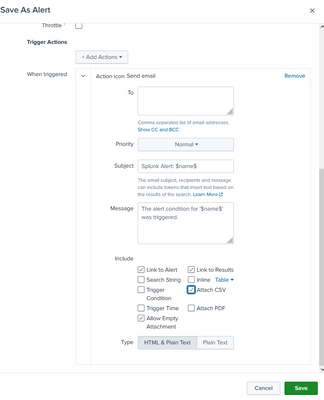
Is that what you want? O did I not understand your question properly?
Regards
Chris
- Mark as New
- Bookmark Message
- Subscribe to Message
- Mute Message
- Subscribe to RSS Feed
- Permalink
- Report Inappropriate Content
sorry @wiederkehrc @chris what i meant was, im not getting csv attachment in the email if the search doesn't have any results, whereas if the search has results I get csv attachment.My requirement is i need csv attachement in my emails regardless of the results
- Mark as New
- Bookmark Message
- Subscribe to Message
- Mute Message
- Subscribe to RSS Feed
- Permalink
- Report Inappropriate Content
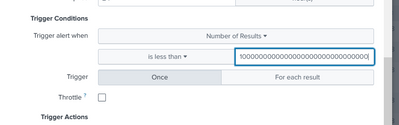
If you set the condition to send emails even if the search does not yield results you should get a csv that contains the text: "No matching events found." You can do that by selecting a "is less than" condition with a big number in the Trigger conditions:
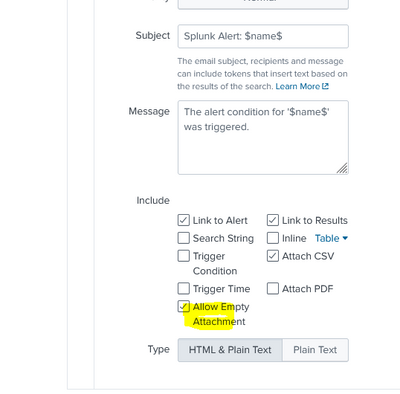
Make sure to select the "Allow Empty Attachment" option when setting up the Alert.
Another option would be to add a dummy result to your search to make sure that you always get at least one result using a command like append:
index=_internal action!=search xuxuxuxux | head 1 | eval myfield="real value" | table _time myfield| append [ makeresults annotate=true | eval myfield="dummy" | table _time myfield ]

Join the Splunk Community Slack to learn, troubleshoot, and make connections with fellow Splunk practitioners in real time!
Join Splunk User Groups to connect and learn in-person by region or remotely by topic or industry.
[Puzzles] Solve, Learn, Repeat: Matching cron expressions
Design, Compete, Win: Submit Your Best Splunk Dashboards for a .conf26 Pass
May 2026 Splunk Expert Sessions: Security & Observability
