
Join the Conversation
- Find Answers
- :
- Splunk Administration
- :
- Getting Data In
- :
- How to exclude or filter 0% window process from ho...
- Subscribe to RSS Feed
- Mark Topic as New
- Mark Topic as Read
- Float this Topic for Current User
- Bookmark Topic
- Subscribe to Topic
- Mute Topic
- Printer Friendly Page
- Mark as New
- Bookmark Message
- Subscribe to Message
- Mute Message
- Subscribe to RSS Feed
- Permalink
- Report Inappropriate Content

Hi Guru,
How do we exclude 0% process usage from Hostmetrics? We would like to capture those process have >0% usage only..
Appreciate if you can provide the sample.
hostmetrics:
collection_interval: 10s
scrapers:
# System processes metrics, disabled by default
process: (filter / exclude 0% process usage)
- Mark as New
- Bookmark Message
- Subscribe to Message
- Mute Message
- Subscribe to RSS Feed
- Permalink
- Report Inappropriate Content

Replied from Splunk Support : unfortunately, it looks like it's not possible to exclude process metrics which have 0% value
- Mark as New
- Bookmark Message
- Subscribe to Message
- Mute Message
- Subscribe to RSS Feed
- Permalink
- Report Inappropriate Content
Replied from Splunk Support : unfortunately, it looks like it's not possible to exclude process metrics which have 0% value
- Mark as New
- Bookmark Message
- Subscribe to Message
- Mute Message
- Subscribe to RSS Feed
- Permalink
- Report Inappropriate Content
Samples: -
Include : * Process > 0%
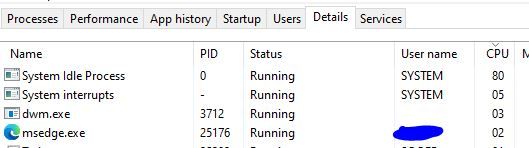
Exclude : * Process = 0%
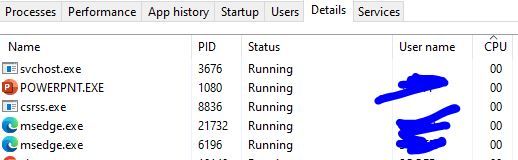
- Mark as New
- Bookmark Message
- Subscribe to Message
- Mute Message
- Subscribe to RSS Feed
- Permalink
- Report Inappropriate Content


These appear to be screenshots - Splunk doesn't ingest these very well.
- Mark as New
- Bookmark Message
- Subscribe to Message
- Mute Message
- Subscribe to RSS Feed
- Permalink
- Report Inappropriate Content
I would like to have something like this:-
PS > Get-Counter '\Process(*)\% Processor Time' -ErrorAction SilentlyContinue | Select-Object -ExpandProperty CounterSamples | Sort-Object -Property cookedvalue -Descending | Where-Object CookedValue -gt 0
*** There are thousand of 0% process which wasted a lot of space and custom metrics license.
- Mark as New
- Bookmark Message
- Subscribe to Message
- Mute Message
- Subscribe to RSS Feed
- Permalink
- Report Inappropriate Content
Please provide some sample raw events that you are trying to ingest, both the ones you want to keep and the one you want to exclude.
- Mark as New
- Bookmark Message
- Subscribe to Message
- Mute Message
- Subscribe to RSS Feed
- Permalink
- Report Inappropriate Content
Please can you provide some sanitised events so we can see what you are dealing with?

Join the Splunk Community Slack to learn, troubleshoot, and make connections with fellow Splunk practitioners in real time!
Join Splunk User Groups to connect and learn in-person by region or remotely by topic or industry.
How Splunk AI Assistant Is Transforming Investigations: Insights from .conf26
Make Your Machine Data AI-Ready in Splunk
Splunk Asynchronous Forwarding Explained
