
Join the Conversation
- Find Answers
- :
- Splunk Administration
- :
- Getting Data In
- :
- Re: How to determine who delete an alert/report?
- Subscribe to RSS Feed
- Mark Topic as New
- Mark Topic as Read
- Float this Topic for Current User
- Bookmark Topic
- Subscribe to Topic
- Mute Topic
- Printer Friendly Page
- Mark as New
- Bookmark Message
- Subscribe to Message
- Mute Message
- Subscribe to RSS Feed
- Permalink
- Report Inappropriate Content
How to determine who delete an alert/report?

- Mark as New
- Bookmark Message
- Subscribe to Message
- Mute Message
- Subscribe to RSS Feed
- Permalink
- Report Inappropriate Content
I tried all the suggestions, but still not seeing the records of when the report was deleted and by whom. The report was deleted after 8:00AM 05/15/19 and before 8:00AM 05/16/19.
I already opened a case with Splunk with diag file. Hope they find something.
Thanks,
- Mark as New
- Bookmark Message
- Subscribe to Message
- Mute Message
- Subscribe to RSS Feed
- Permalink
- Report Inappropriate Content

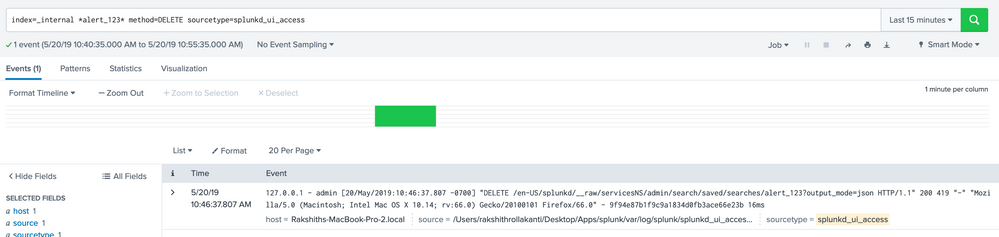
If its a saved search /report you can try this, the user field will give you who deleted the report.
index=_internal method=DELETE sourcetype=splunkd* source="/opt/splunk/var/log/splunk/splunkd_ui_access.log" uri=*saved/searches*
- Mark as New
- Bookmark Message
- Subscribe to Message
- Mute Message
- Subscribe to RSS Feed
- Permalink
- Report Inappropriate Content


- Mark as New
- Bookmark Message
- Subscribe to Message
- Mute Message
- Subscribe to RSS Feed
- Permalink
- Report Inappropriate Content
The report was deleted from Splunk web GUI. I tried both _internal and _audit indexes, but didn't gain much info about the incident.
Thanks,
- Mark as New
- Bookmark Message
- Subscribe to Message
- Mute Message
- Subscribe to RSS Feed
- Permalink
- Report Inappropriate Content

if it is done via Splunk GUI or REST, then it will be audited at :
index="_internal" method=DELETE sourcetype=splunkd_ui_access
2.If it was amended etc, you can see in index=_audit
3. if it is done via backend, hopefully you will have Operating System auditing? Like auditd or Windows Security Log?

Join the Splunk Community Slack to learn, troubleshoot, and make connections with fellow Splunk practitioners in real time!
Join Splunk User Groups to connect and learn in-person by region or remotely by topic or industry.
Announcing Modern Navigation: A New Era of Splunk User Experience
Modernize your Splunk Apps – Introducing Python 3.13 in Splunk
Step into “Hunt the Insider: An Splunk ES Premier Mystery” to catch a cybercriminal ...
