
Join the Conversation
- Find Answers
- :
- Splunk Administration
- :
- Getting Data In
- :
- How to blacklist using props.conf and transforms.c...
- Subscribe to RSS Feed
- Mark Topic as New
- Mark Topic as Read
- Float this Topic for Current User
- Bookmark Topic
- Subscribe to Topic
- Mute Topic
- Printer Friendly Page
- Mark as New
- Bookmark Message
- Subscribe to Message
- Mute Message
- Subscribe to RSS Feed
- Permalink
- Report Inappropriate Content

I need to reject or not index the logs that have the word "notice" inside the log
I understand that it is done using these two files
I have 2 doubts:
1. Is the regex ok?
2. If the path is constantly changing I can use a wildcard? [source::/folder/folder/logs/firewall-xxxxx/* ]
props.conf
[source::/folder/folder/logs/firewall-xxxxx/2020/12/4/local7.log]
TRANSFORMS-null= setnull
transforms.conf
[setnull]
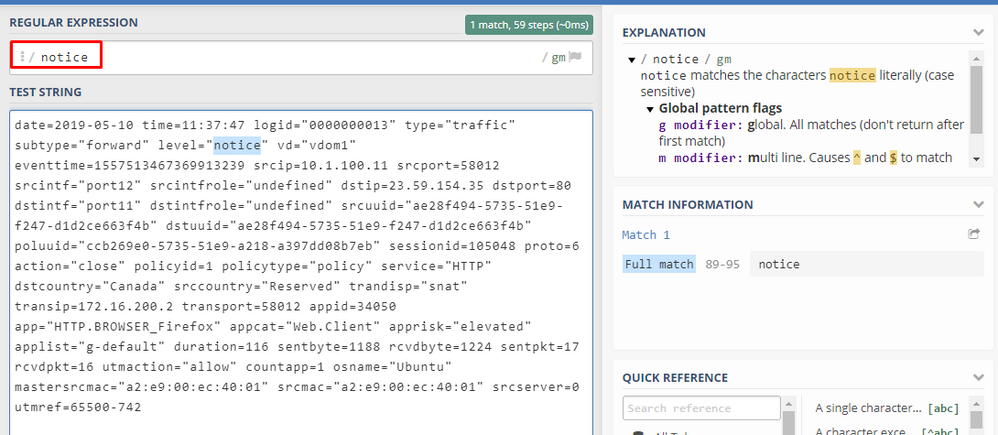
REGEX = notice
DEST_KEY = queue
FORMAT = nullQueue
Sample Log
date=2019-05-10 time=11:37:47 logid="0000000013" type="traffic" subtype="forward" level="notice" vd="vdom1" eventtime=1557513467369913239 srcip=10.1.100.11 srcport=58012 srcintf="port12" srcintfrole="undefined" dstip=23.59.154.35 dstport=80 dstintf="port11" dstintfrole="undefined" srcuuid="ae28f494-5735-51e9-f247-d1d2ce663f4b" dstuuid="ae28f494-5735-51e9-f247-d1d2ce663f4b" poluuid="ccb269e0-5735-51e9-a218-a397dd08b7eb" sessionid=105048 proto=6 action="close" policyid=1 policytype="policy" service="HTTP" dstcountry="Canada" srccountry="Reserved" trandisp="snat" transip=172.16.200.2 transport=58012 appid=34050 app="HTTP.BROWSER_Firefox" appcat="Web.Client" apprisk="elevated" applist="g-default" duration=116 sentbyte=1188 rcvdbyte=1224 sentpkt=17 rcvdpkt=16 utmaction="allow" countapp=1 osname="Ubuntu" mastersrcmac="a2:e9:00:ec:40:01" srcmac="a2:e9:00:ec:40:01" srcserver=0 utmref=65500-742
- Mark as New
- Bookmark Message
- Subscribe to Message
- Mute Message
- Subscribe to RSS Feed
- Permalink
- Report Inappropriate Content

The regex is simple. You'd have to answer if it's appropriate or not. Any log event with "notice" anywhere in the event will match.
Pattern matching in the `[source::]` qualifier works like it does with inputs. `*` matches anything but file delimiters, and `...` matches anything. Something like this might work
`[source::/folder/folder/logs/firewall-*/*/*/*/local*.log]`
- Mark as New
- Bookmark Message
- Subscribe to Message
- Mute Message
- Subscribe to RSS Feed
- Permalink
- Report Inappropriate Content
If someone is helpful, this only applies to Heavy forwarders
In Universal forwarder there is no filtering capability through regular expressions
- Mark as New
- Bookmark Message
- Subscribe to Message
- Mute Message
- Subscribe to RSS Feed
- Permalink
- Report Inappropriate Content
The regex is simple. You'd have to answer if it's appropriate or not. Any log event with "notice" anywhere in the event will match.
Pattern matching in the `[source::]` qualifier works like it does with inputs. `*` matches anything but file delimiters, and `...` matches anything. Something like this might work
`[source::/folder/folder/logs/firewall-*/*/*/*/local*.log]`
- Mark as New
- Bookmark Message
- Subscribe to Message
- Mute Message
- Subscribe to RSS Feed
- Permalink
- Report Inappropriate Content

Hi.
This is a simple "positive/included" regex. OK!
Is there a way, in reverse, to do a "negative/exclude" way to filter data?
As an example, as for the log of the user,
I DO NOT WANT "notice" PATTERN to be indexed, but all the rest,
something like
REGEX != notice
Is there a simple way inside props/transforms?
- Mark as New
- Bookmark Message
- Subscribe to Message
- Mute Message
- Subscribe to RSS Feed
- Permalink
- Report Inappropriate Content
I resolved this issue with 2 (or more) transformations, dropping all unuseful events...
props.conf
[mysourcetype]
TRANSFORMS-filter = drop
transforms.conf
[drop]
REGEX = drop_event1|drop_event2|drop_eventX
DEST_KEY = queue
FORMAT = nullQueue
I think it's the best way. Maybe the only one 🤔
But, at the same time, there's is no way to make both work with drop and get transformation,
props.conf
[mysourcetype]
TRANSFORMS-filter = drop,filter
transforms.conf
[drop]
REGEX = drop_event1|drop_event2|drop_eventX
DEST_KEY = queue
FORMAT = nullQueue

[filter]
REGEX = get_event1|get_event2|get_eventX
DEST_KEY = queue
FORMAT = indexQueue
I would like to explain Splunk 8,
- FIRST: drop all events containing pattern regex "drop_event1|drop_event2|drop_eventX"
- SECOND: get only events containing pattern regex "get_event1|get_event2|get_eventX"
Splunk, after dropping, get all (".*") except "drop_event1|drop_event2|drop_eventX" 😪
Any suggestion?


Join the Splunk Community Slack to learn, troubleshoot, and make connections with fellow Splunk practitioners in real time!
Join Splunk User Groups to connect and learn in-person by region or remotely by topic or industry.
Announcing Modern Navigation: A New Era of Splunk User Experience
Analytics Workspace removal in Splunk 10.6
Vibe-coding, AI, and Splunkcraft: Highlights from the .conf26 Builder Bar
