
Join the Conversation
- Find Answers
- :
- Splunk Administration
- :
- Getting Data In
- :
- Re: How do you debug custom search command: Error ...
- Subscribe to RSS Feed
- Mark Topic as New
- Mark Topic as Read
- Float this Topic for Current User
- Bookmark Topic
- Subscribe to Topic
- Mute Topic
- Printer Friendly Page
- Mark as New
- Bookmark Message
- Subscribe to Message
- Mute Message
- Subscribe to RSS Feed
- Permalink
- Report Inappropriate Content

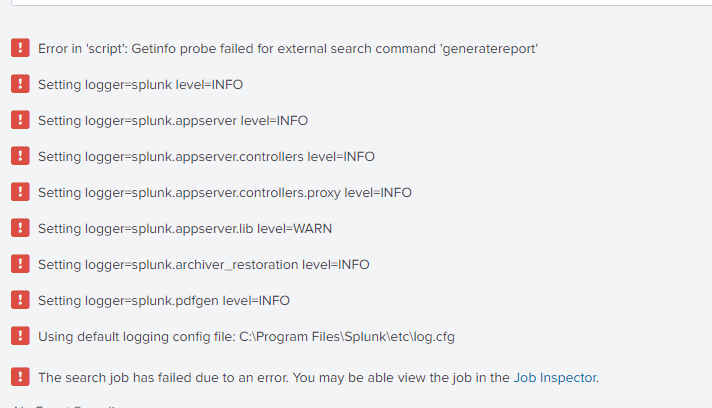
How do I debug following?
I have custom search command generatereport that I have developed on Linux, I am using logger to print information I need. Everything works fine there. I even get error with python output line of code if something is wrong.
But when I move my command to Windows I don't receive detailed error message, only Error in 'script' and it is almost impossible to debug. Is there a way how to read python log and found out what happened? Script had to fail somewhere.

- Mark as New
- Bookmark Message
- Subscribe to Message
- Mute Message
- Subscribe to RSS Feed
- Permalink
- Report Inappropriate Content
I have no idea why this issue was connected to the logger but once I set stderr_dest = log instead stderr_dest = message it started working.
- Mark as New
- Bookmark Message
- Subscribe to Message
- Mute Message
- Subscribe to RSS Feed
- Permalink
- Report Inappropriate Content
I have no idea why this issue was connected to the logger but once I set stderr_dest = log instead stderr_dest = message it started working.

Join the Splunk Community Slack to learn, troubleshoot, and make connections with fellow Splunk practitioners in real time!
Join Splunk User Groups to connect and learn in-person by region or remotely by topic or industry.
Make Your Machine Data AI-Ready in Splunk
Splunk Asynchronous Forwarding Explained
How to Monitor AI Agents with Splunk Agent Observability
