
Join the Conversation
- Find Answers
- :
- Splunk Administration
- :
- Getting Data In
- :
- Re: How do I monitor Forwarded Events logs on Wind...
- Subscribe to RSS Feed
- Mark Topic as New
- Mark Topic as Read
- Float this Topic for Current User
- Bookmark Topic
- Subscribe to Topic
- Mute Topic
- Printer Friendly Page
- Mark as New
- Bookmark Message
- Subscribe to Message
- Mute Message
- Subscribe to RSS Feed
- Permalink
- Report Inappropriate Content

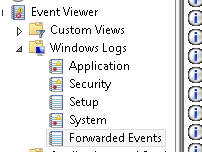
I'm trying to monitor Forwarded Events logs on Windows (not application, system, etc.)?
My inputs.conf stanza looks like this:
[WinEventLog://Forwarded Events]
Doesn't seem to work. Anyone had success monitoring this type of event log?
Any help would be much appreciated.
Thanks!
- Mark as New
- Bookmark Message
- Subscribe to Message
- Mute Message
- Subscribe to RSS Feed
- Permalink
- Report Inappropriate Content
Hi ericlarsen,
just try this. Ignore the Space between "Forwarded Events".
[WinEventLog://ForwardedEvents]
index= YOUR_INDEX
disabled = 0
regards
- Mark as New
- Bookmark Message
- Subscribe to Message
- Mute Message
- Subscribe to RSS Feed
- Permalink
- Report Inappropriate Content
Hi ericlarsen,
just try this. Ignore the Space between "Forwarded Events".
[WinEventLog://ForwardedEvents]
index= YOUR_INDEX
disabled = 0
regards
- Mark as New
- Bookmark Message
- Subscribe to Message
- Mute Message
- Subscribe to RSS Feed
- Permalink
- Report Inappropriate Content
Unfortunately that did not fix the issue.
- Mark as New
- Bookmark Message
- Subscribe to Message
- Mute Message
- Subscribe to RSS Feed
- Permalink
- Report Inappropriate Content
Then you have a problem on any other place.
Example from the official inputs.conf documentation of Splunk.
Monitor Windows event logs ForwardedEvents, this time only gathering the
events happening after first starting to monitor, going forward in time.
[WinEventLog://ForwardedEvents]
disabled = 0
start_from = oldest
current_only = 1
batch_size = 10
checkpointInterval = 5
ignoring the extra parameter this is the right stanza for the inputs.conf.
- Mark as New
- Bookmark Message
- Subscribe to Message
- Mute Message
- Subscribe to RSS Feed
- Permalink
- Report Inappropriate Content
Not sure why, but it works now. Thanks!
- Mark as New
- Bookmark Message
- Subscribe to Message
- Mute Message
- Subscribe to RSS Feed
- Permalink
- Report Inappropriate Content
For those curious, I figured out why it just started suddenly working. I didn't have 'Restart Splunk' selected for the app on the Deployment Manager.
Again, TStrauch, thanks for the help with the monitor stanza.
- Mark as New
- Bookmark Message
- Subscribe to Message
- Mute Message
- Subscribe to RSS Feed
- Permalink
- Report Inappropriate Content
- Mark as New
- Bookmark Message
- Subscribe to Message
- Mute Message
- Subscribe to RSS Feed
- Permalink
- Report Inappropriate Content


Try adding the sourcetype and index in the stanza so it looks like this..
[WinEventLog://System]
index = YOUR_INDEX
sourcetype = winEventLogs
Also, do you have the outputs.conf pointing to your indexer?



Join the Splunk Community Slack to learn, troubleshoot, and make connections with fellow Splunk practitioners in real time!
Join Splunk User Groups to connect and learn in-person by region or remotely by topic or industry.
Thanks for the Memories: .conf26 Took Learning to New Heights
Best Practices: Splunk auto adjust pipeline queue
Splunk Auto Ingestion Parallel Pipeline Scaling
