
Join the Conversation
- Find Answers
- :
- Splunk Administration
- :
- Getting Data In
- :
- Help with Table Format - JSON
- Subscribe to RSS Feed
- Mark Topic as New
- Mark Topic as Read
- Float this Topic for Current User
- Bookmark Topic
- Subscribe to Topic
- Mute Topic
- Printer Friendly Page
- Mark as New
- Bookmark Message
- Subscribe to Message
- Mute Message
- Subscribe to RSS Feed
- Permalink
- Report Inappropriate Content

performing the following search:
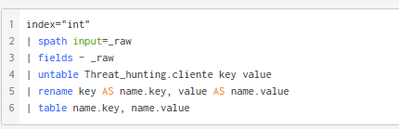
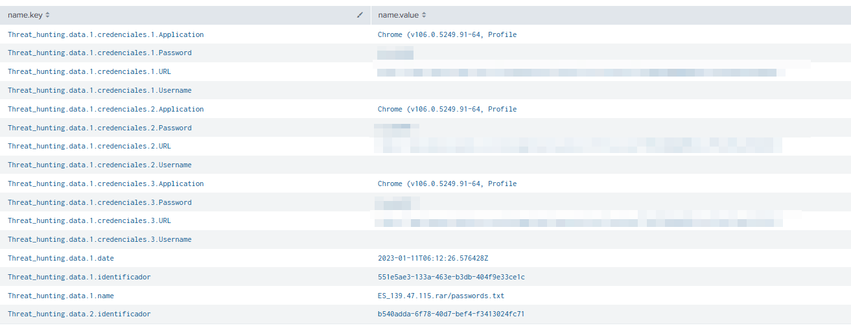
I get this result. I need to parser this information, building a table excel type. The information is in JSON format, so a UPLOAD in SPLUNK.
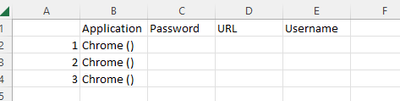
Like this:
- Mark as New
- Bookmark Message
- Subscribe to Message
- Mute Message
- Subscribe to RSS Feed
- Permalink
- Report Inappropriate Content


Try something like this
| rex field=key "Threat_hunting\.data\.(?<data>\d+)\.credenciales\.(?<credencial>\d+)\.(?<key>\w+)"
| eval {key}=value
| fields data credencial Application Password URL Username
| stats values(*) as * by data credencial- Mark as New
- Bookmark Message
- Subscribe to Message
- Mute Message
- Subscribe to RSS Feed
- Permalink
- Report Inappropriate Content
This might be easier from the _raw JSON events. Please can you share anonymised events in a code block </>
- Mark as New
- Bookmark Message
- Subscribe to Message
- Mute Message
- Subscribe to RSS Feed
- Permalink
- Report Inappropriate Content
{"Threat_hunting": {
"cliente": "paginaejemplo.com.ar",
"data": {
"1": {
"identificador": "551e5ae3-133a-463e-b3db-404f9e33ce1c",
"name": "ES_139.47.115.rar/passwords.txt",
"date": "2023-01-11T06:12:26.576428Z",
"credenciales": {
"1": {
"Application": "Chrome (v106.0.5249.91-64, Profile",
"URL": "https://www.paginaejemplo.com.ar",
"Username": "",
"Password": "dddddddd"
},
"2": {
"Application": "Chrome (v106.0.5249.91-64, Profile",
"URL": "https://www.paginaejemplo.com.ar",
"Username": "",
"Password": "bbbbbb"
},
"3": {
"Application": "Chrome (v106.0.5249.91-64, Profile",
"URL": "https://www.paginaejemplo.com.ar",
"Username": "",
"Password": "aaaaaa"
}
}
},
"2": {
"identificador": "b540adda-6f78-40d7-bef4-f3413024fc71",
"name": "AR[8BB40128FD52DCE2DD16C34FE4DA496E] [2022-11-05T18_37_34.rar/ AR[8BB40128FD52DCE2DD16C34FE4DA496E] [2022-11-05T18_37_34/Passwords.txt",
"date": "2023-01-14T05:11:44.593095Z",
"credenciales": {
"1": {
"URL": "https://www.paginaejemplo.com.ar",
"Username": "UNKNOWN",
"Password": "fffffff",
"Application": "Google_[Chrome]_Profile 1"
}
}
}
}
}
}
- Mark as New
- Bookmark Message
- Subscribe to Message
- Mute Message
- Subscribe to RSS Feed
- Permalink
- Report Inappropriate Content
Try something like this
| rex field=key "Threat_hunting\.data\.(?<data>\d+)\.credenciales\.(?<credencial>\d+)\.(?<key>\w+)"
| eval {key}=value
| fields data credencial Application Password URL Username
| stats values(*) as * by data credencial- Mark as New
- Bookmark Message
- Subscribe to Message
- Mute Message
- Subscribe to RSS Feed
- Permalink
- Report Inappropriate Content
Dear,
How can i build this structure, have in mind the identification label?

grateful for your help
- Mark as New
- Bookmark Message
- Subscribe to Message
- Mute Message
- Subscribe to RSS Feed
- Permalink
- Report Inappropriate Content
| rex field=key "Threat_hunting\.data\.(?<data>\d+)\.credenciales\.(?<credencial>\d+)\.(?<key>\w+)"
| rex field=key "Threat_hunting\.data\.(?<data>\d+)\.(?<key>identificador|date)"
| eval {key}=value
| fillnull value=0 credencial
| fields data credencial identificador date Password URL Username
| stats values(*) as * by data credencial
| eventstats values(date) as date values(identificador) as identificador by data
| where credencial != 0- Mark as New
- Bookmark Message
- Subscribe to Message
- Mute Message
- Subscribe to RSS Feed
- Permalink
- Report Inappropriate Content
thank you very much for your knowledge!
- Mark as New
- Bookmark Message
- Subscribe to Message
- Mute Message
- Subscribe to RSS Feed
- Permalink
- Report Inappropriate Content
Thank you very much!!!
It works!

Join the Splunk Community Slack to learn, troubleshoot, and make connections with fellow Splunk practitioners in real time!
Join Splunk User Groups to connect and learn in-person by region or remotely by topic or industry.
Meet the .conf26 AI Agent Buildathon Winners
Trusted Autonomy in the SOC: A Maturity Journey
Supercharging Windows Security Detection Performance: Introducing Hybrid Field ...
