
Join the Conversation
- Find Answers
- :
- Splunk Administration
- :
- Getting Data In
- :
- Re: Gziped file to be directly processed by Splunk
- Subscribe to RSS Feed
- Mark Topic as New
- Mark Topic as Read
- Float this Topic for Current User
- Bookmark Topic
- Subscribe to Topic
- Mute Topic
- Printer Friendly Page
- Mark as New
- Bookmark Message
- Subscribe to Message
- Mute Message
- Subscribe to RSS Feed
- Permalink
- Report Inappropriate Content
Gziped file to be directly processed by Splunk

Hi,
I have several files on a AWS s3 bucket and I have configured an input to get data from these files. Is there a way to make Splunk process them without unzip them manually ?
I use Splunk Enteprise 8.2.2.1 and AWS plugin.
Thanks for your help
Saïd
- Mark as New
- Bookmark Message
- Subscribe to Message
- Mute Message
- Subscribe to RSS Feed
- Permalink
- Report Inappropriate Content
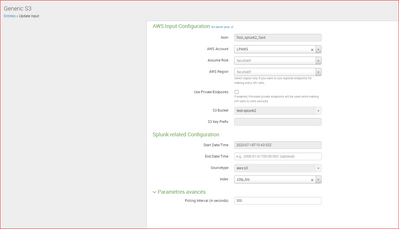
I confirm that auto gzip files doesn' t work for me with the AWS add-on. Do I need to explicit it ?
Here is a sample input test entry for which it doesn't work
- Mark as New
- Bookmark Message
- Subscribe to Message
- Mute Message
- Subscribe to RSS Feed
- Permalink
- Report Inappropriate Content


You can try looking at internal to find out the gzip files being downloaded from S3 before ingestion. Add-on will be able to do the auto extraction.
Try -
index=_internal sourcetype=aws:s3:loghttps://docs.splunk.com/Documentation/AddOns/released/AWS/Troubleshooting
- Mark as New
- Bookmark Message
- Subscribe to Message
- Mute Message
- Subscribe to RSS Feed
- Permalink
- Report Inappropriate Content
Hi @Said75015
AWS Plugin you mean the AWS Add-on? Add-on does the extract internally and ingest the logs wihtout manual intervention. How is your gzip archive one file having all wrapped in them or they individually gzipped?
Have you tested it in test env?
- Mark as New
- Bookmark Message
- Subscribe to Message
- Mute Message
- Subscribe to RSS Feed
- Permalink
- Report Inappropriate Content
Hi @venkatasri
Yes I mean AWS Add-on, files are individually gzipped. I tested it in a local test env.
I'll retry and keep you informed
Saïd

Join the Splunk Community Slack to learn, troubleshoot, and make connections with fellow Splunk practitioners in real time!
Join Splunk User Groups to connect and learn in-person by region or remotely by topic or industry.
Make Your Machine Data AI-Ready in Splunk
Splunk Asynchronous Forwarding Explained
How to Monitor AI Agents with Splunk Agent Observability
