
Turn on suggestions
Auto-suggest helps you quickly narrow down your search results by suggesting possible matches as you type.
Getting Data In
×
Join the Conversation
Without signing in, you're just watching from the sidelines. Sign in or Register to connect, share, and be part of the Splunk Community.
- Find Answers
- :
- Splunk Administration
- :
- Getting Data In
- :
- Re: Extract multiple jsons from array
Options
- Subscribe to RSS Feed
- Mark Topic as New
- Mark Topic as Read
- Float this Topic for Current User
- Bookmark Topic
- Subscribe to Topic
- Mute Topic
- Printer Friendly Page
- Mark as New
- Bookmark Message
- Subscribe to Message
- Mute Message
- Subscribe to RSS Feed
- Permalink
- Report Inappropriate Content

amitdaniel
Explorer
07-21-2019
11:56 PM
Hi all .
This is an example of a json i'm sending to my Splunk cloud.
{   "workers": [
    {
      "UserID": 100000906,
      "ActiveShiftName": "learning sports",
      "WorkerName": "tim",
      "CurrentRoleInShift": "Tagger",
      "IsLogged": true,
      "TimeFromLastEventSaved": "00:00:13.2323651",
      "TimeFromLastEventApproved": null,
      "TotalEventsSavedInPast30Min": 68,
      "TotalEventsApprovedInPast30Min": 0
    },
    {
      "UserID": 100002137,
      "ActiveShiftName": "learning sports",
      "WorkerName": "liverpool2",
      "CurrentRoleInShift": null,
      "IsLogged": false,
      "TimeFromLastEventSaved": null,
      "TimeFromLastEventApproved": null,
      "TotalEventsSavedInPast30Min": 0,
      "TotalEventsApprovedInPast30Min": 0
    }   ] }
I would like to build a table with this fields :
workers{}.active_shift_name
workers{}.worker_name
workers{}.worker_id CurrentRoleInShift
workers{}.TimeFromLastEventSaved
workers{}.TimeFromLastEventApproved
workers{}.IsLogged
I tried multiple commands with no success
For an example I tried this command :
index="Test1" | spath input=_raw path="workers{}.ActiveShiftName" output=active_shift_name | spath input=_raw path="workers{}.WorkerName" output=worker_name |spath input=_raw path="workers{}.UserID" output=worker_id |spath input=_raw path="workers{}.CurrentRoleInShift" output=CurrentRoleInShift |spath input=_raw path="workers{}.TimeFromLastEventSaved" output=TimeFromLastEventSaved |spath input=_raw path="workers{}.TimeFromLastEventApproved" output=TimeFromLastEventApproved |spath input=_raw path="workers{}.TotalEventsSavedInPast30Min" output=TotalEventsSavedInPast30Min |spath input=_raw path="workers{}.TotalEventsApprovedInPast30Min" output=TotalEventsApprovedInPast30Min |spath input=_raw path="workers{}.IsLogged" output=IsLogged | table active_shift_name worker_name worker_id CurrentRoleInShift TimeFromLastEventSaved TimeFromLastEventApproved IsLogged
Can you please help ?
Thank you!
Amit
1 Solution
- Mark as New
- Bookmark Message
- Subscribe to Message
- Mute Message
- Subscribe to RSS Feed
- Permalink
- Report Inappropriate Content

chinmoya
Communicator
07-22-2019
12:48 AM
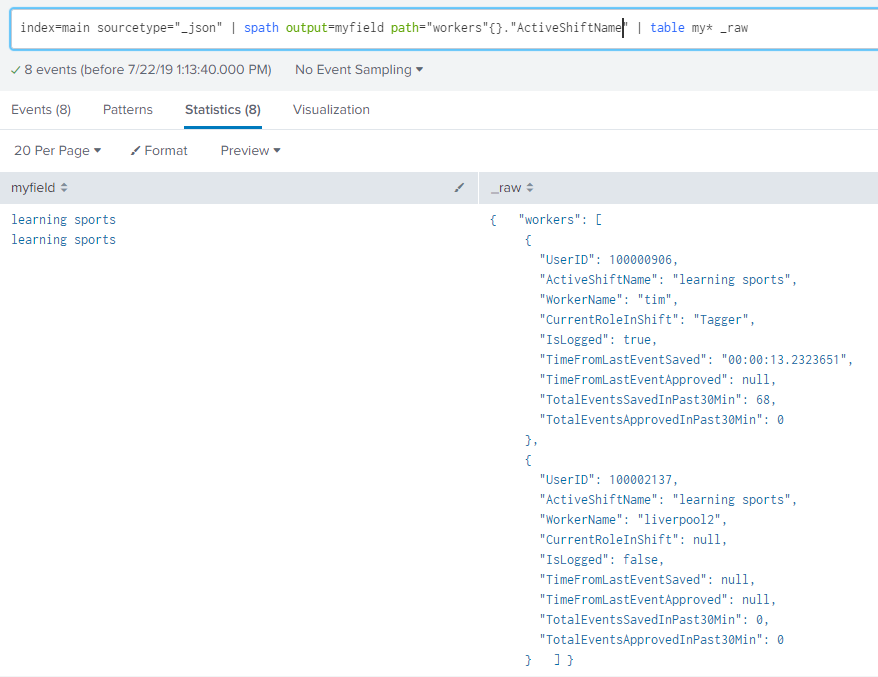
path="workers{}.ActiveShiftName"
Use need to enclose each field in quotes. See attachment.
- Mark as New
- Bookmark Message
- Subscribe to Message
- Mute Message
- Subscribe to RSS Feed
- Permalink
- Report Inappropriate Content
amitdaniel
Explorer
07-22-2019
01:43 AM
Thank you @chinmoya !!!
- Mark as New
- Bookmark Message
- Subscribe to Message
- Mute Message
- Subscribe to RSS Feed
- Permalink
- Report Inappropriate Content
chinmoya
Communicator
07-22-2019
12:48 AM
- Mark as New
- Bookmark Message
- Subscribe to Message
- Mute Message
- Subscribe to RSS Feed
- Permalink
- Report Inappropriate Content

vnravikumar
Champion
07-22-2019
12:24 AM
Hi
Try this and rename the columns as required
| makeresults
| eval test=" {   \"workers\": [
     {
       \"UserID\": 100000906,
       \"ActiveShiftName\": \"learning sports\",
       \"WorkerName\": \"tim\",
       \"CurrentRoleInShift\": \"Tagger\",
       \"IsLogged\": true,
       \"TimeFromLastEventSaved\": \"00:00:13.2323651\",
       \"TimeFromLastEventApproved\": null,
       \"TotalEventsSavedInPast30Min\": 68,
       \"TotalEventsApprovedInPast30Min\": 0
     },
     {
       \"UserID\": 100002137,
       \"ActiveShiftName\": \"learning sports\",
       \"WorkerName\": \"liverpool2\",
       \"CurrentRoleInShift\": null,
       \"IsLogged\": false,
       \"TimeFromLastEventSaved\": null,
       \"TimeFromLastEventApproved\": null,
       \"TotalEventsSavedInPast30Min\": 0,
       \"TotalEventsApprovedInPast30Min\": 0
     }   ] }"
| spath input=test
| table workers{}.ActiveShiftName, workers{}.WorkerName,workers{}.CurrentRoleInShift,workers{}.TimeFromLastEventSaved,workers{}.TimeFromLastEventApproved,workers{}.IsLogged



Got questions? Get answers!
Join the Splunk Community Slack to learn, troubleshoot, and make connections with fellow Splunk practitioners in real time!
Meet up IRL or virtually!
Join Splunk User Groups to connect and learn in-person by region or remotely by topic or industry.
Get Updates on the Splunk Community!
Recap | Agentic Operations Start with Context: Build the Right Data Foundation
Agentic Operations Start with Context: Build the Right Data Foundation
By Courtney Wright, Product Marketing ...
Recap | Assisted, Augmented or Agentic? Choose Your Splunk Starting Point
Assisted, Augmented or Agentic? Choose Your Splunk Starting Point
By Courtney Wright, Product Marketing ...
Session 2 | Beyond the Thread: Operationalizing AI with Confidence
Session 2
Beyond the Thread: Operationalizing AI with Confidence
The true power of the Cisco Data Fabric ...
