
Join the Conversation
- Find Answers
- :
- Splunk Administration
- :
- Getting Data In
- :
- Re: Deploy custom script, then upload the results
- Subscribe to RSS Feed
- Mark Topic as New
- Mark Topic as Read
- Float this Topic for Current User
- Bookmark Topic
- Subscribe to Topic
- Mute Topic
- Printer Friendly Page
- Mark as New
- Bookmark Message
- Subscribe to Message
- Mute Message
- Subscribe to RSS Feed
- Permalink
- Report Inappropriate Content

Newbie here. How can I output the result of a bash script back into Splunk? The script periodically sends netstat commands.
- Mark as New
- Bookmark Message
- Subscribe to Message
- Mute Message
- Subscribe to RSS Feed
- Permalink
- Report Inappropriate Content

The easiest ways I can think that would solve this for you (If I understand the question correctly), would be to either monitor stdout of the netstat script, or write the results to a file and monitor that file.
Here are some suggested steps:
-Create a new app. Follow the instructions for Scripted Inputs. In general:
- Under /etc/deployment-apps/ , create a new app, for example: myapp .
- Under /etc/deployment-apps/myapp/bin , place your .sh script. Out of the box, Splunk should be able to run it. Make sure to add the correct interpreter in the first line (usually /bin/bash).
- You can output the script to a file, and have Splunk monitor that file (“Writing data to a file for indexing”). Another – quick – alternative would be to echo your netstat results to stdout (“Streaming data”). The Splunk service, which runs your script, will watch stdout and will send it back to the indexer as a single event.
- Mark as New
- Bookmark Message
- Subscribe to Message
- Mute Message
- Subscribe to RSS Feed
- Permalink
- Report Inappropriate Content

Simple :
Wire up your script using the Command Modular Input
https://splunkbase.splunk.com/app/1553/
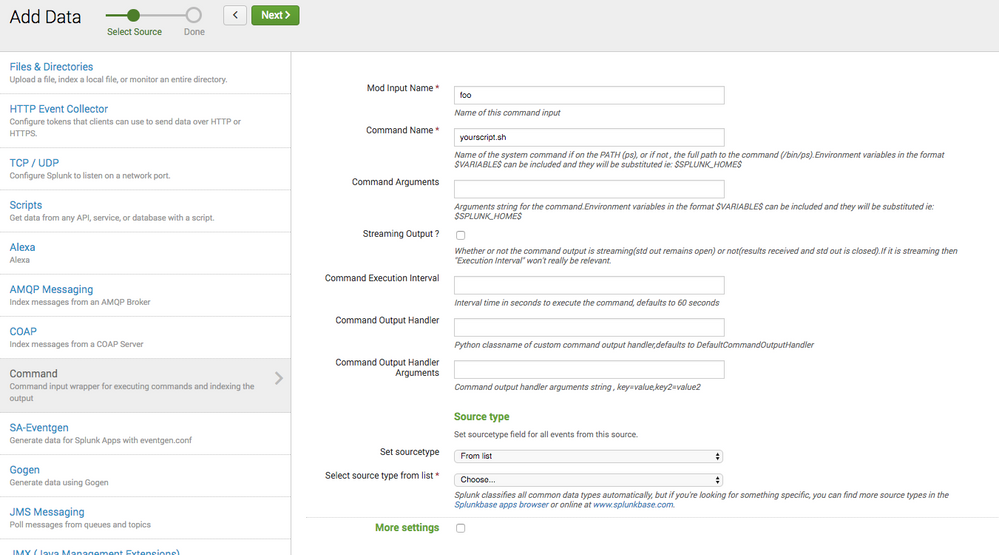
Of course you can also refactor your script into a Splunk Scripted Input or Modular Input and deploy it in it's own App , but if you simply want to execute your script as is and capture the STDOUT in Splunk , then the Command Modular Input will work. And has some advanced stuff like plugging in your own preprocessing if you want.
- Mark as New
- Bookmark Message
- Subscribe to Message
- Mute Message
- Subscribe to RSS Feed
- Permalink
- Report Inappropriate Content
The easiest ways I can think that would solve this for you (If I understand the question correctly), would be to either monitor stdout of the netstat script, or write the results to a file and monitor that file.
Here are some suggested steps:
-Create a new app. Follow the instructions for Scripted Inputs. In general:
- Under /etc/deployment-apps/ , create a new app, for example: myapp .
- Under /etc/deployment-apps/myapp/bin , place your .sh script. Out of the box, Splunk should be able to run it. Make sure to add the correct interpreter in the first line (usually /bin/bash).
- You can output the script to a file, and have Splunk monitor that file (“Writing data to a file for indexing”). Another – quick – alternative would be to echo your netstat results to stdout (“Streaming data”). The Splunk service, which runs your script, will watch stdout and will send it back to the indexer as a single event.



Join the Splunk Community Slack to learn, troubleshoot, and make connections with fellow Splunk practitioners in real time!
Join Splunk User Groups to connect and learn in-person by region or remotely by topic or industry.
SOC4Kafka - New Kafka Connector Powered by OpenTelemetry
Rounding off the Splunk Dashboard Contest
A Four Part Event Series: AI + Observability: AI Agents, LLMs, Apps, & Infrastructure
