
Join the Conversation
- Find Answers
- :
- Splunk Administration
- :
- Getting Data In
- :
- Default behavior of Splunk internal logs
- Subscribe to RSS Feed
- Mark Topic as New
- Mark Topic as Read
- Float this Topic for Current User
- Bookmark Topic
- Subscribe to Topic
- Mute Topic
- Printer Friendly Page
- Mark as New
- Bookmark Message
- Subscribe to Message
- Mute Message
- Subscribe to RSS Feed
- Permalink
- Report Inappropriate Content
Default behavior of Splunk internal logs

Hello Splunkers,
Correct me if I'm wrong but it seems that when you install Splunk UF on a machine, some logs of the machine (specifically located in $SPLUNK_HOME/var/log) will be forwarded by default. For instance I see some default settings here /opt/splunkforwarder/etc/system/default/inputs.conf :
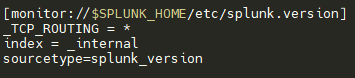
There is also similar config in this path : /opt/splunkforwarder/etc/apps/SplunkUniversalForwarder/default/inputs.conf
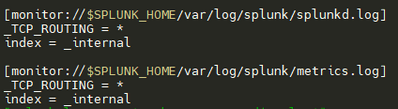
I am wondering about the effects of _TCP_ROUTING = *
Does it mean that those monitored paths will be sent to all tcp group defined in the outputs.conf files of my machine ? What would be the purpose of that ? Would you have a clean way to override that kind of config to send _internal logs only to one particular TCP group ?
Thanks for your time,
GaetanVP
- Mark as New
- Bookmark Message
- Subscribe to Message
- Mute Message
- Subscribe to RSS Feed
- Permalink
- Report Inappropriate Content


https://docs.splunk.com/Documentation/Splunk/latest/Admin/Inputsconf
* To forward data from the "_internal" index, you must explicitly set
  '_TCP_ROUTING' to either "*" or a specific splunktcp target group.
So it's a default setting so that the _internal index data does get sent out. You can of course overwrite it on a per-input level using config file precedence (https://docs.splunk.com/Documentation/Splunk/9.1.0/Admin/Wheretofindtheconfigurationfiles).

Join the Splunk Community Slack to learn, troubleshoot, and make connections with fellow Splunk practitioners in real time!
Join Splunk User Groups to connect and learn in-person by region or remotely by topic or industry.
Make Your Machine Data AI-Ready in Splunk
Splunk Asynchronous Forwarding Explained
How to Monitor AI Agents with Splunk Agent Observability
