
Join the Conversation
- Find Answers
- :
- Splunk Administration
- :
- Getting Data In
- :
- Re: Convert GMT to CST timezone
- Subscribe to RSS Feed
- Mark Topic as New
- Mark Topic as Read
- Float this Topic for Current User
- Bookmark Topic
- Subscribe to Topic
- Mute Topic
- Printer Friendly Page
- Mark as New
- Bookmark Message
- Subscribe to Message
- Mute Message
- Subscribe to RSS Feed
- Permalink
- Report Inappropriate Content
Convert GMT to CST timezone

I am trying to conver the GMT time to CST time. I am able to get the desire data using below query. Now I am looking for query to convert GMT time to CST.
index=test AcdId="*" AgentId="*" AgentLogon="*" chg="*" seqTimestamp"*" currStateStart="*" currActCodeOid="*" currActStart="*" schedActCodeOid="*" schedActStart="*" nextActCodeOid="*" nextActStart="*" schedDate="*" adherenceStart="*" acdtimediff="*"
| eval seqTimestamp=replace(seqTimestamp,"^(.+)T(.+)Z$","\1 \2")
| eval currStateStart=replace(currStateStart,"^(.+)T(.+)Z$","\1 \2")
| eval currActStart=replace(currActStart,"^(.+)T(.+)Z$","\1 \2")
| eval schedActStart=replace(schedActStart,"^(.+)T(.+)Z$","\1 \2")
| eval nextActStart=replace(nextActStart,"^(.+)T(.+)Z$","\1 \2")
| eval adherenceStart=replace(adherenceStart,"^(.+)T(.+)Z$","\1 \2")
| table AcdId, AgentId, AgentLogon, chg, seqTimestamp,seqTimestamp1, currStateStart, currActCodeOid, currActStart, schedActCodeOid, schedActStart, nextActCodeOid, nextActStart, schedDate, adherenceStart, acdtimediff
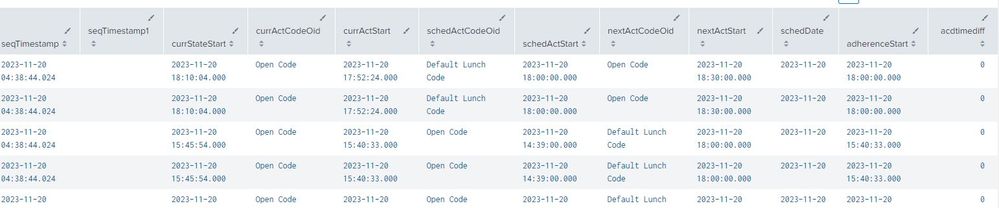
Below are the results I am getting:
- Mark as New
- Bookmark Message
- Subscribe to Message
- Mute Message
- Subscribe to RSS Feed
- Permalink
- Report Inappropriate Content


To add to @ITWhisperer 's answer - Splunk processes timestamp as "unix timestamps" - integers containing number of seconds since epoch. As such, timestamp is "timezoneless", it's just rendered when needed into a string, possibly containing a timezone description. But timestamp is always (when rendered automatically by WebUI or explicitly when strftime is called) rendered in user's timezone (the one set in user's preferences).
So while with strptime you can read and apply the timezone offset from the string representation of a given point in time, strftime doesn't let you specify the timezone freely.
The only thing you can do is "cheat" a bit by manually adjusting the timezone with the offset to another timezone and render it in your local timezone but without displaying said timezone.
- Mark as New
- Bookmark Message
- Subscribe to Message
- Mute Message
- Subscribe to RSS Feed
- Permalink
- Report Inappropriate Content

You need to add (or subtract) the timezone offset from the times. To do this, you should parse the time strings to epoch datetimes with strptime(), change the time appropriately, and then reformat them with strftime().
- Mark as New
- Bookmark Message
- Subscribe to Message
- Mute Message
- Subscribe to RSS Feed
- Permalink
- Report Inappropriate Content
Hello @ITWhisperer can you give me one example on how to convert that
- Mark as New
- Bookmark Message
- Subscribe to Message
- Mute Message
- Subscribe to RSS Feed
- Permalink
- Report Inappropriate Content
| eval curActStart=strftime(strptime(curActStart,"%F %T.%S")+(60*60*5)+(60*30),"%F %T.%S")

Join the Splunk Community Slack to learn, troubleshoot, and make connections with fellow Splunk practitioners in real time!
Join Splunk User Groups to connect and learn in-person by region or remotely by topic or industry.
Meet Splunk Observability Studio: AI-Assisted OpenTelemetry Instrumentation Without ...
Federated Search for Cisco Security and Analytics Logging (SAL) is now GA on Splunk ...
Your Path to AgenticOps: AI Experiences for Every Splunk Practitioner
