
Join the Conversation
- Find Answers
- :
- Splunk Administration
- :
- Getting Data In
- :
- Re: Configuring Windows Registry
- Subscribe to RSS Feed
- Mark Topic as New
- Mark Topic as Read
- Float this Topic for Current User
- Bookmark Topic
- Subscribe to Topic
- Mute Topic
- Printer Friendly Page
- Mark as New
- Bookmark Message
- Subscribe to Message
- Mute Message
- Subscribe to RSS Feed
- Permalink
- Report Inappropriate Content

I am having trouble extracting certain information from registry events. For example I want to extract the "SetValue" from the registry type, however, when I try to use the "extract fields" option to create to create a field for it, Splunk does not allow me to select that specific string to create the field. Is there a way to fix this? Or an alternative method to create fields for registry_type and also key_path and process_image?
event_status="(0)The operation completed successfully."
pid=7008
process_image="svchost.exe"
registry_type="SetValue"
key_path="HKU\s-1-5-20\software\microsoft\windows\currentversion\deliveryoptimization\config\downloadmode_backcompat"
data_type="REG_DWORD"
data="0x00000001(1)"
- Mark as New
- Bookmark Message
- Subscribe to Message
- Mute Message
- Subscribe to RSS Feed
- Permalink
- Report Inappropriate Content

are you using the Splunk TA for Windows?
did you follow this doc:
https://docs.splunk.com/Documentation/Splunk/8.0.0/Data/MonitorWindowsregistrydata
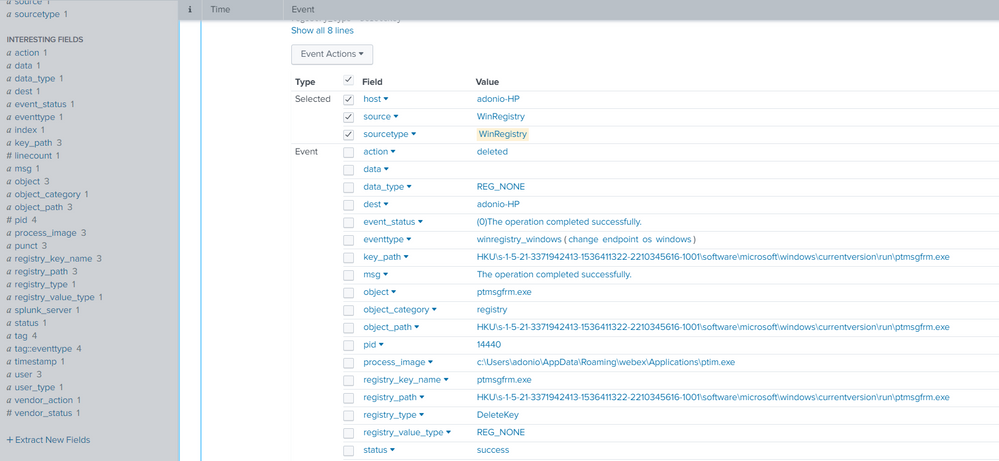
I see all the fields extracted, screenshot below
- Mark as New
- Bookmark Message
- Subscribe to Message
- Mute Message
- Subscribe to RSS Feed
- Permalink
- Report Inappropriate Content
are you using the Splunk TA for Windows?
did you follow this doc:
https://docs.splunk.com/Documentation/Splunk/8.0.0/Data/MonitorWindowsregistrydata
I see all the fields extracted, screenshot below
- Mark as New
- Bookmark Message
- Subscribe to Message
- Mute Message
- Subscribe to RSS Feed
- Permalink
- Report Inappropriate Content
Hi Adonio I am using the TA for Windows and I also followed the doc, however my events still do not look like the ones you have in the screen shot. This is the monitor I am using, not sure if it aligns with the one you are using.
[WinRegMon://hklm_run]
disabled = 0
hive = \REGISTRY\MACHINE\SOFTWARE\Microsoft\Windows\CurrentVersion\Run\.*
proc = .*
index = windows
type = rename|set|create|delete|rename
Also, do you think I need to make any changes or configs to any other file? In order to get all the other events to come in properly?
- Mark as New
- Bookmark Message
- Subscribe to Message
- Mute Message
- Subscribe to RSS Feed
- Permalink
- Report Inappropriate Content
I also had an asterisk at the end of hive in proc, not sure why it didnt come up.



Join the Splunk Community Slack to learn, troubleshoot, and make connections with fellow Splunk practitioners in real time!
Join Splunk User Groups to connect and learn in-person by region or remotely by topic or industry.
Self-Healing Pipeline Is Now Generally Available: AI-Powered CIM Compliance
Meet Splunk Observability Studio: AI-Assisted OpenTelemetry Instrumentation Without ...
Federated Search for Cisco Security and Analytics Logging (SAL) is now GA on Splunk ...
