
Join the Conversation
- Find Answers
- :
- Splunk Administration
- :
- Getting Data In
- :
- Re: CPU Utilization of Splunk Forwarder running on...
- Subscribe to RSS Feed
- Mark Topic as New
- Mark Topic as Read
- Float this Topic for Current User
- Bookmark Topic
- Subscribe to Topic
- Mute Topic
- Printer Friendly Page
- Mark as New
- Bookmark Message
- Subscribe to Message
- Mute Message
- Subscribe to RSS Feed
- Permalink
- Report Inappropriate Content
CPU Utilization of Splunk Forwarder running on Linux machine showing wrong values

Hi,
I have two servers running on Centos that have Universal Forwarder installed and I've enabled the following:
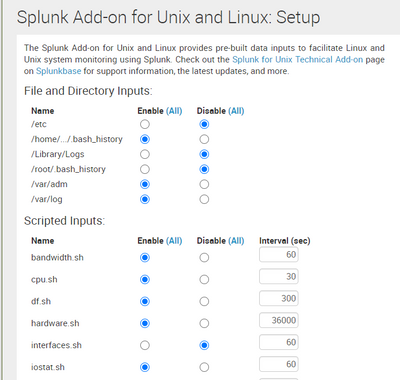
But using htop command on the servers, the CPU utilization is almost 100% but on splunk, it shows 20-30% at most.
Below is the query I used to find the CPU utilization for each available host:
host=* source="vmstat" | bucket span=300s _time | stats max(memUsedPct) as memUsedPct by _time host | timechart span=300s max(memUsedPct) as "Used Memory Percentage" by host limit=0
Please, is there a way to resonate with the htop results?
- Mark as New
- Bookmark Message
- Subscribe to Message
- Mute Message
- Subscribe to RSS Feed
- Permalink
- Report Inappropriate Content

You are asking about CPU utilization, but your search query is using memUsedPct (memory)....?
- Mark as New
- Bookmark Message
- Subscribe to Message
- Mute Message
- Subscribe to RSS Feed
- Permalink
- Report Inappropriate Content
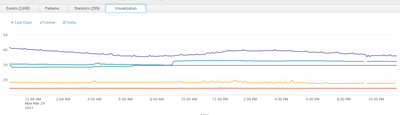
this is the visualization of different hosts using the above query.
Hope this also gives you a better idea of what I'm achieving vs what I really wanna achieve.
- Mark as New
- Bookmark Message
- Subscribe to Message
- Mute Message
- Subscribe to RSS Feed
- Permalink
- Report Inappropriate Content
Hi,
this is what I was getting in my search results.
please refer to the picture below:
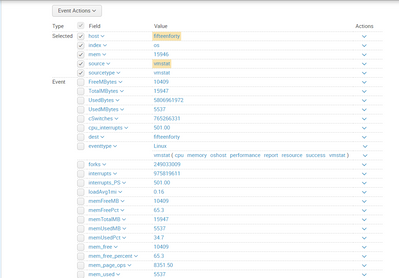
Hope this gives you an idea about the memUsedPct (memory) I've indexed.


Join the Splunk Community Slack to learn, troubleshoot, and make connections with fellow Splunk practitioners in real time!
Join Splunk User Groups to connect and learn in-person by region or remotely by topic or industry.
Your Feedback. Our Roadmap. Visit the PX Feedback Booth at .conf26
Agentic SOC Triage: Investigating Splunk ES Notables with MCP Server and a Local LLM
Painting a Clearer Picture: Creating Cross-Domain Visibility with AI Canvas
