
Join the Conversation
- Find Answers
- :
- Splunk Administration
- :
- Getting Data In
- :
- Re: Adding additional column after grouping for JS...
- Subscribe to RSS Feed
- Mark Topic as New
- Mark Topic as Read
- Float this Topic for Current User
- Bookmark Topic
- Subscribe to Topic
- Mute Topic
- Printer Friendly Page
- Mark as New
- Bookmark Message
- Subscribe to Message
- Mute Message
- Subscribe to RSS Feed
- Permalink
- Report Inappropriate Content

The incoming logs are stored in Splunk in a JSON format.
Example JSON records below.
Entry 1 :
{   data:[
    {
      "endpoint":"ep_1",
      "service":"service_1",
      "http_status_code":"500"
    },
    {
      "endpoint":"ep_2",
      "service":"service_1",
      "http_status_code":"500"
    },
    {
      "endpoint":"ep_3",
      "service":"service_2",
      "http_status_code":"503"
    }   ] }
Entry 2 :
{
  data:[
    {
      "endpoint":"ep_1",
      "service":"service_1",
      "http_status_code":"500"
    }
  ]
}
The expected output for my search should be something like :
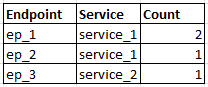
When I search using the query:
host=mashery_production "data{}.http_status_code"= 5*| eval endpoint='data{}.endpoint' | eval service='data{}.service' | Stats Count("data{}.status") as Count, values(service), by endpoint | where Error_Count > 0
the output I get is :
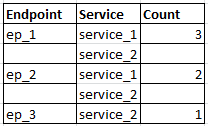
which looks like the grouping is messed up. Please help.
- Mark as New
- Bookmark Message
- Subscribe to Message
- Mute Message
- Subscribe to RSS Feed
- Permalink
- Report Inappropriate Content


HI technie101
Can you please try below search??
host=mashery_production "data{}.http_status_code"= inactive
| rename data{}.endpoint as endpoint, data{}.service as service, data{}.status as status
| eval tempField=mvzip(mvzip(endpoint,service),status)
| stats count by _time,tempField
| eval endpoint=mvindex(split(tempField,","),0), service=mvindex(split(tempField,","),1), status=mvindex(split(tempField,","),1)
| search status="inactive"
| stats count by endpoint,service
Thanks
- Mark as New
- Bookmark Message
- Subscribe to Message
- Mute Message
- Subscribe to RSS Feed
- Permalink
- Report Inappropriate Content
HI technie101
Can you please try below search??
host=mashery_production "data{}.http_status_code"= inactive
| rename data{}.endpoint as endpoint, data{}.service as service, data{}.status as status
| eval tempField=mvzip(mvzip(endpoint,service),status)
| stats count by _time,tempField
| eval endpoint=mvindex(split(tempField,","),0), service=mvindex(split(tempField,","),1), status=mvindex(split(tempField,","),1)
| search status="inactive"
| stats count by endpoint,service
Thanks
- Mark as New
- Bookmark Message
- Subscribe to Message
- Mute Message
- Subscribe to RSS Feed
- Permalink
- Report Inappropriate Content
Hi Kamlesh,
I had wrongly typed the json response which was not matching with the search query that I gave. Apologies. I've updated it now.
Coming to this suggestion, I've tried with the below and I don't see any results.
host=mashery_production "data{}.http_status_code"= 5*
 | rename data{}.endpoint_name as endpoint, data{}.service_name as service, data{}.http_status_code as status
 | eval tempField=mvzip(mvzip(endpoint,service),status)
 | stats count by _time,tempField
 | eval endpoint=mvindex(split(tempField,","),0), service=mvindex(split(tempField,","),1), status=mvindex(split(tempField,","),1)
 | search status="5*"
 | stats count by endpoint,service
- Mark as New
- Bookmark Message
- Subscribe to Message
- Mute Message
- Subscribe to RSS Feed
- Permalink
- Report Inappropriate Content
Quick Update. I got the below working.
host=mashery_production "data{}.http_status_code"= 5*
 | rename data{}.endpoint_name as endpoint, data{}.service_name as service, data{}.http_status_code as status | eval tempField=mvzip(mvzip(endpoint,service),status) | eval endpoint=mvindex(split(tempField,","),0), service=mvindex(split(tempField,","),1), status=mvindex(split(tempField,","),2)  | stats count by endpoint,service
The 2 changes were :
- Corrected the index on the last split on the temp field for status from 1 to 2. That must have been a type.
- Removed search status="5*"
Thanks a lot for the help.
- Mark as New
- Bookmark Message
- Subscribe to Message
- Mute Message
- Subscribe to RSS Feed
- Permalink
- Report Inappropriate Content
HI technie101,
Great,
If It helps you then can you please accept this answer to close this question ??
Thanks
- Mark as New
- Bookmark Message
- Subscribe to Message
- Mute Message
- Subscribe to RSS Feed
- Permalink
- Report Inappropriate Content
host=mashery_production "data{}.http_status_code"= inactive | eval endpoint='data{}.endpoint' | eval service='data{}.service' | Stats Count("data{}.status") as Count by endpoint, service | where Error_Count > 0
Perhaps? Using the values function is expected to provide multiple values, if you are trying to get a count with a value per endpoint/service then you would write something like the above...




Join the Splunk Community Slack to learn, troubleshoot, and make connections with fellow Splunk practitioners in real time!
Join Splunk User Groups to connect and learn in-person by region or remotely by topic or industry.
Vibe-coding, AI, and Splunkcraft: Highlights from the .conf26 Builder Bar
Thanks for the Memories: .conf26 Took Learning to New Heights
Best Practices: Splunk auto adjust pipeline queue
