
Join the Conversation
- Find Answers
- :
- Splunk Administration
- :
- Deployment Architecture
- :
- Re: is the physical server configuration effecting...
- Subscribe to RSS Feed
- Mark Topic as New
- Mark Topic as Read
- Float this Topic for Current User
- Bookmark Topic
- Subscribe to Topic
- Mute Topic
- Printer Friendly Page
- Mark as New
- Bookmark Message
- Subscribe to Message
- Mute Message
- Subscribe to RSS Feed
- Permalink
- Report Inappropriate Content
is the physical server configuration effecting the SearchHead performance.

We have a searchhead and it is an Azure D4V2 machine i.e 8core machine.
We have real time alerts scheduled on the same, now a days we are facing the queue full alert regularly is this also due to the physical configuration of server will a recommendation to upgrade the VM help here.
Thanks.
Vikram.
- Mark as New
- Bookmark Message
- Subscribe to Message
- Mute Message
- Subscribe to RSS Feed
- Permalink
- Report Inappropriate Content


As mentioned in other comments, with light to moderate use on a single instance, we would recommend 12 CPU Cores minimum. In a distributed environment the your requirements may increase based on your needs.
With that said, you will want to avoid Real Time Alerts as those searches will be running all the time and prevent other searches from being dispatched. Keep in mind, Splunk can only run so many searches at a given time. Here is the calculation:
https://answers.splunk.com/answers/270544/how-to-calculate-splunk-search-concurrency-limit-f.html
If your Real Time Alerts are simply sending an email, you should replace all of those with scheduled searches which send an alert and schedule them to run very often, for example every 5 minutes. In this example, there was a RT search running and we replaced it with a scheduled search which runs every 5 minutes, looking back 5 to 10 minutes. The reason we do that is to allow for index latency, to help guarantee that the relevant event isn't missed.
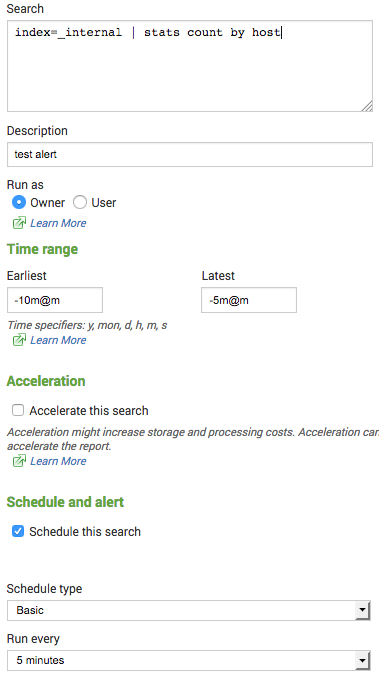
You could adjust that accordingly of course and set Earliest to -8m@m and Latest to -3m@m and run the search every 3 minutes. In summary, make sure you eliminate any unnecessary real time searches. If you are running too many searches in general, adjust the schedules to run less often.
Sr. Technical Support Engineer

- Mark as New
- Bookmark Message
- Subscribe to Message
- Mute Message
- Subscribe to RSS Feed
- Permalink
- Report Inappropriate Content

One core per search per user.
So if a user you open a dashboard with 8 panels, you're already at the limit.
- Mark as New
- Bookmark Message
- Subscribe to Message
- Mute Message
- Subscribe to RSS Feed
- Permalink
- Report Inappropriate Content
Thanks for the answer 3no what my next doubt comes is we have dashboards also configured.
Now is a user logs in and sees the dashboard a core is utilized but suppose if no one opens the dashboard is there anything that still the core is utilized?
Sorry it may feel a invalid question but I had this doubt so asked it.
but thanks again for your previous reply.
- Mark as New
- Bookmark Message
- Subscribe to Message
- Mute Message
- Subscribe to RSS Feed
- Permalink
- Report Inappropriate Content
No but il you have alerts, reports or schedule search running at this time, it will use them.
- Mark as New
- Bookmark Message
- Subscribe to Message
- Mute Message
- Subscribe to RSS Feed
- Permalink
- Report Inappropriate Content

Hi Vikram_m, not sure i fully understand the situation but splunk best practices requires a stronger machine.
reference hardware described here in docs: http://docs.splunk.com/Documentation/Splunk/6.5.3/Capacity/Referencehardware
- Mark as New
- Bookmark Message
- Subscribe to Message
- Mute Message
- Subscribe to RSS Feed
- Permalink
- Report Inappropriate Content
Thanks for the doc adonio...this will be helpful.

Join the Splunk Community Slack to learn, troubleshoot, and make connections with fellow Splunk practitioners in real time!
Join Splunk User Groups to connect and learn in-person by region or remotely by topic or industry.
Design, Compete, Win: Submit Your Best Splunk Dashboards for a .conf26 Pass
May 2026 Splunk Expert Sessions: Security & Observability
Network to App: Observability Unlocked [May & June Series]
