
Join the Conversation
- Find Answers
- :
- Splunk Administration
- :
- Deployment Architecture
- :
- Re: Ubuntu on Windows - tar Splunk is permission d...
- Subscribe to RSS Feed
- Mark Topic as New
- Mark Topic as Read
- Float this Topic for Current User
- Bookmark Topic
- Subscribe to Topic
- Mute Topic
- Printer Friendly Page
- Mark as New
- Bookmark Message
- Subscribe to Message
- Mute Message
- Subscribe to RSS Feed
- Permalink
- Report Inappropriate Content

As someone who grew up on Windows but is now learning Splunk, it's very important for me to learn Linux/Unix. It must be a gift from heaven that we can now run Ubuntu on top of Windows via their new app on Windows Store called Ubuntu which allows you to use Ubuntu terminal while on Windows via cmd (not VM).
I have learned that it's very important not to install Splunk as root or using sudo. Why am I getting permission denied?
Here's what I did;
- Installed Ubuntu from Windows Store
- Opened bash from cmd
- Wget the Splunk tgz
- Used tar to install on /opt/apps/
See:
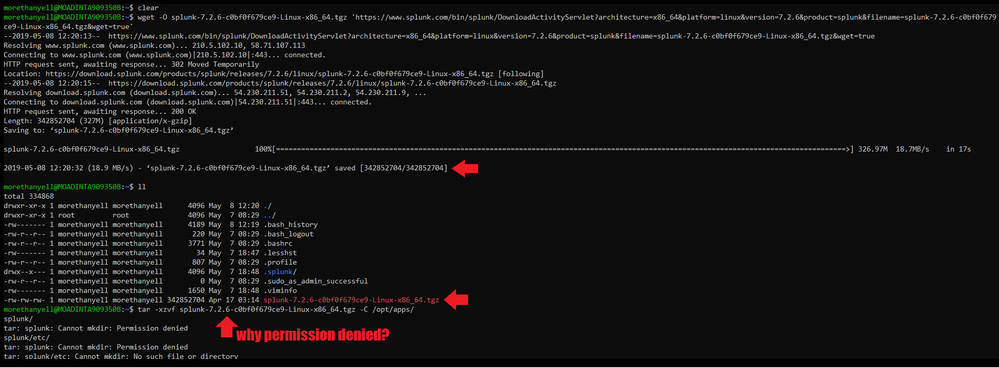
My intention is to practice myself navigating on Linux as this is required in my job. Thanks for your help!

- Mark as New
- Bookmark Message
- Subscribe to Message
- Mute Message
- Subscribe to RSS Feed
- Permalink
- Report Inappropriate Content

The best thing to do is
- Run as root . (sudo to root)
- untar as root
- after it is completely unpacked, the do chown -R splunk:splunk /opt/splunk
- Mark as New
- Bookmark Message
- Subscribe to Message
- Mute Message
- Subscribe to RSS Feed
- Permalink
- Report Inappropriate Content

Looks like your problem is not the tar itself. Seems like your user does not have enough rights to create a folder at /opt/apps/splunk. Try
sudo tar -xzvf ...
And when you finished, change the owner of the splunk installation path back to the desired owner (e.g. a user called splunk). This is also shown in the splunk installation manual:
- Mark as New
- Bookmark Message
- Subscribe to Message
- Mute Message
- Subscribe to RSS Feed
- Permalink
- Report Inappropriate Content
Thank you. I would also accept this as answer but another one has came in first.
- Mark as New
- Bookmark Message
- Subscribe to Message
- Mute Message
- Subscribe to RSS Feed
- Permalink
- Report Inappropriate Content
The best thing to do is
- Run as root . (sudo to root)
- untar as root
- after it is completely unpacked, the do chown -R splunk:splunk /opt/splunk
- Mark as New
- Bookmark Message
- Subscribe to Message
- Mute Message
- Subscribe to RSS Feed
- Permalink
- Report Inappropriate Content
Hey. thanks for the response. what is splunk:splunk? should I be changing that to my username?
- Mark as New
- Bookmark Message
- Subscribe to Message
- Mute Message
- Subscribe to RSS Feed
- Permalink
- Report Inappropriate Content
No, you should create a user and a group called "splunk". With the chown command you can change the owner of a folder to another user and group. in this case to the the user splunk and the group splunk = splunk:splunk.
Simple: you install as root, but since best practise is not to run splunk as root, you change back to an other user after installation.
As mentioned, there is a step by step guide in the docs: https://docs.splunk.com/Documentation/Splunk/7.2.6/Installation/RunSplunkasadifferentornon-rootuser#...
- Mark as New
- Bookmark Message
- Subscribe to Message
- Mute Message
- Subscribe to RSS Feed
- Permalink
- Report Inappropriate Content
thank you. accepted answer

Join the Splunk Community Slack to learn, troubleshoot, and make connections with fellow Splunk practitioners in real time!
Join Splunk User Groups to connect and learn in-person by region or remotely by topic or industry.
May 2026 Splunk Expert Sessions: Security & Observability
Network to App: Observability Unlocked [May & June Series]
SPL2 Deep Dives, AppDynamics Integrations, SAML Made Simple and Much More on Splunk ...
