
Join the Conversation
- Find Answers
- :
- Splunk Administration
- :
- Deployment Architecture
- :
- Issue accessing Splunk Search Head through AWS Loa...
- Subscribe to RSS Feed
- Mark Topic as New
- Mark Topic as Read
- Float this Topic for Current User
- Bookmark Topic
- Subscribe to Topic
- Mute Topic
- Printer Friendly Page
- Mark as New
- Bookmark Message
- Subscribe to Message
- Mute Message
- Subscribe to RSS Feed
- Permalink
- Report Inappropriate Content

Hello
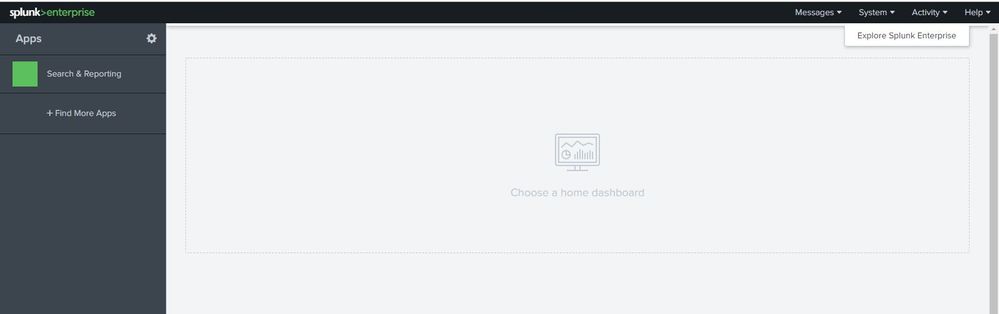
I am facing a weird issue while accessing my Splunk Search Head via AWS Load Balancer. We have Splunk Search head cluster deployed on AWS Linux VM and we have placed Application Load Balancer so as to access the most available Splunk Search Head. When we enter the DNS of Load Balancer , we get the splunk search head login page but when we access the search head it do not show all of the features. It only shows, neither it displays the user name who logged in. I am not sure of the issue here but attaching the screenshot of home screen of search head to get idea what I see when I login as Admin.
Does anyone faced this issue earlier , if yes then how can we resolve this?
Regards,
Sushant
- Mark as New
- Bookmark Message
- Subscribe to Message
- Mute Message
- Subscribe to RSS Feed
- Permalink
- Report Inappropriate Content

Hi @swatghare,
This is happening because your LB session is not sticky/persistent so you are losing your pages content. Could you double check and set it to sticky see if it works ?
Official documentation here:
https://docs.splunk.com/Documentation/Splunk/7.2.6/DistSearch/UseSHCwithloadbalancers
Cheers,
David
- Mark as New
- Bookmark Message
- Subscribe to Message
- Mute Message
- Subscribe to RSS Feed
- Permalink
- Report Inappropriate Content
Hi @swatghare,
This is happening because your LB session is not sticky/persistent so you are losing your pages content. Could you double check and set it to sticky see if it works ?
Official documentation here:
https://docs.splunk.com/Documentation/Splunk/7.2.6/DistSearch/UseSHCwithloadbalancers
Cheers,
David
- Mark as New
- Bookmark Message
- Subscribe to Message
- Mute Message
- Subscribe to RSS Feed
- Permalink
- Report Inappropriate Content
Thanks,
Yes this worked , below is the link for enabling sticky session in AWS
- Mark as New
- Bookmark Message
- Subscribe to Message
- Mute Message
- Subscribe to RSS Feed
- Permalink
- Report Inappropriate Content
awesome, thanks for the link !



Join the Splunk Community Slack to learn, troubleshoot, and make connections with fellow Splunk practitioners in real time!
Join Splunk User Groups to connect and learn in-person by region or remotely by topic or industry.
Meet Splunk Observability Studio: AI-Assisted OpenTelemetry Instrumentation Without ...
Federated Search for Cisco Security and Analytics Logging (SAL) is now GA on Splunk ...
Your Path to AgenticOps: AI Experiences for Every Splunk Practitioner
