
Join the Conversation
- Find Answers
- :
- Splunk Administration
- :
- Deployment Architecture
- :
- If I remove /etc/shcluster/apps/search from the de...
- Subscribe to RSS Feed
- Mark Topic as New
- Mark Topic as Read
- Float this Topic for Current User
- Bookmark Topic
- Subscribe to Topic
- Mute Topic
- Printer Friendly Page
- Mark as New
- Bookmark Message
- Subscribe to Message
- Mute Message
- Subscribe to RSS Feed
- Permalink
- Report Inappropriate Content

So one of predecessors added a THE default app (search) to the deployer for the Search Head Cluster (SHC). It took me a little while to figure out why some of my files were not passing integrity checks and were showing older versions. Even after reinstalling on the SHC members.
My question is, if I remove /.../splunk/etc/shcluster/apps/search directory from the deployer, will it essentially nuke my search head nodes search app?
Obviously I am going to have to reinstall 6.5.2 on these boxes to fix the integrity issues.
- Mark as New
- Bookmark Message
- Subscribe to Message
- Mute Message
- Subscribe to RSS Feed
- Permalink
- Report Inappropriate Content
So, here was the solution. At least for the default app "Search"
Remove the search app from /opt/splunk/etc/shcluster/apps
Run splunk apply shcluster-bundle
Finally, upgrade and roll-restart all the search heads.
- Mark as New
- Bookmark Message
- Subscribe to Message
- Mute Message
- Subscribe to RSS Feed
- Permalink
- Report Inappropriate Content
So, here was the solution. At least for the default app "Search"
Remove the search app from /opt/splunk/etc/shcluster/apps
Run splunk apply shcluster-bundle
Finally, upgrade and roll-restart all the search heads.
- Mark as New
- Bookmark Message
- Subscribe to Message
- Mute Message
- Subscribe to RSS Feed
- Permalink
- Report Inappropriate Content
Most likely not unless you use the deployer to deploy the search app.
What does the following show - ls -tlr /opt/splunk/etc/shcluster/apps/search?
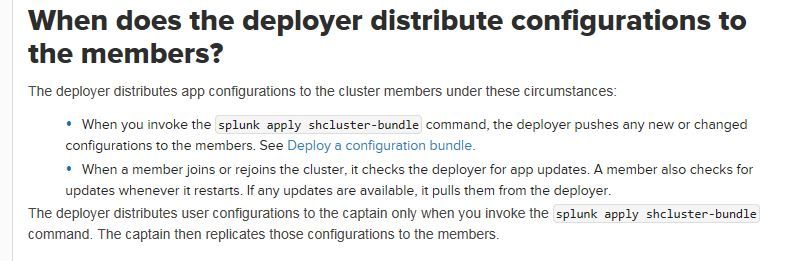
Interesting case you have. The following says Use the deployer to distribute apps and configuration updates
- Mark as New
- Bookmark Message
- Subscribe to Message
- Mute Message
- Subscribe to RSS Feed
- Permalink
- Report Inappropriate Content
Re: Ddrillic.
Posting as Answer so I can attach an image.
It had a full version of the search app in it, version 6.3.0. I have moved that folder elsewhere hoping that the deployer would not overwrite the files on the SHC if I upgraded, again.
I removed the search app from /opt/splunk/etc/shcluster/apps
I shutdown and upgraded all three search heads. They had the 6.5.2 files for a few minutes.
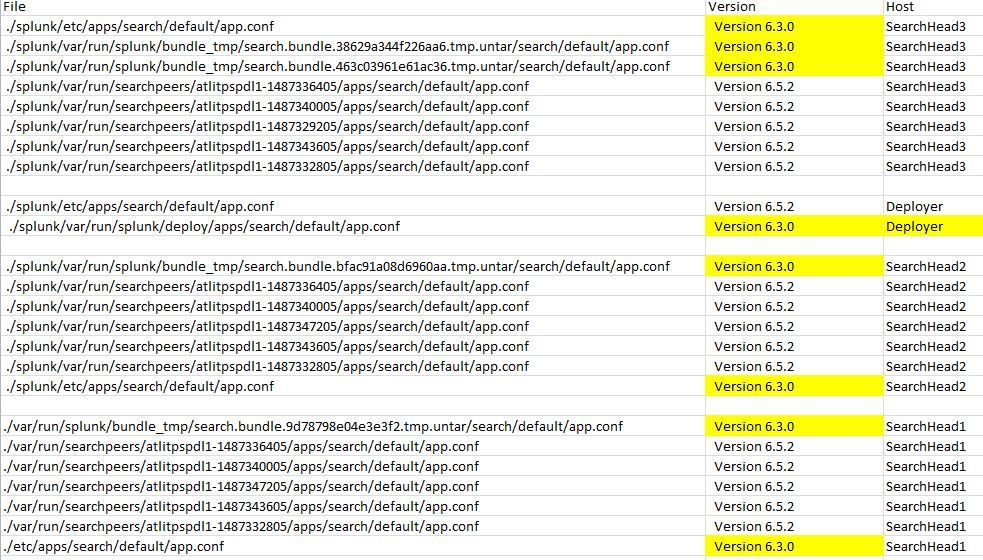
They were then replaced with 6.3.0 versions after a few minutes. Something is overwriting them.
I picked a file I could easily identify the version from. In this case /search/default/app.conf.
here are the locations that they live on my servers, and what their versions are.
I wonder if I can remove the bundle_tmp folders here?
Also, on the deployer Monitoring Console, under Search, Search Head Clustering, Search Head Clustering:App Deployment I still see "Search"


Join the Splunk Community Slack to learn, troubleshoot, and make connections with fellow Splunk practitioners in real time!
Join Splunk User Groups to connect and learn in-person by region or remotely by topic or industry.
Design, Compete, Win: Submit Your Best Splunk Dashboards for a .conf26 Pass
May 2026 Splunk Expert Sessions: Security & Observability
Network to App: Observability Unlocked [May & June Series]
