
Join the Conversation
- Find Answers
- :
- Splunk Administration
- :
- Deployment Architecture
- :
- How to deploy Splunk HF to two indexers?
- Subscribe to RSS Feed
- Mark Topic as New
- Mark Topic as Read
- Float this Topic for Current User
- Bookmark Topic
- Subscribe to Topic
- Mute Topic
- Printer Friendly Page
- Mark as New
- Bookmark Message
- Subscribe to Message
- Mute Message
- Subscribe to RSS Feed
- Permalink
- Report Inappropriate Content

hi experts
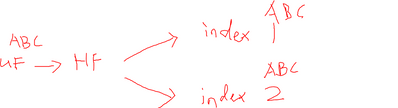
trying to deploy a HF and forward logs to 2 different indexers. clone data
i have 2 UFs feeding windows and syslog logs respectively to a HF.
This is my HF output conf, i think there some thing wrong here as i can only see logs at my indexer1
[tcpout]
defaultGroup=windows,syslog
[tcpout:windows,syslog]
server=indexer1 ip:9997
[tcpout:windows,syslog]
server=indexer2 ip:9997
appreciate any help.
- Mark as New
- Bookmark Message
- Subscribe to Message
- Mute Message
- Subscribe to RSS Feed
- Permalink
- Report Inappropriate Content


Hi @siuolkl,
don't use default group:
[tcpout]

[tcpout:ABC_1]
server=indexer1_ip:9997

[tcpout:ABC_2]
server=indexer2;ip:9997
remember that the group names in the stanza headers (tcpout:...) must be different not the same.
Ciao.
Giuseppe
- Mark as New
- Bookmark Message
- Subscribe to Message
- Mute Message
- Subscribe to RSS Feed
- Permalink
- Report Inappropriate Content
Hi @siuolkl,
don't use default group:
[tcpout]

[tcpout:ABC_1]
server=indexer1_ip:9997

[tcpout:ABC_2]
server=indexer2;ip:9997
remember that the group names in the stanza headers (tcpout:...) must be different not the same.
Ciao.
Giuseppe
- Mark as New
- Bookmark Message
- Subscribe to Message
- Mute Message
- Subscribe to RSS Feed
- Permalink
- Report Inappropriate Content
Hi @siuolkl,
good for you, see next time!
Ciao and happy splunking
Giuseppe
P.S.: Karma Points are appreciated 😉

Join the Splunk Community Slack to learn, troubleshoot, and make connections with fellow Splunk practitioners in real time!
Join Splunk User Groups to connect and learn in-person by region or remotely by topic or industry.
[Puzzles] Solve, Learn, Repeat: Matching cron expressions
Design, Compete, Win: Submit Your Best Splunk Dashboards for a .conf26 Pass
May 2026 Splunk Expert Sessions: Security & Observability
