
Join the Conversation
- Find Answers
- :
- Using Splunk
- :
- Dashboards & Visualizations
- :
- timechart xaxis custom display text
- Subscribe to RSS Feed
- Mark Topic as New
- Mark Topic as Read
- Float this Topic for Current User
- Bookmark Topic
- Subscribe to Topic
- Mute Topic
- Printer Friendly Page
- Mark as New
- Bookmark Message
- Subscribe to Message
- Mute Message
- Subscribe to RSS Feed
- Permalink
- Report Inappropriate Content
timechart xaxis custom display text

Hi all,
It would be great if anyone have a solution for my timechart xaxis issue. Thanks in advance for you time and effort.
Here is the problem:
A timechart (5 line charts) with span=30min earliest=-180d@d. _time transforms to | eval Date=strftime(Date, "%d/%m/%y %H:%M") .
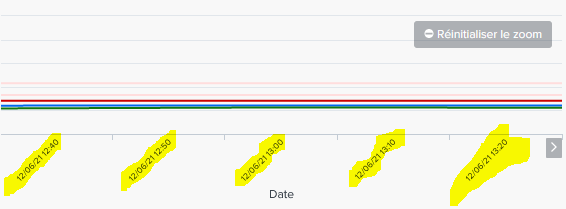
Since i dont use the _time var, so timechart does not display the Xaxis time interval ( 1st pic). If i zoom in, the Xaxis tecxt will be visible( 2nd pic).
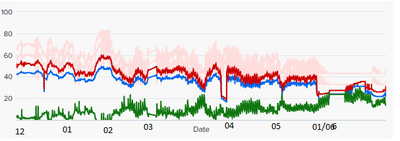
Is this possible to have xaxis time interval text ( by month 12 01 02 03 04 05 06). Because without it, user have to move the mouse to read lien chart by the tooltip box.
restriction: I need to respect the format "%d/%m/%y %H:%M" so i could not use default _time ( which is available in SPLUNK)
1st : without zoom, need to depend on tooltip to know the Date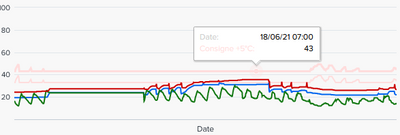
2nd: zoom, xaxis lable become visible
What i looking to acheive by either ccs or SPL( dont think it is possible)
xaxis time interval text ( by month %m or %d/%m/%y %H:%M could be great)
thanks


Join the Splunk Community Slack to learn, troubleshoot, and make connections with fellow Splunk practitioners in real time!
Join Splunk User Groups to connect and learn in-person by region or remotely by topic or industry.
Announcing Modern Navigation: A New Era of Splunk User Experience
Analytics Workspace removal in Splunk 10.6
Vibe-coding, AI, and Splunkcraft: Highlights from the .conf26 Builder Bar
