
Join the Conversation
- Find Answers
- :
- Using Splunk
- :
- Dashboards & Visualizations
- :
- Re: how to create trend showing increase or decrea...
- Subscribe to RSS Feed
- Mark Topic as New
- Mark Topic as Read
- Float this Topic for Current User
- Bookmark Topic
- Subscribe to Topic
- Mute Topic
- Printer Friendly Page
- Mark as New
- Bookmark Message
- Subscribe to Message
- Mute Message
- Subscribe to RSS Feed
- Permalink
- Report Inappropriate Content

hi ,
my requirement is to show a single value graph with difference from yesterday scope count .the difference should be shown near the total count of today with increase or decrease symbol .
ex: 4001 then symbol with difference
please help me with it
- Mark as New
- Bookmark Message
- Subscribe to Message
- Mute Message
- Subscribe to RSS Feed
- Permalink
- Report Inappropriate Content

@umsundar2015 as stated by @kmorris_splunk you should be able to use Single Value Chart with Trending to depict such kind of data. Following is a run anywhere dashboard based on Splunk's _internal index:

Following is Simple XML code for run anywhere example in the screenshot:
<dashboard>
  <label>Trend Today Compared to Previous Day</label>
  <row>
    <panel>
      <single>
        <search>
          <query>index=_internal sourcetype=splunkd log_level!="INFO" earliest=-1d@d latest=now
| timechart span=1d count</query>
          <earliest>-24h@h</earliest>
          <latest>now</latest>
          <sampleRatio>1</sampleRatio>
        </search>
        <option name="colorBy">trend</option>
        <option name="colorMode">block</option>
        <option name="drilldown">none</option>
        <option name="numberPrecision">0</option>
        <option name="rangeColors">["0x65a637","0x6db7c6","0xf7bc38","0xf58f39","0xd93f3c"]</option>
        <option name="rangeValues">[0,30,70,100]</option>
        <option name="showSparkline">1</option>
        <option name="showTrendIndicator">1</option>
        <option name="trellis.enabled">0</option>
        <option name="trellis.scales.shared">1</option>
        <option name="trellis.size">medium</option>
        <option name="trendColorInterpretation">inverse</option>
        <option name="trendDisplayMode">absolute</option>
        <option name="unitPosition">after</option>
        <option name="useColors">1</option>
        <option name="useThousandSeparators">1</option>
      </single>
    </panel>
  </row>
</dashboard>
| makeresults | eval message= "Happy Splunking!!!"
- Mark as New
- Bookmark Message
- Subscribe to Message
- Mute Message
- Subscribe to RSS Feed
- Permalink
- Report Inappropriate Content
@umsundar2015 as stated by @kmorris_splunk you should be able to use Single Value Chart with Trending to depict such kind of data. Following is a run anywhere dashboard based on Splunk's _internal index:
Following is Simple XML code for run anywhere example in the screenshot:
<dashboard>
  <label>Trend Today Compared to Previous Day</label>
  <row>
    <panel>
      <single>
        <search>
          <query>index=_internal sourcetype=splunkd log_level!="INFO" earliest=-1d@d latest=now
| timechart span=1d count</query>
          <earliest>-24h@h</earliest>
          <latest>now</latest>
          <sampleRatio>1</sampleRatio>
        </search>
        <option name="colorBy">trend</option>
        <option name="colorMode">block</option>
        <option name="drilldown">none</option>
        <option name="numberPrecision">0</option>
        <option name="rangeColors">["0x65a637","0x6db7c6","0xf7bc38","0xf58f39","0xd93f3c"]</option>
        <option name="rangeValues">[0,30,70,100]</option>
        <option name="showSparkline">1</option>
        <option name="showTrendIndicator">1</option>
        <option name="trellis.enabled">0</option>
        <option name="trellis.scales.shared">1</option>
        <option name="trellis.size">medium</option>
        <option name="trendColorInterpretation">inverse</option>
        <option name="trendDisplayMode">absolute</option>
        <option name="unitPosition">after</option>
        <option name="useColors">1</option>
        <option name="useThousandSeparators">1</option>
      </single>
    </panel>
  </row>
</dashboard>
| makeresults | eval message= "Happy Splunking!!!"
- Mark as New
- Bookmark Message
- Subscribe to Message
- Mute Message
- Subscribe to RSS Feed
- Permalink
- Report Inappropriate Content


You will need to use relative_time and eval to calculate the number from yesterday vs the number from today which will then display as a single value. What is your timespan you want to compare? Yesterdays value compared to todays value?
- Mark as New
- Bookmark Message
- Subscribe to Message
- Mute Message
- Subscribe to RSS Feed
- Permalink
- Report Inappropriate Content
yes , i need yesterday value compared with today .can you please help me with code
- Mark as New
- Bookmark Message
- Subscribe to Message
- Mute Message
- Subscribe to RSS Feed
- Permalink
- Report Inappropriate Content


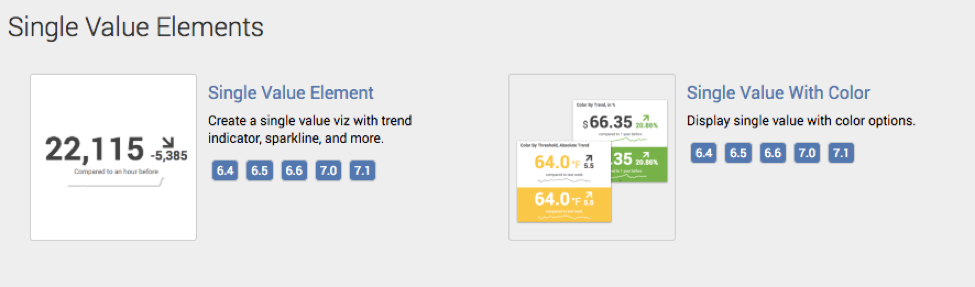
Take a look at the Splunk Dashboard Examples app:
https://splunkbase.splunk.com/app/1603/
Under Single Value Elements section there are examples.




Join the Splunk Community Slack to learn, troubleshoot, and make connections with fellow Splunk practitioners in real time!
Join Splunk User Groups to connect and learn in-person by region or remotely by topic or industry.
SOC4Kafka - New Kafka Connector Powered by OpenTelemetry
Rounding off the Splunk Dashboard Contest
A Four Part Event Series: AI + Observability: AI Agents, LLMs, Apps, & Infrastructure
