
Turn on suggestions
Auto-suggest helps you quickly narrow down your search results by suggesting possible matches as you type.
Dashboards & Visualizations
×
Join the Conversation
Without signing in, you're just watching from the sidelines. Sign in or Register to connect, share, and be part of the Splunk Community.
- Find Answers
- :
- Using Splunk
- :
- Dashboards & Visualizations
- :
- Re: how convert byte to Mb
Options
- Subscribe to RSS Feed
- Mark Topic as New
- Mark Topic as Read
- Float this Topic for Current User
- Bookmark Topic
- Subscribe to Topic
- Mute Topic
- Printer Friendly Page
- Mark as New
- Bookmark Message
- Subscribe to Message
- Mute Message
- Subscribe to RSS Feed
- Permalink
- Report Inappropriate Content

soheilamiri
Explorer
12-20-2020
03:57 AM
hello guys
i am new in splunk world, i want to create a report that show total inbound traffic in Mb. here is my search code :
sourcetype=fgt_traffic dest=1.1.1.* NOT (src=1.1.1.* OR dest=skyroom.online) bytes_in>0 AND action ="allowed"
and here is my pivot visual with table entry.
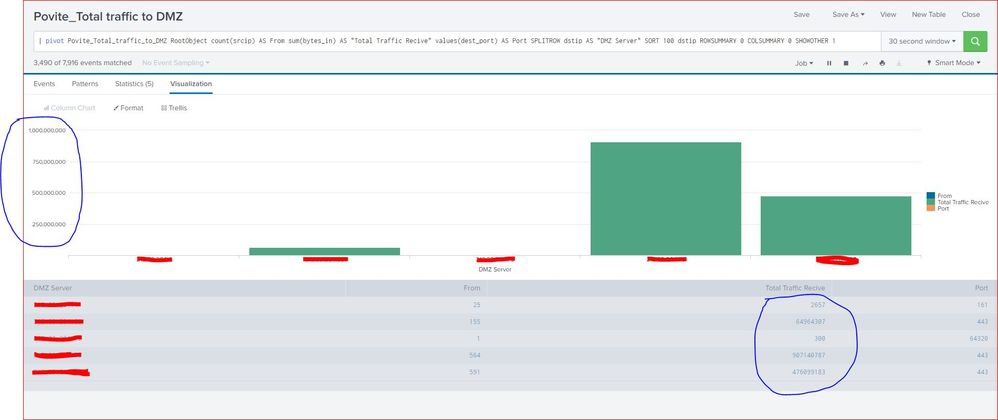
1 Solution
- Mark as New
- Bookmark Message
- Subscribe to Message
- Mute Message
- Subscribe to RSS Feed
- Permalink
- Report Inappropriate Content
soheilamiri
Explorer
12-21-2020
02:43 AM
hi @scelikok thanks for your answer
i customize our code :
sourcetype=fgt_traffic dest=0.0.0.0 NOT (src=0.0.0.0 OR dest=test.com) bytes_in>0 NOT action ="blocked"
| stats  sum(bytes_in) as "Total Traffic Receive" by dstip
| eval "Total Traffic Receive"=round('Total Traffic Receive'/10240/1024,2)
| rename dstip as "DMZ Server"
it's work perfect.
- Mark as New
- Bookmark Message
- Subscribe to Message
- Mute Message
- Subscribe to RSS Feed
- Permalink
- Report Inappropriate Content

scelikok

SplunkTrust
12-20-2020
06:02 AM
@soheilamiri, changing timechart command to stats should work;
sourcetype=fgt_traffic dest=1.1.1.* NOT (src=1.1.1.* OR dest=skyroom.online) bytes_in>0 AND action ="allowed"
| stats count(srcip) as From eval(round(sum(bytes_in)/1024/1024,2)) as "Total Traffic Receive" values(dstport) as Port by dstip | rename dstip as"DMZ Server"
If this resolves your issue, an upvote is appreciated.
If this reply helps you an upvote and "Accept as Solution" is appreciated.
- Mark as New
- Bookmark Message
- Subscribe to Message
- Mute Message
- Subscribe to RSS Feed
- Permalink
- Report Inappropriate Content
soheilamiri
Explorer
12-20-2020
06:10 AM
- Mark as New
- Bookmark Message
- Subscribe to Message
- Mute Message
- Subscribe to RSS Feed
- Permalink
- Report Inappropriate Content
scelikok
SplunkTrust
12-20-2020
12:59 PM
Sorry @soheilamiri, I wrote without testing, below should work
sourcetype=fgt_traffic dest=1.1.1.* NOT (src=1.1.1.* OR dest=skyroom.online) bytes_in>0 AND action ="allowed"
| stats count(srcip) as From sum(bytes_in) as "Total Traffic Receive" values(dstport) as Port by dstip
| eval "Total Traffic Receive"=round('Total Traffic Receive'/1024/1024,2)
| rename dstip as"DMZ Server"
If this reply helps you an upvote and "Accept as Solution" is appreciated.
- Mark as New
- Bookmark Message
- Subscribe to Message
- Mute Message
- Subscribe to RSS Feed
- Permalink
- Report Inappropriate Content
soheilamiri
Explorer
12-21-2020
02:43 AM
hi @scelikok thanks for your answer
i customize our code :
sourcetype=fgt_traffic dest=0.0.0.0 NOT (src=0.0.0.0 OR dest=test.com) bytes_in>0 NOT action ="blocked"
| stats  sum(bytes_in) as "Total Traffic Receive" by dstip
| eval "Total Traffic Receive"=round('Total Traffic Receive'/10240/1024,2)
| rename dstip as "DMZ Server"
it's work perfect.
- Mark as New
- Bookmark Message
- Subscribe to Message
- Mute Message
- Subscribe to RSS Feed
- Permalink
- Report Inappropriate Content
scelikok
SplunkTrust
12-20-2020
04:20 AM
Hi @soheilamiri, please try below;
sourcetype=fgt_traffic dest=1.1.1.* NOT (src=1.1.1.* OR dest=skyroom.online) bytes_in>0 AND action ="allowed"
| timechart count(srcip) as From eval(round(sum(bytes_in)/1024/1024,2)) as "Total Traffic Receive" values(dstport) as Port by dstip | rename dstip as"DMZ Server"
If this reply helps you an upvote and "Accept as Solution" is appreciated.
- Mark as New
- Bookmark Message
- Subscribe to Message
- Mute Message
- Subscribe to RSS Feed
- Permalink
- Report Inappropriate Content
soheilamiri
Explorer
12-20-2020
05:44 AM


Got questions? Get answers!
Join the Splunk Community Slack to learn, troubleshoot, and make connections with fellow Splunk practitioners in real time!
Meet up IRL or virtually!
Join Splunk User Groups to connect and learn in-person by region or remotely by topic or industry.
Get Updates on the Splunk Community!
Announcing Modern Navigation: A New Era of Splunk User Experience
We are excited to introduce the Modern Navigation feature in the Splunk Platform, available to both cloud and ...
SOC4Kafka - New Kafka Connector Powered by OpenTelemetry
The new SOC4Kafka connector, built on OpenTelemetry, enables the collection of Kafka messages and forwards ...
Rounding off the Splunk Dashboard Contest
What does a contest-winning Splunk dashboard look like? In this case, it isn't in a browser tab at all. It ...
