
Join the Conversation
- Find Answers
- :
- Using Splunk
- :
- Dashboards & Visualizations
- :
- Why am I unable to display a custom TagCloud visua...
- Subscribe to RSS Feed
- Mark Topic as New
- Mark Topic as Read
- Float this Topic for Current User
- Bookmark Topic
- Subscribe to Topic
- Mute Topic
- Printer Friendly Page
- Mark as New
- Bookmark Message
- Subscribe to Message
- Mute Message
- Subscribe to RSS Feed
- Permalink
- Report Inappropriate Content

Hi,
In my dashboard, I need to plot a custom TagCloud visualization chart. I need to know why i\I keep getting this error:
No matching visualization found for type: tagcloud, in app: simple_xml examples
How should I deal with it?
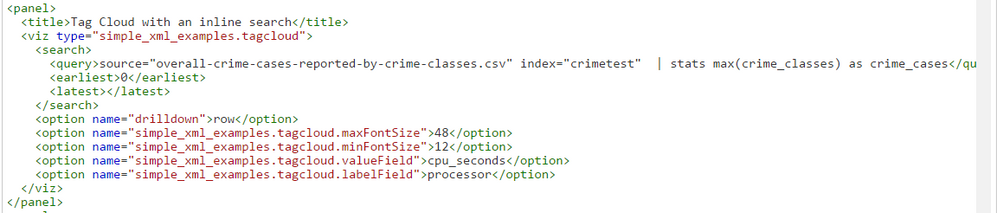
This is my XML text:
- Mark as New
- Bookmark Message
- Subscribe to Message
- Mute Message
- Subscribe to RSS Feed
- Permalink
- Report Inappropriate Content


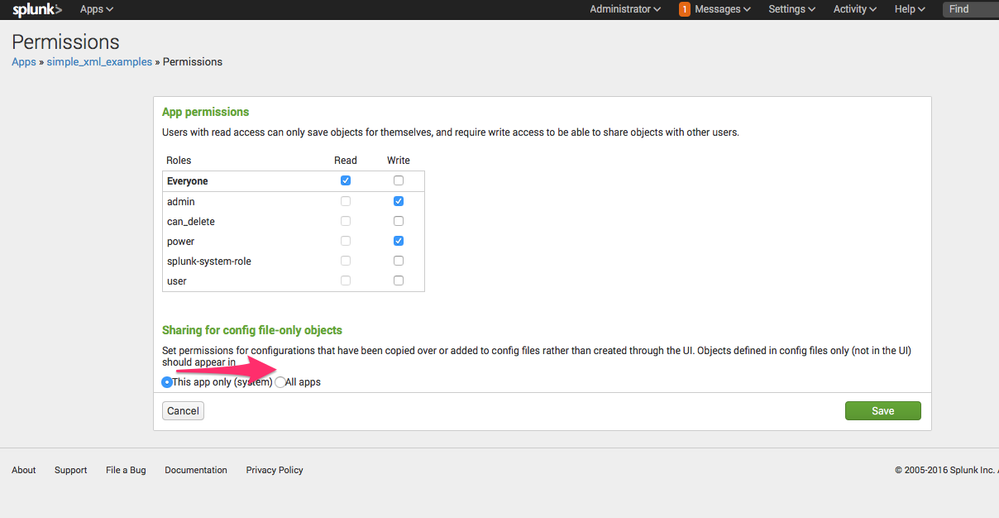
In order for custom visualizations to be available throughout Splunk, you have to set visibility/permissions to "global". In order to do this, select "Permissions" in the App Management menu and change the permissions to "All apps"

Alternatively, there is a standalone app, provided by a member of the Splunk community, which has more features than the one included in the Dashboard Examples app: https://splunkbase.splunk.com/app/3212/

- Mark as New
- Bookmark Message
- Subscribe to Message
- Mute Message
- Subscribe to RSS Feed
- Permalink
- Report Inappropriate Content
In order for custom visualizations to be available throughout Splunk, you have to set visibility/permissions to "global". In order to do this, select "Permissions" in the App Management menu and change the permissions to "All apps"
Alternatively, there is a standalone app, provided by a member of the Splunk community, which has more features than the one included in the Dashboard Examples app: https://splunkbase.splunk.com/app/3212/
- Mark as New
- Bookmark Message
- Subscribe to Message
- Mute Message
- Subscribe to RSS Feed
- Permalink
- Report Inappropriate Content
Hey thanks.
I managed to get the Tagcloud out.
- Mark as New
- Bookmark Message
- Subscribe to Message
- Mute Message
- Subscribe to RSS Feed
- Permalink
- Report Inappropriate Content
@MFen
Hi, did you have to change any references in the config files of the tagcloud visualization? after adding it to your own app?

Join the Splunk Community Slack to learn, troubleshoot, and make connections with fellow Splunk practitioners in real time!
Join Splunk User Groups to connect and learn in-person by region or remotely by topic or industry.
Index This | What travels the world but is also stuck in place?
Discover New Use Cases: Unlock Greater Value from Your Existing Splunk Data
Continue Your Journey: Join Session 2 of the Data Management and Federation Bootcamp ...
