
Turn on suggestions
Auto-suggest helps you quickly narrow down your search results by suggesting possible matches as you type.
Dashboards & Visualizations
×
Join the Conversation
Without signing in, you're just watching from the sidelines. Sign in or Register to connect, share, and be part of the Splunk Community.
Turn on suggestions
Auto-suggest helps you quickly narrow down your search results by suggesting possible matches as you type.
- Find Answers
- :
- Using Splunk
- :
- Dashboards & Visualizations
- :
- Re: Why am I unable to create a trellis bell curve...
Options
- Subscribe to RSS Feed
- Mark Topic as New
- Mark Topic as Read
- Float this Topic for Current User
- Bookmark Topic
- Subscribe to Topic
- Mute Topic
- Printer Friendly Page
- Mark as New
- Bookmark Message
- Subscribe to Message
- Mute Message
- Subscribe to RSS Feed
- Permalink
- Report Inappropriate Content
Why am I unable to create a trellis bell curve for my search query?

Lynyrd
Explorer
02-06-2018
09:11 AM
I am not getting any bell curve for each one of my stepnames, why?
sourcetype=mfgtestengsoftware | search "Result Logged" "Results{}.Pass"=true "CCS" "B1611" | spath Results{}.Actual | rename Results{}.Actual AS Actual | eval Actual = Round(Actual) | transaction StepName | bin Actual span=0.5 | chart count by StepName
- Mark as New
- Bookmark Message
- Subscribe to Message
- Mute Message
- Subscribe to RSS Feed
- Permalink
- Report Inappropriate Content
Lynyrd
Explorer
02-13-2018
02:30 PM
- Mark as New
- Bookmark Message
- Subscribe to Message
- Mute Message
- Subscribe to RSS Feed
- Permalink
- Report Inappropriate Content

DalJeanis
Legend
08-10-2018
11:10 PM
@Lynyrd -
Did this ever get resolved?
I'm actually not certain what you mean by "bell curve plot". Data either makes a bell curve or it doesn't. If you mean you want to overlay a bell curve onto a histogram, then that would be something that can be done.
- Mark as New
- Bookmark Message
- Subscribe to Message
- Mute Message
- Subscribe to RSS Feed
- Permalink
- Report Inappropriate Content
Lynyrd
Explorer
02-06-2018
11:11 AM
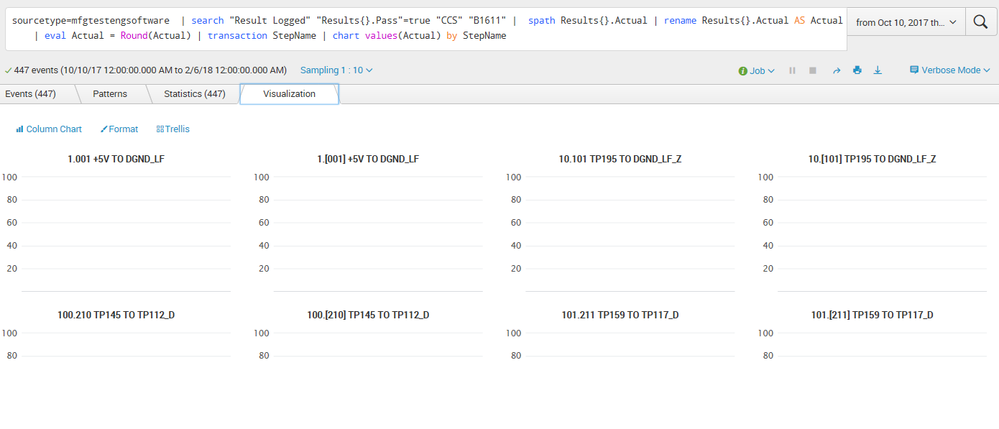


- Mark as New
- Bookmark Message
- Subscribe to Message
- Mute Message
- Subscribe to RSS Feed
- Permalink
- Report Inappropriate Content
Lynyrd
Explorer
02-06-2018
10:16 AM
tried this too, still no bell curve plots in trellis,
sourcetype=mfgtestengsoftware | search "Result Logged" "Results{}.Pass"=true "CCS" "B1611" | spath Results{}.Actual | rename Results{}.Actual AS Actual | eval Actual = Round(Actual) | transaction StepName | bin Actual span=0.75 | chart values(Actual) by StepName
- Mark as New
- Bookmark Message
- Subscribe to Message
- Mute Message
- Subscribe to RSS Feed
- Permalink
- Report Inappropriate Content

somesoni2
Revered Legend
02-06-2018
10:58 AM
You're using single value visualization?
Give this a try as well.
sourcetype=mfgtestengsoftware | search "Result Logged" "Results{}.Pass"=true "CCS" "B1611" | spath Results{}.Actual | rename Results{}.Actual AS Actual | eval Actual = Round(Actual) | transaction StepName | bin Actual span=0.75 | timechart count(Actual) by StepName
- Mark as New
- Bookmark Message
- Subscribe to Message
- Mute Message
- Subscribe to RSS Feed
- Permalink
- Report Inappropriate Content
Lynyrd
Explorer
02-06-2018
11:16 AM
I tried that and it gave me no bell curves, it gives me names of months of the x axis.
- Mark as New
- Bookmark Message
- Subscribe to Message
- Mute Message
- Subscribe to RSS Feed
- Permalink
- Report Inappropriate Content
Lynyrd
Explorer
02-06-2018
10:08 AM
I tried this and the statisitcs looks better but there is no bell curve plot in trellis.
sourcetype=mfgtestengsoftware | search "Result Logged" "Results{}.Pass"=true "CCS" "B1611" | spath Results{}.Actual | rename Results{}.Actual AS Actual | eval Actual = Round(Actual) | transaction StepName | bin Actual span=0.75 | chart count(Actual) by StepName

Get Updates on the Splunk Community!
Splunk Search APIを使えば調査過程が残せます
このゲストブログは、JCOM株式会社の情報セキュリティ本部・専任部長である渡辺慎太郎氏によって執筆されました。
Note: This article is published in both Japanese ...
Integrating Splunk Search API and Quarto to Create Reproducible Investigation ...
Splunk is More Than Just the Web Console
For Digital Forensics and Incident Response (DFIR) practitioners, ...
Congratulations to the 2025-2026 SplunkTrust!
Hello, Splunk Community! We are beyond thrilled to announce our newest group of SplunkTrust members!
The ...
