
Join the Conversation
- Find Answers
- :
- Using Splunk
- :
- Dashboards & Visualizations
- :
- Re: Trellis Dashboard define rows?
- Subscribe to RSS Feed
- Mark Topic as New
- Mark Topic as Read
- Float this Topic for Current User
- Bookmark Topic
- Subscribe to Topic
- Mute Topic
- Printer Friendly Page
- Mark as New
- Bookmark Message
- Subscribe to Message
- Mute Message
- Subscribe to RSS Feed
- Permalink
- Report Inappropriate Content
Trellis Dashboard define rows?

So I am working off a query based off the Splunk app for *nix. It uses the interfaces.sh.
query: index=os sourcetype=interfaces host=server Name=eth* | head 8 | eval status = if (RXbytes = "0", "UP", 'DOWN") | stats values(RXbytes) by Name
Basically I want to show the 8 interfaces, have the # of RX Bytes in each Single Value and color coded for UP/DOWN - which I set via the dashboard option
0-1 - Red
1-500 - Yellow
500 - Max - Green
Also starting to wonder if I really need the eval statement in there? I
I would like it to look like
ETH1 ETH 2 ETH 3 ETH 4
ETH 5 ETH 6 ETH 7 ETH 8
vice
ETH1 ETH2 ETH 3 ETH 4 ETH 5 ETH 6
ETH 7 ETH 8
is that possible, sorry system is not connected so its kind of a pain to get screen shots.
- Mark as New
- Bookmark Message
- Subscribe to Message
- Mute Message
- Subscribe to RSS Feed
- Permalink
- Report Inappropriate Content

@ddecker03 refer to one of my older answers to set the width of Trellis panels dynamically based on number of results. https://community.splunk.com/t5/Dashboards-Visualizations/Trellis-to-align-automatically-to-the-pane...
However, since you want icon/value/color kind of visualization, you may try out Status Indicator Custom Visualization: https://splunkbase.splunk.com/app/3119/
Following is a run anywhere example with some Text Box based CSS configuration for you to test out whether you want single row or two rows of trellis (with 11% and 12% width respectively)
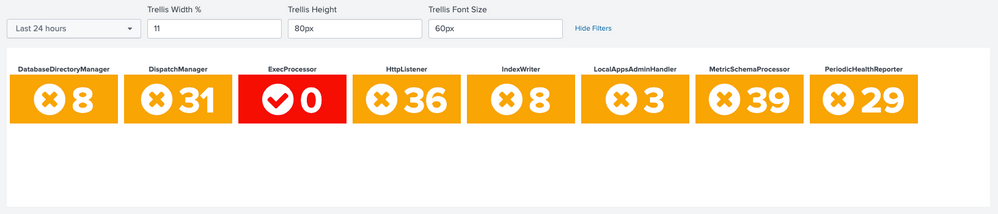

Following is the required Simple XML run anywhere example:
<form>
<label>Trellis Width</label>
<fieldset submitButton="false">
<input type="time" token="field1">
<label></label>
<default>
<earliest>-24h@h</earliest>
<latest>now</latest>
</default>
</input>
<input type="text" token="trellisWidth" searchWhenChanged="true">
<label>Trellis Width %</label>
<default>22</default>
</input>
<input type="text" token="trellisHeight" searchWhenChanged="true">
<label>Trellis Height</label>
<default>80px</default>
</input>
<input type="text" token="trellisFontSize" searchWhenChanged="true">
<label>Trellis Font Size</label>
<default>60px</default>
</input>
</fieldset>
<row>
<panel>
<html>
<style>
#my_single_trellis div.viz-facet{
$tokWidth$
height: $trellisHeight$ !important;
}
div.splunk-status-indicator{
font-size: $trellisFontSize$ !important;
}
</style>
</html>
<viz id="my_single_trellis" type="status_indicator_app.status_indicator">
<search>
<progress>
<condition match="$job.resultCount$==8">
<set token="tokWidth">width: $trellisWidth$% !important;</set>
</condition>
<condition>
<set token="tokWidth">width: initial;</set>
</condition>
</progress>
<query>index=_internal sourcetype=splunkd component IN ("*or", "*er")
| fields component date_second
| dedup component
| head 8
| rename date_second as RXbytes
| eval icon=if(RXbytes=0,"check-circle","times-circle")
| eval color=case(RXbytes>=0 AND RXbytes<1,"red",
RXbytes>=1 AND RXbytes<500,"orange",
RXbytes>=500,"green")
| stats last(RXbytes) as RXbytes last(icon) as icon last(color) as color by component
| fields - "$trellisWidth$" "$trellisHeight$" "$trellisFontSize$"</query>
<earliest>$field1.earliest$</earliest>
<latest>$field1.latest$</latest>
<sampleRatio>1</sampleRatio>
</search>
<option name="drilldown">none</option>
<option name="height">239</option>
<option name="refresh.display">progressbar</option>
<option name="status_indicator_app.status_indicator.colorBy">field_value</option>
<option name="status_indicator_app.status_indicator.fillTarget">background</option>
<option name="status_indicator_app.status_indicator.fixIcon">warning</option>
<option name="status_indicator_app.status_indicator.icon">field_value</option>
<option name="status_indicator_app.status_indicator.precision">0</option>
<option name="status_indicator_app.status_indicator.showOption">1</option>
<option name="status_indicator_app.status_indicator.staticColor">#555</option>
<option name="status_indicator_app.status_indicator.useColors">true</option>
<option name="status_indicator_app.status_indicator.useThousandSeparator">true</option>
<option name="trellis.enabled">1</option>
<option name="trellis.scales.shared">1</option>
<option name="trellis.size">medium</option>
</viz>
</panel>
</row>
</form>| makeresults | eval message= "Happy Splunking!!!"
- Mark as New
- Bookmark Message
- Subscribe to Message
- Mute Message
- Subscribe to RSS Feed
- Permalink
- Report Inappropriate Content


I think the following search may do better?
index=os sourcetype=interfaces host=server Name=eth*
| stats sum(RXbytes) AS rxbytes by Name
By doing the 'head 8' up front, you were just taking the first 8 rows. But do you know for sure what 8 rows it is? Is 8 exactly and precisely correct always and is it always the first 8? Just saying that feels a little suspicious, so I don't do that.
If you want to trim it back to 8, that's of course perfectly fine, but I'd do it *after* the stats. Then at least you'd know what order it's in (by name).
Or if you want to do it to the 8 most active ones, add
| sort - rxbytes
| head 8
to the end of the above.
ALSO I fixed something. I'm not sure you wanted "values()" for the RXbytes. I mean, maybe, but it again feels suspiciously accidental that your head 8 worked just right so that you had one and only one entry for each name, because if for some reason you had two, you'd have an multi-valued field there, like "18737, 7663" instead of the sum of the two.
So, maybe all this is not important, but I feel that even if it isn't right now, it will be some day when you try to extend this process to a server with only 4 NICs. Or 12.
To you last question on reordering the columns/rows of a trellis. My understanding is nope, you get what you get. Indeed, it also pages at a certain amount, and that amount of baby-trellis pictures that it makes you go to a second page for? Yeah, that's not even an evenly filled out row unless you accidentally made your browser the right size. Nope, sometimes it's midway through a row that it just stops and tells you to click for the next page. *sigh* Wouldn't it be great to have an option like "columns=4 rows=2 overall=8" or some combination thereof?
In fact, that's such a good idea that I just wrote it up in Splunk Ideas. Go vote on it! https://ideas.splunk.com/ideas/EID-I-586
- Mark as New
- Bookmark Message
- Subscribe to Message
- Mute Message
- Subscribe to RSS Feed
- Permalink
- Report Inappropriate Content
Thanks Everyone, will have to try these solutions out.
You are probably right Richfez, I just created a search that provided what I was looking for, have not validated that it will always provide the correct data :). Its the initial stages.


Join the Splunk Community Slack to learn, troubleshoot, and make connections with fellow Splunk practitioners in real time!
Join Splunk User Groups to connect and learn in-person by region or remotely by topic or industry.
SOC4Kafka - New Kafka Connector Powered by OpenTelemetry
Event Series: Level up your SOC: Advancing with Splunk Enterprise Security
Announcing Modern Navigation: A New Era of Splunk User Experience
