
Join the Conversation
- Find Answers
- :
- Using Splunk
- :
- Dashboards & Visualizations
- :
- Re: Too much annotations
- Subscribe to RSS Feed
- Mark Topic as New
- Mark Topic as Read
- Float this Topic for Current User
- Bookmark Topic
- Subscribe to Topic
- Mute Topic
- Printer Friendly Page
- Mark as New
- Bookmark Message
- Subscribe to Message
- Mute Message
- Subscribe to RSS Feed
- Permalink
- Report Inappropriate Content

Hi,
I have created a bar chart that shows in my case example data on the CPU usage of a device with two overlays for inbound and outbound traffic.
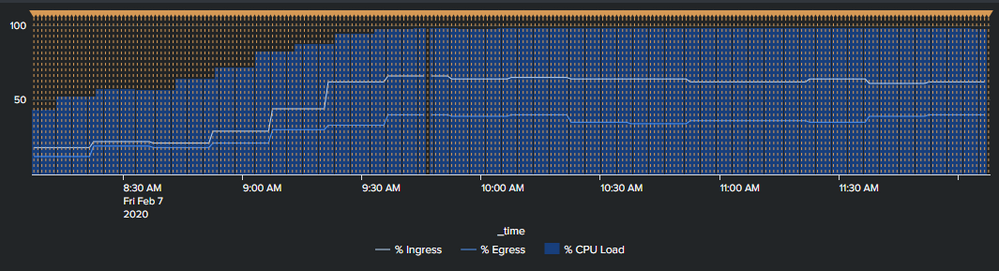
When a certain combination of values is exceeded I want to place an annotation to highlight this. As shown in this example.
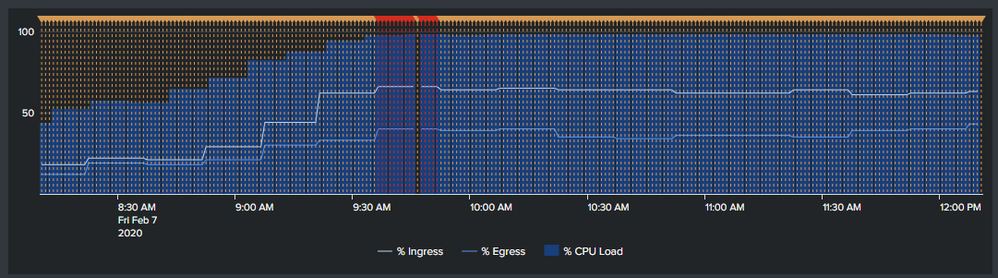
What I cannot seem to get rid off are the orange annotations that seem to be placed when the condition is not matched.
The search is as follows. In this I am evaluating and updating the label and the category.
<search type="annotation">
<query>index="bla"
| timechart span=1m avg(inPercentUtil) as inPercentUtil avg(Percent_CPULoad) as Percent_CPULoad
| eval critical=if(inPercentUtil>65 AND Percent_CPULoad>90,"Yes","No")
| eval annotation_category=case(critical="Yes","Critical")
| eval annotation_label=case(critical="Yes","Insert_Message")
 </query>
What should I do to stop the orange markers from showing? I don't even specify a color for the annotations.
<option name="charting.annotation.categoryColors">{"Critical":"0xe60000"}</option>
- Mark as New
- Bookmark Message
- Subscribe to Message
- Mute Message
- Subscribe to RSS Feed
- Permalink
- Report Inappropriate Content
Right, been staring at this for ages but it seems to be solved.
It was suggested to only select the moments to place the annotation from the search rather then look for them from the result.
Changed the annotation query to
index="bla" | search inPercentUtil>65 AND Percent_CPULoad>90
| eval annotation_category="Critical"
| eval annotation_label="Insert_Message"
Now it is working.
- Mark as New
- Bookmark Message
- Subscribe to Message
- Mute Message
- Subscribe to RSS Feed
- Permalink
- Report Inappropriate Content
Right, been staring at this for ages but it seems to be solved.
It was suggested to only select the moments to place the annotation from the search rather then look for them from the result.
Changed the annotation query to
index="bla" | search inPercentUtil>65 AND Percent_CPULoad>90
| eval annotation_category="Critical"
| eval annotation_label="Insert_Message"
Now it is working.
- Mark as New
- Bookmark Message
- Subscribe to Message
- Mute Message
- Subscribe to RSS Feed
- Permalink
- Report Inappropriate Content

Great news!
I have converted your comment to an answer. Please accept it so others can see how you resolved your issue.
- Mark as New
- Bookmark Message
- Subscribe to Message
- Mute Message
- Subscribe to RSS Feed
- Permalink
- Report Inappropriate Content
Thank you, I have done so.




Join the Splunk Community Slack to learn, troubleshoot, and make connections with fellow Splunk practitioners in real time!
Join Splunk User Groups to connect and learn in-person by region or remotely by topic or industry.
Cisco Data Fabric from Architecture to Investigation, Better SOC Visibility, and More ...
The Trust Gap: Why a Data Foundation is Fundamental to an Agentic Enterprise
Data Management Digest – September 2026
