
Join the Conversation
- Find Answers
- :
- Using Splunk
- :
- Dashboards & Visualizations
- :
- Time range not showing full text
- Subscribe to RSS Feed
- Mark Topic as New
- Mark Topic as Read
- Float this Topic for Current User
- Bookmark Topic
- Subscribe to Topic
- Mute Topic
- Printer Friendly Page
- Mark as New
- Bookmark Message
- Subscribe to Message
- Mute Message
- Subscribe to RSS Feed
- Permalink
- Report Inappropriate Content
Time range not showing full text

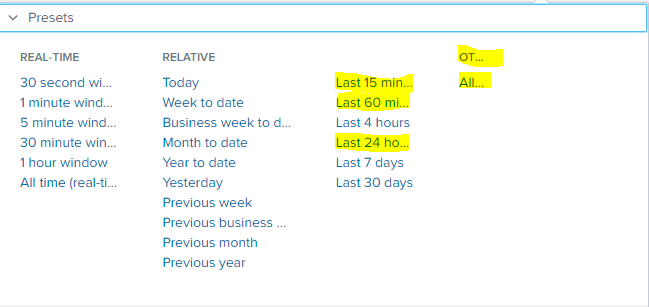
I am using Splunk 7.2.0 on Windows OS and I am seeing strange behavior of time range- where I am not seeing full text (see below screen shot).
I did check zoom in/out and tried in incognito mode but still same issue.
Any suggestion what I am doing wrong here?
- Mark as New
- Bookmark Message
- Subscribe to Message
- Mute Message
- Subscribe to RSS Feed
- Permalink
- Report Inappropriate Content

Greetings @ips_mandar (and @Sukisen1981),
I haven't seen a solution yet, but you can check out my analysis of the behavior below. Splunk screwed up their CSS here.
From that comment:
It's caused by
overflow-x:hiddenfor the css style.shared-timerangepicker-dialog .presets-container .presets-groupli, but I can't find a way to modify it. The value should beoverflow-x:visibleoroverflow:visible
Jacob
If you feel this response answered your question, please do not forget to mark it as such. If it did not, but you do have the answer, feel free to answer your own post and accept that as the answer.
- Mark as New
- Bookmark Message
- Subscribe to Message
- Mute Message
- Subscribe to RSS Feed
- Permalink
- Report Inappropriate Content
yes it seems something was change (not sure if it's splunk or chrome) and from last few days I am seeing this behavior on search and reporting app..
- Mark as New
- Bookmark Message
- Subscribe to Message
- Mute Message
- Subscribe to RSS Feed
- Permalink
- Report Inappropriate Content
Like I said, Splunk screwed up their CSS. Chrome is just displaying what it's told to display.
Jacob
If you feel this response answered your question, please do not forget to mark it as such. If it did not, but you do have the answer, feel free to answer your own post and accept that as the answer.
- Mark as New
- Bookmark Message
- Subscribe to Message
- Mute Message
- Subscribe to RSS Feed
- Permalink
- Report Inappropriate Content

any chance this is on chrome? 7.3 latest download is giving me the same view
- Mark as New
- Bookmark Message
- Subscribe to Message
- Mute Message
- Subscribe to RSS Feed
- Permalink
- Report Inappropriate Content
yes this error is on chrome browser...few days back it was working fine..



Join the Splunk Community Slack to learn, troubleshoot, and make connections with fellow Splunk practitioners in real time!
Join Splunk User Groups to connect and learn in-person by region or remotely by topic or industry.
SOC4Kafka - New Kafka Connector Powered by OpenTelemetry
Event Series: Level up your SOC: Advancing with Splunk Enterprise Security
Announcing Modern Navigation: A New Era of Splunk User Experience
