
Join the Conversation
- Find Answers
- :
- Using Splunk
- :
- Dashboards & Visualizations
- :
- Re: Splunk dashboard: XML dashboard shows up as "l...
- Subscribe to RSS Feed
- Mark Topic as New
- Mark Topic as Read
- Float this Topic for Current User
- Bookmark Topic
- Subscribe to Topic
- Mute Topic
- Printer Friendly Page
- Mark as New
- Bookmark Message
- Subscribe to Message
- Mute Message
- Subscribe to RSS Feed
- Permalink
- Report Inappropriate Content

Hello splunkers,
I have came across a different splunk behavior :
when i am creating the dashboard i have written simple xml like below:
<dashboard>
  <label>manish_testing2</label>

  <row>
    <panel>
      <html>
        <head>
          </head>
        <body>
          <p>hello manish</p>

        </body>
             </html>

    </panel>
    </row>
</dashboard>
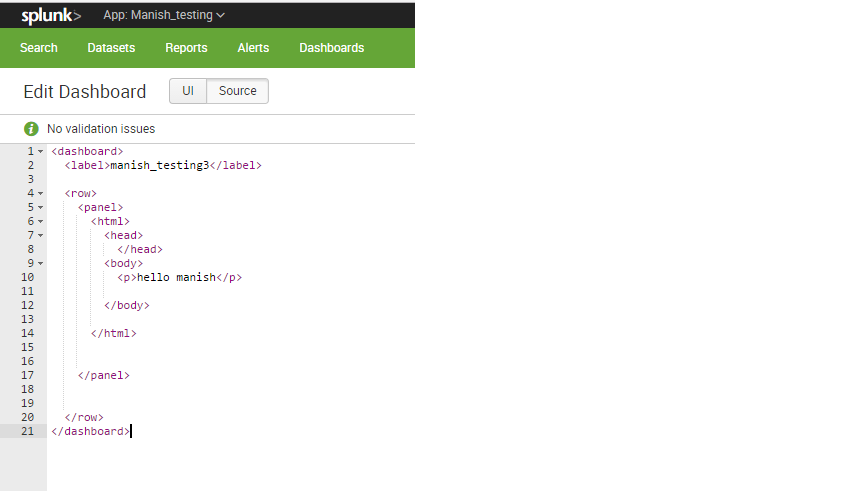
After saving the dashboard, i reopend dashboard i am getting something else .
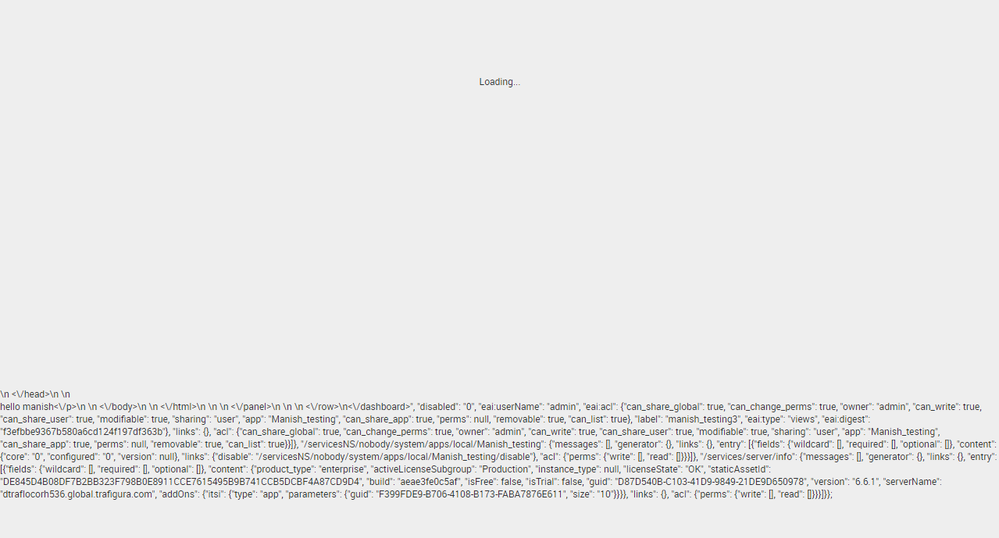
Please help !


- Mark as New
- Bookmark Message
- Subscribe to Message
- Mute Message
- Subscribe to RSS Feed
- Permalink
- Report Inappropriate Content

Hmmm, looks like you try to readd a head tag, which will be filled by splunk with that:
<label>manish_testing2<\/label>\n        <row>\n          <panel>\n            <html>\n              <head>
        <meta name="referrer" content="never" />
        <meta name="referrer" content="no-referrer" />

          <script>
                window._splunk_metrics_events = {
                   push : function() {},
                   active: false,
                   }
          </script>
    \n                <\/head>\n              <body>\n
Unless you have to rewrite head and body think it over again and just remove them.
It will work that way as well:
<html>
<p>hello manish</p>
</html>
You don't have to create a whole html page, the needed tags are enough, splunk will do the rest for you.
Also in the simple_xml_examples is a html example included.
HTML Doc
- Mark as New
- Bookmark Message
- Subscribe to Message
- Mute Message
- Subscribe to RSS Feed
- Permalink
- Report Inappropriate Content
Hmmm, looks like you try to readd a head tag, which will be filled by splunk with that:
<label>manish_testing2<\/label>\n        <row>\n          <panel>\n            <html>\n              <head>
        <meta name="referrer" content="never" />
        <meta name="referrer" content="no-referrer" />

          <script>
                window._splunk_metrics_events = {
                   push : function() {},
                   active: false,
                   }
          </script>
    \n                <\/head>\n              <body>\n
Unless you have to rewrite head and body think it over again and just remove them.
It will work that way as well:
<html>
<p>hello manish</p>
</html>
You don't have to create a whole html page, the needed tags are enough, splunk will do the rest for you.
Also in the simple_xml_examples is a html example included.
HTML Doc
- Mark as New
- Bookmark Message
- Subscribe to Message
- Mute Message
- Subscribe to RSS Feed
- Permalink
- Report Inappropriate Content

hey @kannu
It might be Splunk problem cause I tried the code its working fine at my end
go to dashboard >>createnewdashboard and in the source code copy below code and try again!
 <dashboard>
       <label>manish_testing2</label>
       <row>
         <panel>
           <html>
             <head>
               </head>
             <body>
               <p>hello manish</p>
             </body>
                  </html>
         </panel>
         </row>
     </dashboard>
try doing http://splunksh/en-US/debug/refresh
and restarting splunk
let me know if this helps you!
- Mark as New
- Bookmark Message
- Subscribe to Message
- Mute Message
- Subscribe to RSS Feed
- Permalink
- Report Inappropriate Content
@mayurr98
Thank for your reply ,
Actually issue will be seen when save the dashboard close your splunk browser window re open the splunk got to dashboard click the dashboard again which you have saved . You will be able to see that error
and issue is resolved actually as mentioned by @Elsurion .
- Mark as New
- Bookmark Message
- Subscribe to Message
- Mute Message
- Subscribe to RSS Feed
- Permalink
- Report Inappropriate Content

may be There are invisible escape characters in the code .
remove the spaces between the lines and create a new dashboard with new name
- Mark as New
- Bookmark Message
- Subscribe to Message
- Mute Message
- Subscribe to RSS Feed
- Permalink
- Report Inappropriate Content
Hi @naidusadanala,
thank you for the quick reply.
I have tried the same after removing the spaces but still getting the same error .

Join the Splunk Community Slack to learn, troubleshoot, and make connections with fellow Splunk practitioners in real time!
Join Splunk User Groups to connect and learn in-person by region or remotely by topic or industry.
May 2026 Splunk Expert Sessions: Security & Observability
Network to App: Observability Unlocked [May & June Series]
SPL2 Deep Dives, AppDynamics Integrations, SAML Made Simple and Much More on Splunk ...
