
Join the Conversation
- Find Answers
- :
- Using Splunk
- :
- Dashboards & Visualizations
- :
- Re: Splunk Graph using 4 Fields combination
- Subscribe to RSS Feed
- Mark Topic as New
- Mark Topic as Read
- Float this Topic for Current User
- Bookmark Topic
- Subscribe to Topic
- Mute Topic
- Printer Friendly Page
- Mark as New
- Bookmark Message
- Subscribe to Message
- Mute Message
- Subscribe to RSS Feed
- Permalink
- Report Inappropriate Content

Hi,
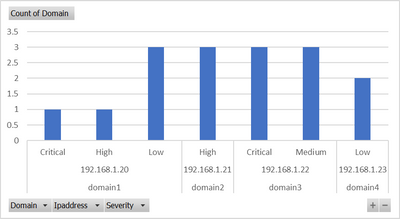
I am looking to plot a graph using four fields in splunk. Looking for relationship graph among Domain, Category , Ipaddress and Severity similar to excel graph as below.
Sample Data:
| Domain | Category | Ipaddress | Severity |
| domain1 | prod | 192.168.1.20 | Low |
| domain2 | non-prod | 192.168.1.21 | High |
| domain3 | prod | 192.168.1.22 | Critical |
| domain3 | prod | 192.168.1.22 | Medium |
| domain4 | non-prod | 192.168.1.23 | Low |
| domain1 | prod | 192.168.1.20 | Low |
| domain2 | non-prod | 192.168.1.21 | High |
| domain3 | prod | 192.168.1.22 | Critical |
| domain3 | prod | 192.168.1.22 | Medium |
| domain4 | non-prod | 192.168.1.23 | Low |
| domain1 | prod | 192.168.1.20 | Low |
| domain2 | non-prod | 192.168.1.21 | High |
| domain3 | prod | 192.168.1.22 | Critical |
| domain3 | prod | 192.168.1.22 | Medium |
| domain1 | prod | 192.168.1.20 | High |
| domain1 | prod | 192.168.1.20 | Critical |
Graph prepared using excel:
Please advise search command to see the relationship in Visualization to plot the graph.
- Mark as New
- Bookmark Message
- Subscribe to Message
- Mute Message
- Subscribe to RSS Feed
- Permalink
- Report Inappropriate Content

Hi @amgsplunk
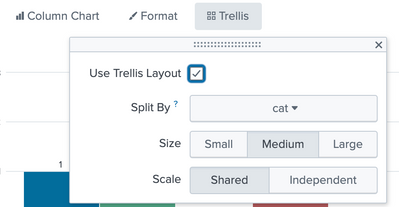
Try something with Trellis for your charts and turn on Legends as per your need
| inputlookup test1.csv
| eval cat = Domain+"-"+Category
| stats count(eval(Severity="Critical")) as Critical
    count(eval(Severity="High")) as High
    count(eval(Severity="Medium")) as Medium
    count(eval(Severity="Low")) as Low
    by Ipaddress cat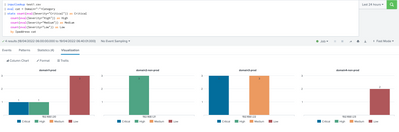
- Mark as New
- Bookmark Message
- Subscribe to Message
- Mute Message
- Subscribe to RSS Feed
- Permalink
- Report Inappropriate Content
Hi @amgsplunk
Try something with Trellis for your charts and turn on Legends as per your need
| inputlookup test1.csv
| eval cat = Domain+"-"+Category
| stats count(eval(Severity="Critical")) as Critical
    count(eval(Severity="High")) as High
    count(eval(Severity="Medium")) as Medium
    count(eval(Severity="Low")) as Low
    by Ipaddress cat
- Mark as New
- Bookmark Message
- Subscribe to Message
- Mute Message
- Subscribe to RSS Feed
- Permalink
- Report Inappropriate Content
Dear Gr0und_Z3r0,
Thank you very much for the solution. This is what I am looking.
- Mark as New
- Bookmark Message
- Subscribe to Message
- Mute Message
- Subscribe to RSS Feed
- Permalink
- Report Inappropriate Content
Thanks for your response. Graph is not showing the severity.
source="reports_19_1.csv" host="ClassES1" index="mallik_index_local" sourcetype="csv" |eval ipdomain=Domain." - ".Ipaddress
| stats count by ipdomain Category Severity
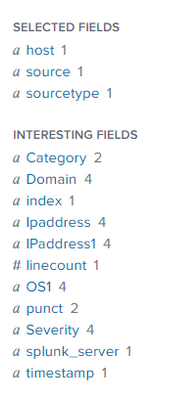
Not getting the desired output. I want to see domain, Ipaddress, Severity and category in the graph. Severity and Category fields are missing in the graph. The following is the visualization result from splunk search, visualization.

- Mark as New
- Bookmark Message
- Subscribe to Message
- Mute Message
- Subscribe to RSS Feed
- Permalink
- Report Inappropriate Content


As you wrote yourself, it's
<your search>
| stats count by Domain Ipaddress Category Severity
Nothing fancy.
In this case domain maps 1:1 with ipaddress so you might "squeeze" them into one field
<your search>
| eval ipdomain=Domain." - ".Ipaddress
| stats count by ipdomain Category Severity

Join the Splunk Community Slack to learn, troubleshoot, and make connections with fellow Splunk practitioners in real time!
Join Splunk User Groups to connect and learn in-person by region or remotely by topic or industry.
Meet the .conf26 AI Agent Buildathon Winners
Trusted Autonomy in the SOC: A Maturity Journey
Supercharging Windows Security Detection Performance: Introducing Hybrid Field ...
