
Join the Conversation
- Find Answers
- :
- Using Splunk
- :
- Dashboards & Visualizations
- :
- Re: Setting token for a dropdwn with a search and ...
- Subscribe to RSS Feed
- Mark Topic as New
- Mark Topic as Read
- Float this Topic for Current User
- Bookmark Topic
- Subscribe to Topic
- Mute Topic
- Printer Friendly Page
- Mark as New
- Bookmark Message
- Subscribe to Message
- Mute Message
- Subscribe to RSS Feed
- Permalink
- Report Inappropriate Content

Hello,
I'm trying from an initial search to put the value into a token to use it as a default initial value for a dropdown list something like this:
<form script="table_with_buttons.js">
      <search>
        <query>
            | makeresults
            | eval day=strftime(now(), "%d")
            | fields day
        </query>
        <done>
          <set token="day">$result.day$</set>
        </done>
      </search>
      <init>
        <set token="start_day">$day$</set>
       </init>
  <row>
    <panel>
      <title>Data Inizio</title>
      <input type="dropdown" token="start_day">
        <label>Giorno $start_day$</label>
        <fieldForLabel>giorno</fieldForLabel>
        <fieldForValue>giornoid</fieldForValue>
        <search>
          <query>|inputlookup day.csv| table dayid day</query>
        </search>
        <choice value="$start_day$">$start_day$</choice>
        <default>$start_day$</default>
      </input>
    </panel>
  </row>
<form>
at runtime what I obtain is shown in the picture :
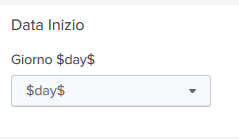
Any Suggestion ?
Thanks
Fabrizio

- Mark as New
- Bookmark Message
- Subscribe to Message
- Mute Message
- Subscribe to RSS Feed
- Permalink
- Report Inappropriate Content

Hi
Check this, Please correct fieldForLabel and fieldForValue based on your query
<form script="table_with_buttons.js">
  <search>
    <query>
             | makeresults
             | eval day=strftime(now(), "%d")
             | fields day
         </query>
    <done>
      <set token="day">$result.day$</set>
    </done>
  </search>
  <init>
    <set token="start_day">$day$</set>
  </init>
  <fieldset submitButton="false"></fieldset>
  <row>
    <panel>
      <title>Data Inizio</title>
      <input type="dropdown" token="start_day">
        <label>Giorno $start_day$</label>
        <fieldForLabel>day</fieldForLabel>
        <fieldForValue>day</fieldForValue>
        <search>
          <query>| makeresults count=31 | streamstats count as day</query>
        </search>
        <default>$start_day$</default>
      </input>
    </panel>
  </row>
</form>
- Mark as New
- Bookmark Message
- Subscribe to Message
- Mute Message
- Subscribe to RSS Feed
- Permalink
- Report Inappropriate Content
Hi
Check this, Please correct fieldForLabel and fieldForValue based on your query
<form script="table_with_buttons.js">
  <search>
    <query>
             | makeresults
             | eval day=strftime(now(), "%d")
             | fields day
         </query>
    <done>
      <set token="day">$result.day$</set>
    </done>
  </search>
  <init>
    <set token="start_day">$day$</set>
  </init>
  <fieldset submitButton="false"></fieldset>
  <row>
    <panel>
      <title>Data Inizio</title>
      <input type="dropdown" token="start_day">
        <label>Giorno $start_day$</label>
        <fieldForLabel>day</fieldForLabel>
        <fieldForValue>day</fieldForValue>
        <search>
          <query>| makeresults count=31 | streamstats count as day</query>
        </search>
        <default>$start_day$</default>
      </input>
    </panel>
  </row>
</form>
- Mark as New
- Bookmark Message
- Subscribe to Message
- Mute Message
- Subscribe to RSS Feed
- Permalink
- Report Inappropriate Content
It doesn't work in the dropdown the default value is not 15 ( today ) is always $day$.
It seems that Splunk doesn't accept the first query which pass the today value in the token.
The porpouse is to load a dropdown with the list of days, and by default to show the today value.
Thanks
- Mark as New
- Bookmark Message
- Subscribe to Message
- Mute Message
- Subscribe to RSS Feed
- Permalink
- Report Inappropriate Content
Can you try this
<form script="table_with_buttons.js">
  <search>
    <query>
             | makeresults
             | eval day=strftime(now(), "%d")
             | fields day
         </query>
    <done>
      <set token="day">$result.day$</set>
    </done>
  </search>
  <fieldset submitButton="false"></fieldset>
  <row>
    <panel>
      <title>Data Inizio</title>
      <input type="dropdown" token="start_day">
        <label>Giorno $day$</label>
        <fieldForLabel>day</fieldForLabel>
        <fieldForValue>day</fieldForValue>
        <search>
          <query>| makeresults count=31 | streamstats count as day</query>
        </search>
        <default>$day$</default>
      </input>
    </panel>
  </row>
</form>
- Mark as New
- Bookmark Message
- Subscribe to Message
- Mute Message
- Subscribe to RSS Feed
- Permalink
- Report Inappropriate Content
Ok this works fine !
Thanks a lot!
How can I accept this as ansswer ??
- Mark as New
- Bookmark Message
- Subscribe to Message
- Mute Message
- Subscribe to RSS Feed
- Permalink
- Report Inappropriate Content
please click accept button

Join the Splunk Community Slack to learn, troubleshoot, and make connections with fellow Splunk practitioners in real time!
Join Splunk User Groups to connect and learn in-person by region or remotely by topic or industry.
[Puzzles] Solve, Learn, Repeat: Matching cron expressions
Design, Compete, Win: Submit Your Best Splunk Dashboards for a .conf26 Pass
May 2026 Splunk Expert Sessions: Security & Observability
