
Join the Conversation
- Find Answers
- :
- Using Splunk
- :
- Dashboards & Visualizations
- :
- Row expansion for a hidden column in SplunkJS
- Subscribe to RSS Feed
- Mark Topic as New
- Mark Topic as Read
- Float this Topic for Current User
- Bookmark Topic
- Subscribe to Topic
- Mute Topic
- Printer Friendly Page
- Mark as New
- Bookmark Message
- Subscribe to Message
- Mute Message
- Subscribe to RSS Feed
- Permalink
- Report Inappropriate Content

Hi,
My table has 7 fields, but I want to hide one of them which is Database ID. However, I still want Database ID to appear in the row expansion. Here's my JS code:
    var search2 = new SearchManager({
        id: "search2",
        preview: true,
        cache: true,
        search: "index=assets_py asset_type=database | rename database_id as \"Database ID\" data_source as \"Data Source\" source_type as \"Source Type\" anomaly_count as \"Anomaly Count\" data_source as \"Data Source\" hostname as \"Host Name\" ip as IP port as Port | fields \"Database ID\", \"Data Source\", \"Source Type\", \"Anomaly Count\", \"Host Name\", IP, Port| fields - _time _bkt _cd _indextime _kv _raw _serial _si _sourcetype"
    });

    // Create a table for a custom row expander
    var mycustomrowtable = new TableView({
        id: "table-customrow",
        managerid: "search2",
        drilldown: "none",
        fields: ["Data Source", "Source Type", "Anomaly Count", "Host Name", "IP", "Port"],
        el: $("#table-customrow")
    });
    var CustomRowRenderer = TableView.BaseRowExpansionRenderer.extend({
        canRender: function(rowData) {
            console.log("RowData: ", rowData);
            return true;
        },

        render: function($container, rowData) {
        // Print the rowData object to the console
        console.log("RowData: ", rowData);

        // Display some of the rowData in the expanded row
        $container.append("<div>"
            + "<b>Database ID</b>: " + rowData.values[0]
            + "</div>");
        }
    });
Attached file is what it looks like on UI. Instead of Database ID: FinanceDB, I want the row expansion to show the real Database ID for this database, but it seems like the hidden Database ID is not in fields.
Could someone guide me through this? Thank you!
- Mark as New
- Bookmark Message
- Subscribe to Message
- Mute Message
- Subscribe to RSS Feed
- Permalink
- Report Inappropriate Content


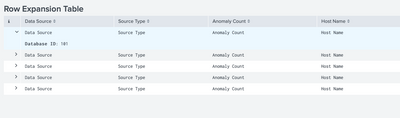
Can you please try this Example? I have updated the search by adding
| eval data_source=data_source."|".database_id
and some JS
XML
<dashboard script="row_expansion.js">
  <label>Row Expansion Table</label>
  <row>
    <panel>
      <table id="sample_table">
        <search>
          <query>| makeresults count=5 | eval id=1 |accum id | eval database_id=100+id,data_source="Data Source",source_type="Source Type",anomaly_count="Anomaly Count",data_source="Data Source",hostname="Host Name",ip="IP",port="Port"
| eval data_source=data_source."|".database_id
| rename data_source as "Data Source" source_type as "Source Type" anomaly_count as "Anomaly Count" data_source as "Data Source" hostname as "Host Name" ip as IP port as Port | fields "Data Source", "Source Type", "Anomaly Count", "Host Name", IP, Port | fields - _time</query>
          <earliest>-24h@h</earliest>
          <latest>now</latest>
          <sampleRatio>1</sampleRatio>
        </search>
        <option name="count">100</option>
        <option name="dataOverlayMode">none</option>
        <option name="drilldown">none</option>
        <option name="percentagesRow">false</option>
        <option name="rowNumbers">false</option>
        <option name="totalsRow">false</option>
        <option name="wrap">true</option>
      </table>
    </panel>
  </row>
</dashboard>
row_expansion.js
require([
    'underscore',
    'jquery',
    'splunkjs/mvc',
    'splunkjs/mvc/tableview',
    'splunkjs/mvc/simplexml/ready!'
], function(_, $, mvc, TableView) {

    var CustomRangeRenderer = TableView.BaseCellRenderer.extend({
        canRender: function(cell) {
            return cell.field;
        },
        render: function($container, rowData) {
            if (rowData.field === "Data Source") {
                $container.html(rowData.value.split("|")[0])
            } else {
                $container.html(rowData.value)
            }
        }
    });

    var EventSearchBasedRowExpansionRenderer = TableView.BaseRowExpansionRenderer.extend({
        initialize: function(args) {
            // initialize will run once, so we will set up a search and events to be reused.
        },
        canRender: function(rowData) {
            return true;
        },
        render: function($container, rowData) {
            var index = rowData.fields.indexOf("Data Source");
            $container.append("<div><b>Database ID</b>: " + rowData.values[index].split("|")[1] + "</div>");
        }
    });
    var tableElement = mvc.Components.getInstance("sample_table");
    tableElement.getVisualization(function(tableView) {
        // Add custom cell renderer, the table will re-render automatically.
        tableView.table.addCellRenderer(new CustomRangeRenderer());
        tableView.table.render();
        tableView.addRowExpansionRenderer(new EventSearchBasedRowExpansionRenderer());
    });
});

Thanks
KV
▄︻̷̿┻̿═━一
If any of my reply helps you to solve the problem Or gain knowledge, an upvote would be appreciated.
- Mark as New
- Bookmark Message
- Subscribe to Message
- Mute Message
- Subscribe to RSS Feed
- Permalink
- Report Inappropriate Content

You can use the <fields> XML element inside the <table> to only expose the fields in the table you want but which has as many fields as you like. Not sure if that's helpful with your use case though.
https://docs.splunk.com/Documentation/Splunk/8.1.2/Viz/PanelreferenceforSimplifiedXML#table
- Mark as New
- Bookmark Message
- Subscribe to Message
- Mute Message
- Subscribe to RSS Feed
- Permalink
- Report Inappropriate Content
Can you please try this Example? I have updated the search by adding
| eval data_source=data_source."|".database_id
and some JS
XML
<dashboard script="row_expansion.js">
  <label>Row Expansion Table</label>
  <row>
    <panel>
      <table id="sample_table">
        <search>
          <query>| makeresults count=5 | eval id=1 |accum id | eval database_id=100+id,data_source="Data Source",source_type="Source Type",anomaly_count="Anomaly Count",data_source="Data Source",hostname="Host Name",ip="IP",port="Port"
| eval data_source=data_source."|".database_id
| rename data_source as "Data Source" source_type as "Source Type" anomaly_count as "Anomaly Count" data_source as "Data Source" hostname as "Host Name" ip as IP port as Port | fields "Data Source", "Source Type", "Anomaly Count", "Host Name", IP, Port | fields - _time</query>
          <earliest>-24h@h</earliest>
          <latest>now</latest>
          <sampleRatio>1</sampleRatio>
        </search>
        <option name="count">100</option>
        <option name="dataOverlayMode">none</option>
        <option name="drilldown">none</option>
        <option name="percentagesRow">false</option>
        <option name="rowNumbers">false</option>
        <option name="totalsRow">false</option>
        <option name="wrap">true</option>
      </table>
    </panel>
  </row>
</dashboard>
row_expansion.js
require([
    'underscore',
    'jquery',
    'splunkjs/mvc',
    'splunkjs/mvc/tableview',
    'splunkjs/mvc/simplexml/ready!'
], function(_, $, mvc, TableView) {

    var CustomRangeRenderer = TableView.BaseCellRenderer.extend({
        canRender: function(cell) {
            return cell.field;
        },
        render: function($container, rowData) {
            if (rowData.field === "Data Source") {
                $container.html(rowData.value.split("|")[0])
            } else {
                $container.html(rowData.value)
            }
        }
    });

    var EventSearchBasedRowExpansionRenderer = TableView.BaseRowExpansionRenderer.extend({
        initialize: function(args) {
            // initialize will run once, so we will set up a search and events to be reused.
        },
        canRender: function(rowData) {
            return true;
        },
        render: function($container, rowData) {
            var index = rowData.fields.indexOf("Data Source");
            $container.append("<div><b>Database ID</b>: " + rowData.values[index].split("|")[1] + "</div>");
        }
    });
    var tableElement = mvc.Components.getInstance("sample_table");
    tableElement.getVisualization(function(tableView) {
        // Add custom cell renderer, the table will re-render automatically.
        tableView.table.addCellRenderer(new CustomRangeRenderer());
        tableView.table.render();
        tableView.addRowExpansionRenderer(new EventSearchBasedRowExpansionRenderer());
    });
});
Thanks
KV
▄︻̷̿┻̿═━一
If any of my reply helps you to solve the problem Or gain knowledge, an upvote would be appreciated.
- Mark as New
- Bookmark Message
- Subscribe to Message
- Mute Message
- Subscribe to RSS Feed
- Permalink
- Report Inappropriate Content
Thank you so much! That's really helpful!

Join the Splunk Community Slack to learn, troubleshoot, and make connections with fellow Splunk practitioners in real time!
Join Splunk User Groups to connect and learn in-person by region or remotely by topic or industry.
[Puzzles] Solve, Learn, Repeat: Character substitutions with Regular Expressions
Splunk Community Badges!
[Puzzles] Solve, Learn, Repeat: Matching cron expressions
