
Join the Conversation
- Find Answers
- :
- Using Splunk
- :
- Dashboards & Visualizations
- :
- Pie Chart Problem
- Subscribe to RSS Feed
- Mark Topic as New
- Mark Topic as Read
- Float this Topic for Current User
- Bookmark Topic
- Subscribe to Topic
- Mute Topic
- Printer Friendly Page
- Mark as New
- Bookmark Message
- Subscribe to Message
- Mute Message
- Subscribe to RSS Feed
- Permalink
- Report Inappropriate Content

I'm new to Splunk and initially, this requirement appears easy to me, but doesn't seem to be. I have some 6 application components. Each component is running tens of Adapters.
Component Failed Adapter Count
========= ================
Comp1 0
Comp2 0
Comp3 0
Comp4 0
Comp5 18 (I don't care about this number. Any value greater than 0 means its a Failed Component.)
Comp6 0
I just wanted to create a Pie Chart showing 1 of the 6 Component is down (May be 5 parts of the Pie in Green Colour and 1 Part in Red). with the data I have mentioned above
- Mark as New
- Bookmark Message
- Subscribe to Message
- Mute Message
- Subscribe to RSS Feed
- Permalink
- Report Inappropriate Content

[UPDATED ANSWER]
If your objective is to create a Slice of equal size for each component irrespective of the count you can try the following run anywhere search. The query from | makeresults till | fields - _time datacook up sample data. You can use your base search instead.
| makeresults
| eval data="Comp1=0;Comp2=0;Comp3=0;Comp4=0;Comp5=18;Comp6=0"
| makemv data  delim=";"
| mvexpand data
| eval data=split(data,"=")
| eval component=mvindex(data,0),count=mvindex(data,1)
| fields - _time data
| stats sum(count) as count by component
| streamstats count as sliceCount by component
| eval status=if(count=0,"Success","Fail")
| eval component=component."(".status."- ".count.")"
| table component sliceCount
@sarvan7777 pie chart will not show Slices with count 0. It will show only slices which do not have count 0. Which means you will have to color Slice Label based on value (which would require CSS and possibly jQuery also).
Instead if you are on Splunk 6.6 or higher, you can use Trellis Layout with Single Value (built in visualization) or Status Indicator Custom Visualization provided your final query is statistical query by split by component
Following is a run anywhere dashboard example based on sample data provided in the question. (There are several examples of Single Value and Status Indicator with Trellis that you can check out on Splunk Answers).
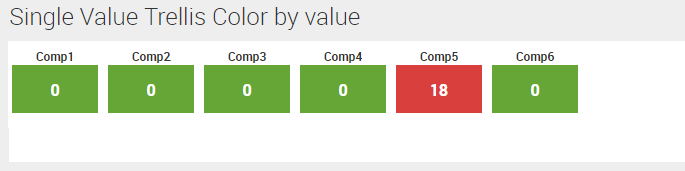
Following is run anywhere dashboard simple xml code:
<dashboard>
  <label>Single Value Trellis Color by value</label>
  <row>
    <panel>
      <single>
        <search>
          <query>| makeresults
| eval data="Comp1=0;Comp2=0;Comp3=0;Comp4=0;Comp5=18;Comp6=0"
| makemv data  delim=";"
| mvexpand data
| eval data=split(data,"=")
| eval component=mvindex(data,0),count=mvindex(data,1)
| fields - _time data
| stats sum(count) as count by component</query>
          <earliest>-24h@h</earliest>
          <latest>now</latest>
          <sampleRatio>1</sampleRatio>
        </search>
        <option name="colorBy">value</option>
        <option name="colorMode">block</option>
        <option name="drilldown">none</option>
        <option name="height">120</option>
        <option name="numberPrecision">0</option>
        <option name="rangeColors">["0x65a637","0xd93f3c"]</option>
        <option name="rangeValues">[0]</option>
        <option name="showSparkline">1</option>
        <option name="showTrendIndicator">1</option>
        <option name="trellis.enabled">1</option>
        <option name="trellis.scales.shared">1</option>
        <option name="trellis.size">small</option>
        <option name="trendColorInterpretation">standard</option>
        <option name="trendDisplayMode">absolute</option>
        <option name="unitPosition">after</option>
        <option name="useColors">1</option>
        <option name="useThousandSeparators">1</option>
      </single>
    </panel>
  </row>
</dashboard>
PS: Adjust height of the Panel based on your need ( using Simple XML configuration <option name="height">120</option>)
| makeresults | eval message= "Happy Splunking!!!"
- Mark as New
- Bookmark Message
- Subscribe to Message
- Mute Message
- Subscribe to RSS Feed
- Permalink
- Report Inappropriate Content
[UPDATED ANSWER]
If your objective is to create a Slice of equal size for each component irrespective of the count you can try the following run anywhere search. The query from | makeresults till | fields - _time datacook up sample data. You can use your base search instead.
| makeresults
| eval data="Comp1=0;Comp2=0;Comp3=0;Comp4=0;Comp5=18;Comp6=0"
| makemv data  delim=";"
| mvexpand data
| eval data=split(data,"=")
| eval component=mvindex(data,0),count=mvindex(data,1)
| fields - _time data
| stats sum(count) as count by component
| streamstats count as sliceCount by component
| eval status=if(count=0,"Success","Fail")
| eval component=component."(".status."- ".count.")"
| table component sliceCount
@sarvan7777 pie chart will not show Slices with count 0. It will show only slices which do not have count 0. Which means you will have to color Slice Label based on value (which would require CSS and possibly jQuery also).
Instead if you are on Splunk 6.6 or higher, you can use Trellis Layout with Single Value (built in visualization) or Status Indicator Custom Visualization provided your final query is statistical query by split by component
Following is a run anywhere dashboard example based on sample data provided in the question. (There are several examples of Single Value and Status Indicator with Trellis that you can check out on Splunk Answers).
Following is run anywhere dashboard simple xml code:
<dashboard>
  <label>Single Value Trellis Color by value</label>
  <row>
    <panel>
      <single>
        <search>
          <query>| makeresults
| eval data="Comp1=0;Comp2=0;Comp3=0;Comp4=0;Comp5=18;Comp6=0"
| makemv data  delim=";"
| mvexpand data
| eval data=split(data,"=")
| eval component=mvindex(data,0),count=mvindex(data,1)
| fields - _time data
| stats sum(count) as count by component</query>
          <earliest>-24h@h</earliest>
          <latest>now</latest>
          <sampleRatio>1</sampleRatio>
        </search>
        <option name="colorBy">value</option>
        <option name="colorMode">block</option>
        <option name="drilldown">none</option>
        <option name="height">120</option>
        <option name="numberPrecision">0</option>
        <option name="rangeColors">["0x65a637","0xd93f3c"]</option>
        <option name="rangeValues">[0]</option>
        <option name="showSparkline">1</option>
        <option name="showTrendIndicator">1</option>
        <option name="trellis.enabled">1</option>
        <option name="trellis.scales.shared">1</option>
        <option name="trellis.size">small</option>
        <option name="trendColorInterpretation">standard</option>
        <option name="trendDisplayMode">absolute</option>
        <option name="unitPosition">after</option>
        <option name="useColors">1</option>
        <option name="useThousandSeparators">1</option>
      </single>
    </panel>
  </row>
</dashboard>
PS: Adjust height of the Panel based on your need ( using Simple XML configuration <option name="height">120</option>)
| makeresults | eval message= "Happy Splunking!!!"
- Mark as New
- Bookmark Message
- Subscribe to Message
- Mute Message
- Subscribe to RSS Feed
- Permalink
- Report Inappropriate Content
Try to seriesColors like this for pie in xml:
<option name="charting.seriesColors">[0x00FF00,0x999999]</option>
- Mark as New
- Bookmark Message
- Subscribe to Message
- Mute Message
- Subscribe to RSS Feed
- Permalink
- Report Inappropriate Content
Sorry, It's not about the colouring. How do I decode the zeros and non-zero values so that it forms the 100% of Pie. I.e. for each component I will need to assign 1/6 weightage.
If I simply plot the graph for the below listed values, then Splunk ignores all Components in the Pie and only Comp5 as it has a non-zero values
Comp1 0
Comp2 0
Comp3 0
Comp4 0
Comp5 18
Comp6 0
- Mark as New
- Bookmark Message
- Subscribe to Message
- Mute Message
- Subscribe to RSS Feed
- Permalink
- Report Inappropriate Content
ohh!! Can you share the search query you are using? Try something below to display all component even if its value is zero.
index=<yourindex> | stats values(adaptor) as "Adapter Count" by Component

Join the Splunk Community Slack to learn, troubleshoot, and make connections with fellow Splunk practitioners in real time!
Join Splunk User Groups to connect and learn in-person by region or remotely by topic or industry.
Make Your Machine Data AI-Ready in Splunk
Splunk Asynchronous Forwarding Explained
How to Monitor AI Agents with Splunk Agent Observability
