
Join the Conversation
- Find Answers
- :
- Using Splunk
- :
- Dashboards & Visualizations
- :
- Re: Panels that send users to corresponding tab
- Subscribe to RSS Feed
- Mark Topic as New
- Mark Topic as Read
- Float this Topic for Current User
- Bookmark Topic
- Subscribe to Topic
- Mute Topic
- Printer Friendly Page
- Mark as New
- Bookmark Message
- Subscribe to Message
- Mute Message
- Subscribe to RSS Feed
- Permalink
- Report Inappropriate Content
Panels that send users to corresponding tab

Hi, I created a dashboard using javascript tabs and would like to have the panels when clicked, send users to the corresponding tab where they can see more details related to that panel. For example, if I were to click panel A, it sends me to tab A and load all the panels associated with panel A. Is this something that is possible since the tabs use javascript?
Here is also a link to the tabs tutorial I followed if it helps:
Thanks

- Mark as New
- Bookmark Message
- Subscribe to Message
- Mute Message
- Subscribe to RSS Feed
- Permalink
- Report Inappropriate Content

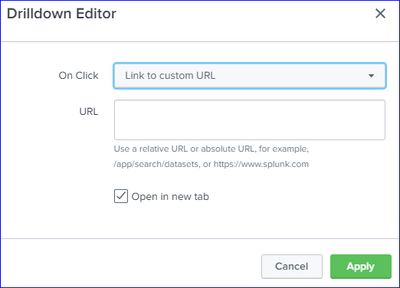
Try using the Edit Drilldown feature from the Panels and redirect it to the dashboard tab with the tokens set to pointing the corresponding tab using the custom URL feature.
- Mark as New
- Bookmark Message
- Subscribe to Message
- Mute Message
- Subscribe to RSS Feed
- Permalink
- Report Inappropriate Content
We actually tried to go that route but since the tabs are in line with the dashboard, that does not seem possible. The tabs do not have a specific URL attached to them.

Join the Splunk Community Slack to learn, troubleshoot, and make connections with fellow Splunk practitioners in real time!
Join Splunk User Groups to connect and learn in-person by region or remotely by topic or industry.
Network to App: Observability Unlocked [May & June Series]
SPL2 Deep Dives, AppDynamics Integrations, SAML Made Simple and Much More on Splunk ...
[Puzzles] Solve, Learn, Repeat: Matching cron expressions
