
Join the Conversation
- Find Answers
- :
- Using Splunk
- :
- Dashboards & Visualizations
- :
- Not accurate data after transpose implemented- How...
- Subscribe to RSS Feed
- Mark Topic as New
- Mark Topic as Read
- Float this Topic for Current User
- Bookmark Topic
- Subscribe to Topic
- Mute Topic
- Printer Friendly Page
- Mark as New
- Bookmark Message
- Subscribe to Message
- Mute Message
- Subscribe to RSS Feed
- Permalink
- Report Inappropriate Content
Not accurate data after transpose implemented- How to fix?

Hi.
I have two panel dashboard. One is general status of cluster and another one details for selected cluster.
---------
Panel 1
--------
`myapp_get_index` sourcetype="myapp:pce:metadata" myapp_type="myapp:pce:health"
|stats values(status) as status by fqdn
|rename fqdn as FQDN
| eval "Cluster Status" = upper(substr(status,0,1)) + lower(substr(status,2))
|fields - status
-----------------------
Panel 2
--------------
`myapp_get_index` sourcetype="myapp:pce:metadata" myapp_type="myapp:pce:health" fqdn=$fqdn$
| head 1
|spath path="nodes{}" output=nodes
| mvexpand nodes
|table nodes
|spath input=nodes
|eval "Uptime Day"=round(uptime_seconds/60/60,0)
|table hostname, ip_address, type, cpu.percent, disk{}.location, disk{}.value.percent,memory.percent,services.running{},services.status, "Uptime Day"
-----
This code works.
I added transpose command to panel 1
--------------
 `myapp_get_index` sourcetype="myapp:pce:metadata" myapp_type="myapp:pce:health"
|stats values(status) as status by fqdn
|rename fqdn as FQDN
|eval "Cluster Status" = upper(substr(status,0,1)) + lower(substr(status,2))
|fields - status
|transpose 5
|fields - column
| rename column as FQDN,"row 1" as "FQDN 1", "row 2" as "FQDN 2", "row 3" as "FQDN 3", "row 4" as "FQDN 4", "row 5" as "FQDN 5"
------------------
It shows data as I wanted in panel1, but in panel 2 it shows details only for first FQDN regardless what I click on.
-----------------------
I could not pinpoint what is missing.
Thank you in advance.
- Mark as New
- Bookmark Message
- Subscribe to Message
- Mute Message
- Subscribe to RSS Feed
- Permalink
- Report Inappropriate Content
<option name="drilldown">cell</option>
<option name="refresh.display">progressbar</option>
<drilldown>
<set token="fqdn">$click.value$</set>
</drilldown>
- Mark as New
- Bookmark Message
- Subscribe to Message
- Mute Message
- Subscribe to RSS Feed
- Permalink
- Report Inappropriate Content


So you aren't changing the drilldown when you add the transpose?
You possibly need to use $click.name2$ after transpose instead of $click.value$?
- Mark as New
- Bookmark Message
- Subscribe to Message
- Mute Message
- Subscribe to RSS Feed
- Permalink
- Report Inappropriate Content
Thank you for an advise.
I changed drilldown to
<drilldown>
<set token="fqdn">$click.name2$</set>
</drilldown>
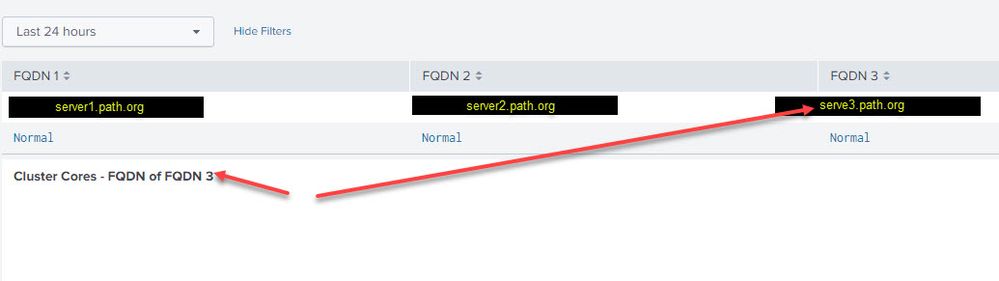
It moves closer, but did not solve the issue.
That grabs column title, but not a FQDN value
I.e. values in the query "fqdn=FQDN 3" and not a "server3.path.org"
- Mark as New
- Bookmark Message
- Subscribe to Message
- Mute Message
- Subscribe to RSS Feed
- Permalink
- Report Inappropriate Content
OK then you want $click.value2$
| $click.name$ | $click.name2$ | |
| $click.value$ | $click.value2$ |
- Mark as New
- Bookmark Message
- Subscribe to Message
- Mute Message
- Subscribe to RSS Feed
- Permalink
- Report Inappropriate Content
THANK YOU. 😁
That did the trick.
.
- Mark as New
- Bookmark Message
- Subscribe to Message
- Mute Message
- Subscribe to RSS Feed
- Permalink
- Report Inappropriate Content
What do you have in your drilldown for each instance i.e. before and after you add the transpose?
- Mark as New
- Bookmark Message
- Subscribe to Message
- Mute Message
- Subscribe to RSS Feed
- Permalink
- Report Inappropriate Content
Hi.
Before transpose I have in panel 2 details for each cluster after I click on FQDN in top panel (panel1)
After transpose I have the same data, but only for FQDN #1 regardless on what FQ DN I click on in panel 1
TIA
- Mark as New
- Bookmark Message
- Subscribe to Message
- Mute Message
- Subscribe to RSS Feed
- Permalink
- Report Inappropriate Content
And what do you have configured for the drilldown actions in each of those instances?

Join the Splunk Community Slack to learn, troubleshoot, and make connections with fellow Splunk practitioners in real time!
Join Splunk User Groups to connect and learn in-person by region or remotely by topic or industry.
May 2026 Splunk Expert Sessions: Security & Observability
Network to App: Observability Unlocked [May & June Series]
SPL2 Deep Dives, AppDynamics Integrations, SAML Made Simple and Much More on Splunk ...
