
Join the Conversation
- Find Answers
- :
- Using Splunk
- :
- Dashboards & Visualizations
- :
- Modal Table from column chart
- Subscribe to RSS Feed
- Mark Topic as New
- Mark Topic as Read
- Float this Topic for Current User
- Bookmark Topic
- Subscribe to Topic
- Mute Topic
- Printer Friendly Page
- Mark as New
- Bookmark Message
- Subscribe to Message
- Mute Message
- Subscribe to RSS Feed
- Permalink
- Report Inappropriate Content
Modal Table from column chart

Hi everyone
I found a javascript code that show a table drilldown in a modal window. I'm trying to adapt this one to this column chart

When I click on one of these bars, it could be represented a table with event details. I wrote this two codes
app.js
ModalView.js
Anyone could help me to find what is wrong and how to make it works, please??
- Mark as New
- Bookmark Message
- Subscribe to Message
- Mute Message
- Subscribe to RSS Feed
- Permalink
- Report Inappropriate Content


Try by replacing below condition
if(e.field === "_time") {with
if (e.data['click.name'] === "_time") {
KV
- Mark as New
- Bookmark Message
- Subscribe to Message
- Mute Message
- Subscribe to RSS Feed
- Permalink
- Report Inappropriate Content
Thanks for your answer, unfortunately it seems doesn't working
Maybe is helpful for you to know that the chart that I've posted is a drilldown and this drilldown need to pass some tokens to the table in the modal view
First Panel
Drilldown

- Mark as New
- Bookmark Message
- Subscribe to Message
- Mute Message
- Subscribe to RSS Feed
- Permalink
- Report Inappropriate Content
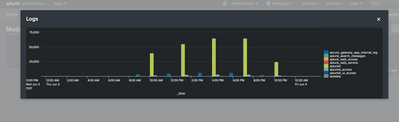
Can you please try this? This is sample code for Chart in popup. Just change search and other parameters as per your requirements.
XML
<dashboard script="drilldown.js" theme="dark">
  <label>ModalView</label>
  <row>
    <panel>
      <single id="abc">
        <search>
          <query>index=_internal | stats count</query>
          <earliest>-24h@h</earliest>
          <latest>now</latest>
          <sampleRatio>1</sampleRatio>
        </search>
        <option name="drilldown">all</option>
        <option name="refresh.display">progressbar</option>
        <drilldown>
          <condition></condition>
        </drilldown>
      </single>
    </panel>
  </row>
</dashboard>
drilldown.js
require([
    'underscore',
    'splunkjs/mvc',
    'splunkjs/mvc/searchmanager',
    '../app/search/modalView',
    'splunkjs/mvc/simplexml/ready!'
], function(_, mvc, SearchManager, modalView) {

    var activeCustomers = mvc.Components.get('abc');
    console.log("activeCustomers", activeCustomers);

    var activeCustomersSearch = new SearchManager({
        id: "activeCustomersSearch",
        earliest_time: "-1d@d",
        latest_time: "@d",
        preview: false,
        cache: false,
        search: "index=_internal | timechart span=3h count by sourcetype"
    }, {
        tokens: true,
        tokenNamespace: "submitted"
    });
    var modal = new modalView({ title: "Logs", search: "activeCustomersSearch" });
    activeCustomers.on("click", function(e) {
        console.log("Show modal");
        e.preventDefault();
        console.log("Prevent Deafult");
        console.log("Modal Object", modal);
        modal.show();
    });
});
modalView.js
define([
    'underscore',
    'backbone',
    'splunkjs/mvc',
    'jquery',
    "splunkjs/mvc/chartview"
], function(_, Backbone, mvc, $, ChartView) {

    var modalTemplate = "<div id=\"drilldownModal\" class=\"modal\">" +
        "<div class=\"modal-header\"><h3><%- title %></h3><button class=\"close\">Close</button></div>" +
        "<div class=\"modal-body\"></div>" +
        "<div class=\"modal-footer\"></div>" +
        "</div>" +
        "<div class=\"modal-backdrop\"></div>";

    var modalView = Backbone.View.extend({
        defaults: {
            title: 'Not Set'
        },

        initialize: function(options) {
            this.options = options;
            this.options = _.extend({}, this.defaults, this.options);
            this.template = _.template(modalTemplate);
            console.log('Hello from Modal View: ' + this.options.title);
            this.childViews = [];
        },

        events: {
            'click .close': 'close',
            'click .modal-backdrop': 'close'
        },

        render: function() {
            var data = { title: this.options.title };
            this.$el.html(this.template(data));
            return this;
        },

        show: function() {
            $(document.body).append(this.render().el);
            $(this.el).find('.modal-body').append('<div id="modalVizualization"/>');
            //modify the modal so it occupies 90% of the screen width
            $(this.el).find('.modal').css({
                width: '90%',
                height: 'auto',
                left: '5%',
                'margin-left': '0',
                'max-height': '100%'
            });
            //get a reference to the search
            var search = mvc.Components.get(this.options.search);
            var barchart = new ChartView({
                id: "example-chart",
                managerid: this.options.search,
                type: "column",
                el: $("#modalVizualization")
            }).render();

            //add our detailTable to our childViews array so we can remove them later
            this.childViews.push(barchart);

            //run the search
            search.startSearch();
        },

        close: function() {
            this.unbind();
            this.remove();
            _.each(this.childViews, function(childView) {
                childView.unbind();
                childView.remove();
            });
        }
    });
    return modalView;
});
Thanks
KV
▄︻̷̿┻̿═━一
If any of my reply helps you to solve the problem Or gain knowledge, an upvote would be appreciated.
- Mark as New
- Bookmark Message
- Subscribe to Message
- Mute Message
- Subscribe to RSS Feed
- Permalink
- Report Inappropriate Content
It works, but maybe i didn't explain well what I have to do
I would to show in the modal view a table that is a details table for the column that I click on the column chart
- Mark as New
- Bookmark Message
- Subscribe to Message
- Mute Message
- Subscribe to RSS Feed
- Permalink
- Report Inappropriate Content
Can you please try this?
XML
<dashboard script="app.js" theme="dark">
  <label>ModalView</label>
  <row>
    <panel>
      <chart id="master">
        <search>
          <query>index=_internal sourcetype!="splunkd" | timechart span=6h count by sourcetype</query>
          <earliest>-24h@h</earliest>
          <latest>now</latest>
          <sampleRatio>1</sampleRatio>
        </search>
        <option name="charting.chart">column</option>
        <option name="charting.drilldown">all</option>
        <option name="refresh.display">progressbar</option>
        <drilldown>
          <condition></condition>
        </drilldown>
      </chart>
    </panel>
  </row>
</dashboard>
app.js
require([
    'underscore',
    '../app/search/ModalViewNew',
    'splunkjs/mvc',
    'splunkjs/mvc/searchmanager',
    'splunkjs/mvc/simplexml/ready!'
], function(_, ModalView, mvc, SearchManager) {

    var master = mvc.Components.get('master');

    var tokens = mvc.Components.getInstance("submitted");

    var detailSearch = new SearchManager({
        id: "detailSearch",
        earliest_time: "-24h@h",
        latest_time: "now",
        preview: true,
        cache: false,
        search: "index=_internal sourcetype=$sourcetype$ | timechart count"
    }, { tokens: true, tokenNamespace: "submitted" });

    master.on("click", function(e) {
        e.preventDefault();
        console.log("E", e)
        if (e.data['click.name'] === "_time") {
            var _title = e.data['click.name2'];
            tokens.set('sourcetype', _title);
            var modal = new ModalView({ title: _title, search: detailSearch });
            modal.show();
        }
    });
});
define([
    'underscore',
    'backbone',
    'jquery',
    'splunkjs/mvc',
    'splunkjs/mvc/searchmanager',
    'splunkjs/mvc/simplexml/element/table'
], function(_, Backbone, $, mvc, SearchManager, TableElement) {

    var modalTemplate = "<div id=\"pivotModal\" class=\"modal\">" +
        "<div class=\"modal-header\"><h3><%- title %></h3><button class=\"close\">Close</button></div>" +
        "<div class=\"modal-body\"></div>" +
        "<div class=\"modal-footer\"></div>" +
        "</div>" +
        "<div class=\"modal-backdrop\"></div>";

    var ModalView = Backbone.View.extend({

        defaults: {
            title: 'Not set'
        },

        initialize: function(options) {
            this.options = options;
            this.options = _.extend({}, this.defaults, this.options);
            this.childViews = [];
            console.log('Hello from the modal window: ', this.options.title);
            this.template = _.template(modalTemplate);
        },

        events: {
            'click .close': 'close',
            'click .modal-backdrop': 'close'
        },

        render: function() {
            var data = { title: this.options.title };
            this.$el.html(this.template(data));
            return this;
        },

        show: function() {
            $(document.body).append(this.render().el);

            $(this.el).find('.modal-body').append('<div id="modalVizualization"/>');

            $(this.el).find('.modal').css({
                width: '90%',
                height: 'auto',
                left: '5%',
                'margin-left': '0',
                'max-height': '100%'
            });

            var search = mvc.Components.get(this.options.search.id);

            var detailTable = new TableElement({
                id: "detailTable",
                managerid: search.name,
                pageSize: "5",
                el: $('#modalVizualization')
            }).render();

            this.childViews.push(detailTable);
            search.startSearch();
        },

        close: function() {
            this.unbind();
            this.remove();
            _.each(this.childViews, function(childView) {

                childView.unbind();
                childView.remove();

            });
        }

    });

    return ModalView;

});
Thanks
KV
▄︻̷̿┻̿═━一
If any of my reply helps you to solve the problem Or gain knowledge, an upvote would be appreciated.


Join the Splunk Community Slack to learn, troubleshoot, and make connections with fellow Splunk practitioners in real time!
Join Splunk User Groups to connect and learn in-person by region or remotely by topic or industry.
Data Management Digest – September 2026
Federated Search for CloudWatch Unified Data Store Is Generally Available
Announcing Modern Navigation: A New Era of Splunk User Experience
