
Join the Conversation
- Find Answers
- :
- Using Splunk
- :
- Dashboards & Visualizations
- :
- Latest time in time picker only allows 'now'
- Subscribe to RSS Feed
- Mark Topic as New
- Mark Topic as Read
- Float this Topic for Current User
- Bookmark Topic
- Subscribe to Topic
- Mute Topic
- Printer Friendly Page
- Mark as New
- Bookmark Message
- Subscribe to Message
- Mute Message
- Subscribe to RSS Feed
- Permalink
- Report Inappropriate Content

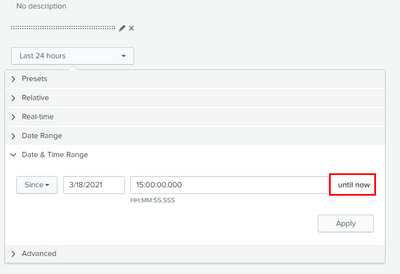
I am trying to create a dashboard for users that need to be able to set a time/date range manually. But in the time picker that is created by default in the dashboard, the latest_time is always 'now'. The only way around this is to use the presets or the advanced options, but I can't expect users to work out the necessary times in the advanced.
I've tried looking through the documentation and forums, but not finding anything yet that indicates how to get around this. Anyone have a way to get around this?
- Mark as New
- Bookmark Message
- Subscribe to Message
- Mute Message
- Subscribe to RSS Feed
- Permalink
- Report Inappropriate Content
Hi @damickel ,
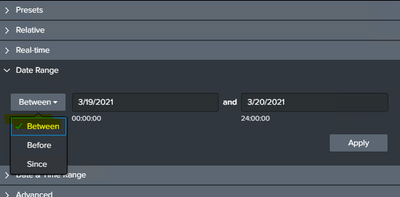
There is an option to set the time range manually if you change the status from Since to between in the time range pickker.
- Mark as New
- Bookmark Message
- Subscribe to Message
- Mute Message
- Subscribe to RSS Feed
- Permalink
- Report Inappropriate Content
Hi @damickel ,
There is an option to set the time range manually if you change the status from Since to between in the time range pickker.
- Mark as New
- Bookmark Message
- Subscribe to Message
- Mute Message
- Subscribe to RSS Feed
- Permalink
- Report Inappropriate Content
Thanks! I think I was looking to hard and missed the obvious. Is there any way to set 'Between' as the default behavior? It seems like it is that way outside of Dashboards.

Splunk Search APIを使えば調査過程が残せます
Integrating Splunk Search API and Quarto to Create Reproducible Investigation ...
Congratulations to the 2025-2026 SplunkTrust!
