
Join the Conversation
- Find Answers
- :
- Using Splunk
- :
- Dashboards & Visualizations
- :
- Re: Key indicator question
- Subscribe to RSS Feed
- Mark Topic as New
- Mark Topic as Read
- Float this Topic for Current User
- Bookmark Topic
- Subscribe to Topic
- Mute Topic
- Printer Friendly Page
- Mark as New
- Bookmark Message
- Subscribe to Message
- Mute Message
- Subscribe to RSS Feed
- Permalink
- Report Inappropriate Content



- Mark as New
- Bookmark Message
- Subscribe to Message
- Mute Message
- Subscribe to RSS Feed
- Permalink
- Report Inappropriate Content
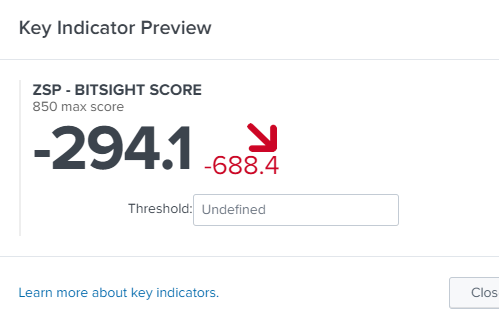
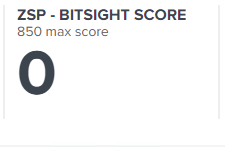
I figured it out, however this makes no sense. Many examples on the key indicators start with search and then the actual search. Example would be "search index=some_index earliest=-3d@d blah blah blah". With the search in front my preview works, but the results are missing on the dashboard. If I take the search out of it, the preview no longer work, however its now working on my dashboard. I don't know what made me try that but I now have my dashboard working so I'm happy. Maybe someone can explain the difference?
Thanks,
-Matt
- Mark as New
- Bookmark Message
- Subscribe to Message
- Mute Message
- Subscribe to RSS Feed
- Permalink
- Report Inappropriate Content
I figured it out, however this makes no sense. Many examples on the key indicators start with search and then the actual search. Example would be "search index=some_index earliest=-3d@d blah blah blah". With the search in front my preview works, but the results are missing on the dashboard. If I take the search out of it, the preview no longer work, however its now working on my dashboard. I don't know what made me try that but I now have my dashboard working so I'm happy. Maybe someone can explain the difference?
Thanks,
-Matt
- Mark as New
- Bookmark Message
- Subscribe to Message
- Mute Message
- Subscribe to RSS Feed
- Permalink
- Report Inappropriate Content

@matt1t once the search query runs, how are you moving the panel to your dashboard? Are you using Save as Dashboard option or are you merging the search <query> manually? By any chance are you using Post-Processing in the dashboard?
| makeresults | eval message= "Happy Splunking!!!"
- Mark as New
- Bookmark Message
- Subscribe to Message
- Mute Message
- Subscribe to RSS Feed
- Permalink
- Report Inappropriate Content
I wonder is this is the issue. So when I click on the preview, my search runs and I get the data I expect. If I'm within the Content Management section and look at the info for my key indicator I get the following stats:
Statistics
Avg. Event Count ..... 17.36
Avg. Result Count ..... 0
Avg. Run Time ....... 0:00:02
Invocations ....... 25
Skipped ........ 0
Success ........0
Update Time ........ Jan 6, 2020 10:30:00 AM
So no successes and 25 invocations? What are invocations and how can I fix this?
- Mark as New
- Bookmark Message
- Subscribe to Message
- Mute Message
- Subscribe to RSS Feed
- Permalink
- Report Inappropriate Content
On the dashboard I click edit, and then it has a plus sign which then loads a Add Indicators. I choose the indicator I created and then its added.

Join the Splunk Community Slack to learn, troubleshoot, and make connections with fellow Splunk practitioners in real time!
Join Splunk User Groups to connect and learn in-person by region or remotely by topic or industry.
Index This | What travels the world but is also stuck in place?
Discover New Use Cases: Unlock Greater Value from Your Existing Splunk Data
Continue Your Journey: Join Session 2 of the Data Management and Federation Bootcamp ...
