
Join the Conversation
- Find Answers
- :
- Using Splunk
- :
- Dashboards & Visualizations
- :
- Re: JSON string, split in search?
- Subscribe to RSS Feed
- Mark Topic as New
- Mark Topic as Read
- Float this Topic for Current User
- Bookmark Topic
- Subscribe to Topic
- Mute Topic
- Printer Friendly Page
- Mark as New
- Bookmark Message
- Subscribe to Message
- Mute Message
- Subscribe to RSS Feed
- Permalink
- Report Inappropriate Content

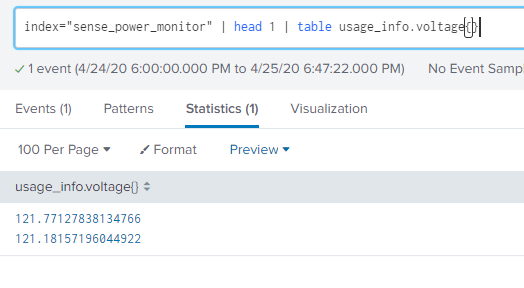
Thanks everyone, you have helped me a lot these last few days as I binge learn splunk... This question, im pretty sure, is an easy one, im just missing something obvious...... I grab JSON values that are a multivalue field so usage_info.voltage contains value1,valu2 Im trying to add value1 and value2 to a dashboard as two different single value displays. How can i modify my search to show one value or the other?
RAW JSON DATA
"voltage":[121.77615356445312,121.19967651367188]
- Mark as New
- Bookmark Message
- Subscribe to Message
- Mute Message
- Subscribe to RSS Feed
- Permalink
- Report Inappropriate Content

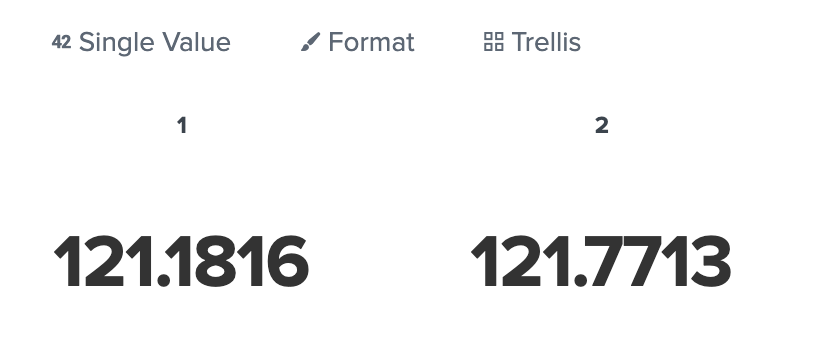
index="sense_power_monitor" | head 1| rename usage_info.voltage{} as voltage |mvexpand voltage | stats values(voltage) by voltage | streamstats count as voltage
Viz >> single value with trellis voltage
- Mark as New
- Bookmark Message
- Subscribe to Message
- Mute Message
- Subscribe to RSS Feed
- Permalink
- Report Inappropriate Content
index="sense_power_monitor" | head 1| rename usage_info.voltage{} as voltage |mvexpand voltage | stats values(voltage) by voltage | streamstats count as voltage
Viz >> single value with trellis voltage
- Mark as New
- Bookmark Message
- Subscribe to Message
- Mute Message
- Subscribe to RSS Feed
- Permalink
- Report Inappropriate Content
- Mark as New
- Bookmark Message
- Subscribe to Message
- Mute Message
- Subscribe to RSS Feed
- Permalink
- Report Inappropriate Content
I see, you are using Trellis. I can not use trellis, i need to use regular single value display. no matter what size i pick i can not fit my reading in a trellis view.

- Mark as New
- Bookmark Message
- Subscribe to Message
- Mute Message
- Subscribe to RSS Feed
- Permalink
- Report Inappropriate Content
you use single value chart.
If you want to display multivalues , use trellis.
i can not fit
why do you append extra unit?
- Mark as New
- Bookmark Message
- Subscribe to Message
- Mute Message
- Subscribe to RSS Feed
- Permalink
- Report Inappropriate Content
I need high resolution plus unit name. Looks fine in a single value display... Is there no way to filter out one of the two values, so i can display only one value?
- Mark as New
- Bookmark Message
- Subscribe to Message
- Mute Message
- Subscribe to RSS Feed
- Permalink
- Report Inappropriate Content
- Mark as New
- Bookmark Message
- Subscribe to Message
- Mute Message
- Subscribe to RSS Feed
- Permalink
- Report Inappropriate Content
that just returns "1" and not "121.7713" like i would expect?
remember i'm using a single value display.




Join the Splunk Community Slack to learn, troubleshoot, and make connections with fellow Splunk practitioners in real time!
Join Splunk User Groups to connect and learn in-person by region or remotely by topic or industry.
Cisco Data Fabric from Architecture to Investigation, Better SOC Visibility, and More ...
The Trust Gap: Why a Data Foundation is Fundamental to an Agentic Enterprise
Data Management Digest – September 2026
