
Join the Conversation
- Find Answers
- :
- Using Splunk
- :
- Dashboards & Visualizations
- :
- Is there a way to implement multiple tabs/pages fo...
- Subscribe to RSS Feed
- Mark Topic as New
- Mark Topic as Read
- Float this Topic for Current User
- Bookmark Topic
- Subscribe to Topic
- Mute Topic
- Printer Friendly Page
- Mark as New
- Bookmark Message
- Subscribe to Message
- Mute Message
- Subscribe to RSS Feed
- Permalink
- Report Inappropriate Content

Is there a way to implement multiple tabs/pages for a single dashboard?
- Mark as New
- Bookmark Message
- Subscribe to Message
- Mute Message
- Subscribe to RSS Feed
- Permalink
- Report Inappropriate Content


Hi @sizemorejm,
It's good to hear you're swapping between tabs - the next step is to update your searches.
At the moment, all searches are running when the dashboard loads. What we can do is update the searches so that they only run when their tab is active. That way we only run the searches the user wants.
To do that, update your search code so that they also have depends="$show_tab_X$":
 <row depends="$show_tab_1$">
    <panel>
      <title>Tab 1</title>
      <table>
        <search depends="$show_tab_1$">
          <query>| makeresults | eval title="Tab 1"</query>
        </search>
      </table>
    </panel>
  </row>
  <row depends="$show_tab_2$">
    <panel>
      <title>Tab 2</title>
      <table>
        <search depends="$show_tab_2$">
          <query>| makeresults | eval title="Tab 2"</query>
        </search>
      </table>
    </panel>
  </row>
Once the search is run, we want to keep the results, so when users click back to the tab the results are still there.
Cheers,
Daniel
- Mark as New
- Bookmark Message
- Subscribe to Message
- Mute Message
- Subscribe to RSS Feed
- Permalink
- Report Inappropriate Content

Hi @sizemorejm ,
good for you, see next time!
Ciao and happy splunking
Giuseppe
P.S.: Karma Points are appreciated by all the contributors 😉
- Mark as New
- Bookmark Message
- Subscribe to Message
- Mute Message
- Subscribe to RSS Feed
- Permalink
- Report Inappropriate Content
Hi @sizemorejm ,
install the Splunk Dashboard Examples App (https://splunkbase.splunk.com/app/1603) and see the Link Switcher dashboard, is what you're searching.
Ciao.
Giuseppe
- Mark as New
- Bookmark Message
- Subscribe to Message
- Mute Message
- Subscribe to RSS Feed
- Permalink
- Report Inappropriate Content
Hi @sizemorejm,
On Simple XML dashboards (aka Classic Dashboards) you can do that by using tokens.
When you set a token, you can make panels or rows show, or make searches run.
To make it show when the token exists use this:
<row depends="$token$">
There's more info on docs here:
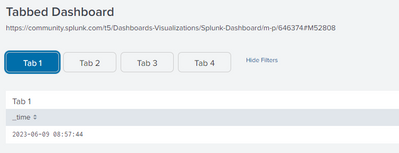
Here's a sample dashboard with 4 tabs that show based on which button you click:
<form version="1.1">
  <label>Tabbed Dashboard</label>
  <description>https://community.splunk.com/t5/Dashboards-Visualizations/Splunk-Dashboard/m-p/646374#M52808</description>
  <fieldset submitButton="false">
    <input type="link" token="page" searchWhenChanged="true" id="tab_menu">
      <label></label>
      <choice value="Tab 1">Tab 1</choice>
      <choice value="Tab 2">Tab 2</choice>
      <choice value="Tab 3">Tab 3</choice>
      <choice value="Tab 4">Tab 4</choice>
      <change>
        <condition value="Tab 1"><set token="show_tab_1">true</set><unset token="show_tab_2"></unset><unset token="show_tab_3"></unset><unset token="show_tab_4"></unset></condition>
        <condition value="Tab 2"><set token="show_tab_2">true</set><unset token="show_tab_1"></unset><unset token="show_tab_3"></unset><unset token="show_tab_4"></unset></condition>
        <condition value="Tab 3"><set token="show_tab_3">true</set><unset token="show_tab_1"></unset><unset token="show_tab_2"></unset><unset token="show_tab_4"></unset></condition>
        <condition value="Tab 4"><set token="show_tab_4">true</set><unset token="show_tab_1"></unset><unset token="show_tab_2"></unset><unset token="show_tab_3"></unset></condition>
      </change>
    </input>
  </fieldset>
  <row depends="$show_tab_1$">
    <panel>
      <title>Tab 1</title>
       <table>
        <search>
          <query>| makeresults
| eval title="Page 1"</query>
          <earliest>-24h@h</earliest>
          <latest>now</latest>
        </search>
        <option name="drilldown">none</option>
      </table>
    </panel>
    </row>
    <row depends="$show_tab_2$">
    <panel>
      <title>Tab 2</title>
    <table>
        <search>
          <query>| makeresults
| eval title="Tab 2"</query>
          <earliest>-24h@h</earliest>
          <latest>now</latest>
        </search>
        <option name="drilldown">none</option>
      </table>
    </panel>
    </row>
    <row depends="$show_tab_3$">
    <panel>
      <title>Tab 3</title>
    <table>
        <search>
          <query>| makeresults
| eval title="Tab 3"</query>
          <earliest>-24h@h</earliest>
          <latest>now</latest>
        </search>
        <option name="drilldown">none</option>
      </table>
    </panel>
    </row>
    <row depends="$show_tab_4$">
    <panel>
      <title>Tab 4</title>
     <table>
        <search>
          <query>| makeresults
| eval title="Tab 4"</query>
          <earliest>-24h@h</earliest>
          <latest>now</latest>
        </search>
        <option name="drilldown">none</option>
      </table>
      </panel>
  </row>
  <row depends="$CSS_ONLY$"><html><style>
#tab_menu { width: fit-content!important; }
div#tab_menu button{
                    height: 38px!important;
                    border: 1px solid #cccccc;
                    min-width: 100px;
                    /* background-color:#ffffff; */
                    width: auto;
                    padding: 10px;
                    margin-right: 8px;
                    color: #333333;
                    height: 55px;
                    border-radius:7px;
                    font-size: 16px;
                    }

div#tab_menu button[aria-checked="true"]{background-color:#006eaa!important;color:white!important;}
  </style></html></row>
</form>
Cheers,
Daniel
- Mark as New
- Bookmark Message
- Subscribe to Message
- Mute Message
- Subscribe to RSS Feed
- Permalink
- Report Inappropriate Content
Hello Daniel,
Your post was very helpful in solving my issue. I have another question regarding the use of tabs. So now I am able to swap between tabs, but in each tab I am calling different searches for individual tables. Is there a similar way to "unset" the search for a table when the tab is not in use? I am experiencing some lag, I believe.
Thanks,
James
- Mark as New
- Bookmark Message
- Subscribe to Message
- Mute Message
- Subscribe to RSS Feed
- Permalink
- Report Inappropriate Content
Hi @sizemorejm,
It's good to hear you're swapping between tabs - the next step is to update your searches.
At the moment, all searches are running when the dashboard loads. What we can do is update the searches so that they only run when their tab is active. That way we only run the searches the user wants.
To do that, update your search code so that they also have depends="$show_tab_X$":
 <row depends="$show_tab_1$">
    <panel>
      <title>Tab 1</title>
      <table>
        <search depends="$show_tab_1$">
          <query>| makeresults | eval title="Tab 1"</query>
        </search>
      </table>
    </panel>
  </row>
  <row depends="$show_tab_2$">
    <panel>
      <title>Tab 2</title>
      <table>
        <search depends="$show_tab_2$">
          <query>| makeresults | eval title="Tab 2"</query>
        </search>
      </table>
    </panel>
  </row>
Once the search is run, we want to keep the results, so when users click back to the tab the results are still there.
Cheers,
Daniel
- Mark as New
- Bookmark Message
- Subscribe to Message
- Mute Message
- Subscribe to RSS Feed
- Permalink
- Report Inappropriate Content
Great solution thank you!
I added "depends" to my all charts search, it's loading only the data in the current tab, but when I click on another tab (after the current tab finish to run) error is written in all charts: " Search was not dispatched. To adjust search dispatch settings, edit the dashboard XML"
Do you know why?
thanks,
Maayan
- Mark as New
- Bookmark Message
- Subscribe to Message
- Mute Message
- Subscribe to RSS Feed
- Permalink
- Report Inappropriate Content
Hi @maayan,
good for you, see next time!
Ciao and happy splunking
Giuseppe
P.S.: Karma Points are appreciated by all the contributors 😉
- Mark as New
- Bookmark Message
- Subscribe to Message
- Mute Message
- Subscribe to RSS Feed
- Permalink
- Report Inappropriate Content
thanks but you didn't answer 🙂
what should I do if I switch between tabs I get the error: "Search was not dispatched. To adjust search dispatch settings, edit the dashboard XML"?

Join the Splunk Community Slack to learn, troubleshoot, and make connections with fellow Splunk practitioners in real time!
Join Splunk User Groups to connect and learn in-person by region or remotely by topic or industry.
Design, Compete, Win: Submit Your Best Splunk Dashboards for a .conf26 Pass
May 2026 Splunk Expert Sessions: Security & Observability
Network to App: Observability Unlocked [May & June Series]
