
Join the Conversation
- Find Answers
- :
- Using Splunk
- :
- Dashboards & Visualizations
- :
- Re: How to Sort Fields by color using eval and cha...
- Subscribe to RSS Feed
- Mark Topic as New
- Mark Topic as Read
- Float this Topic for Current User
- Bookmark Topic
- Subscribe to Topic
- Mute Topic
- Printer Friendly Page
- Mark as New
- Bookmark Message
- Subscribe to Message
- Mute Message
- Subscribe to RSS Feed
- Permalink
- Report Inappropriate Content

I am currently using a bar chart visualization but I need to sort the bars by descending order.
I can't use a simple chart count by EVNTSEVCAT | sort -count because the SEVCAT field contains multiple values and we only need I,II, and III.
below is my query
search *
| eval CATI = if(SEVCAT=="I", 1,0)
| eval CATII = if(SEVCAT=="II", 1,0)
| eval CATIII = if(SEVCAT=="III", 1,0)
| chart sum(CATI) sum(CATII) sum(CATIII)
| transpose
The visualization:
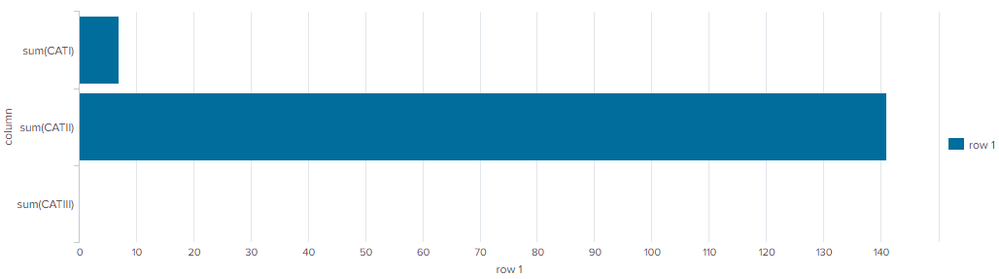
I need the visualization to be sorted in descending order. Any suggestions help :-).
Thank you,
Marco
- Mark as New
- Bookmark Message
- Subscribe to Message
- Mute Message
- Subscribe to RSS Feed
- Permalink
- Report Inappropriate Content


| transpose 0 header_field=cat column_name=cat
| sort 0 - "row 1"
| transpose 0 header_field=cat column_name=cat
| fields - cat- Mark as New
- Bookmark Message
- Subscribe to Message
- Mute Message
- Subscribe to RSS Feed
- Permalink
- Report Inappropriate Content
Do you mean sort the names in descending order or the values in descending order?
- Mark as New
- Bookmark Message
- Subscribe to Message
- Mute Message
- Subscribe to RSS Feed
- Permalink
- Report Inappropriate Content
The values in descending order.
The table below represents my bar chart:
| sum(CATI) | sum(CATII) | sum(CATIII) |
| 7 | 141 | 3 |
I want the bar chart to sort it out in descending order, so that way sum(CATII) shows first, sum(CATI) second, ,and sum(CATIII) third
-Marco
- Mark as New
- Bookmark Message
- Subscribe to Message
- Mute Message
- Subscribe to RSS Feed
- Permalink
- Report Inappropriate Content
| transpose 0 header_field=cat column_name=cat
| sort 0 - "row 1"
| transpose 0 header_field=cat column_name=cat
| fields - cat- Mark as New
- Bookmark Message
- Subscribe to Message
- Mute Message
- Subscribe to RSS Feed
- Permalink
- Report Inappropriate Content
@ITWhisperer Thank you I modified it a bit and it works. For people in the future, this is the final query, with the final visualization.
search *
| eval CATI = if(SEVCAT=="I", 1,0)
| eval CATII = if(SEVCAT=="II", 1,0)
| eval CATIII = if(SEVCAT=="III", 1,0)
| chart sum(CATI) sum(CATII) sum(CATIII)
| transpose
| sort - "row 1"

-Marco

Join the Splunk Community Slack to learn, troubleshoot, and make connections with fellow Splunk practitioners in real time!
Join Splunk User Groups to connect and learn in-person by region or remotely by topic or industry.
Make Your Machine Data AI-Ready in Splunk
Splunk Asynchronous Forwarding Explained
How to Monitor AI Agents with Splunk Agent Observability
