
Join the Conversation
- Find Answers
- :
- Using Splunk
- :
- Dashboards & Visualizations
- :
- How to separate multiselect drilldown
- Subscribe to RSS Feed
- Mark Topic as New
- Mark Topic as Read
- Float this Topic for Current User
- Bookmark Topic
- Subscribe to Topic
- Mute Topic
- Printer Friendly Page
- Mark as New
- Bookmark Message
- Subscribe to Message
- Mute Message
- Subscribe to RSS Feed
- Permalink
- Report Inappropriate Content

Hi All,
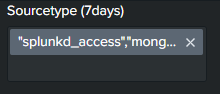
How could i separate the values of multiselect inputs that came from a drilldown ?
The values came from a dashboard click drilldown to the mutiselect field, unfortunately token passed are joined in one box, how could i separate them ?
Hope the picture will help
- Mark as New
- Bookmark Message
- Subscribe to Message
- Mute Message
- Subscribe to RSS Feed
- Permalink
- Report Inappropriate Content
I've solve the issue. This page help me:
https://www.advisori.de/splunk-struggles-with-multiselects-and-how-to-rule-them-all-or-at-least-some...
As per my understanding: If you set a token in a table drilldown its in array form, and need to be converted in per line value*[Split command]* for it to work.
<form>
   <label>Mutiselect</label>
   <fieldset submitButton="false">
     <input type="multiselect" token="multiselect_token">
       <label>number</label>
       <choice value="1">1</choice>
       <choice value="2">2</choice>
       <choice value="3">3</choice>
       <delimiter>,</delimiter>
     </input>
   </fieldset>
   <row>
     <panel>
       <table>
         <search>
           <query>|makeresults
 |eval value="1,2,3"</query>
           <earliest>-24h@h</earliest>
           <latest>now</latest>
         </search>
         <option name="count">10</option>
         <option name="drilldown">cell</option>
         <drilldown>
           <eval token="form.multiselect_token">split($row.value$,",")</eval>
         </drilldown>
       </table>
     </panel>
   </row>
 </form>
- Mark as New
- Bookmark Message
- Subscribe to Message
- Mute Message
- Subscribe to RSS Feed
- Permalink
- Report Inappropriate Content
I've solve the issue. This page help me:
https://www.advisori.de/splunk-struggles-with-multiselects-and-how-to-rule-them-all-or-at-least-some...
As per my understanding: If you set a token in a table drilldown its in array form, and need to be converted in per line value*[Split command]* for it to work.
<form>
   <label>Mutiselect</label>
   <fieldset submitButton="false">
     <input type="multiselect" token="multiselect_token">
       <label>number</label>
       <choice value="1">1</choice>
       <choice value="2">2</choice>
       <choice value="3">3</choice>
       <delimiter>,</delimiter>
     </input>
   </fieldset>
   <row>
     <panel>
       <table>
         <search>
           <query>|makeresults
 |eval value="1,2,3"</query>
           <earliest>-24h@h</earliest>
           <latest>now</latest>
         </search>
         <option name="count">10</option>
         <option name="drilldown">cell</option>
         <drilldown>
           <eval token="form.multiselect_token">split($row.value$,",")</eval>
         </drilldown>
       </table>
     </panel>
   </row>
 </form>
- Mark as New
- Bookmark Message
- Subscribe to Message
- Mute Message
- Subscribe to RSS Feed
- Permalink
- Report Inappropriate Content

@jadengoho try the following two step process:
Step 1: Process a hidden field (prefix field name with underscore _ as one option for this), which prepares querystring for multiselect in the destination dashboard. i.e. splunkd,splunkd_access converts to form.tokSourcetype=splunkd&form.tokSourcetype=splunkd_access
Step 2: pass the same as token without escaping using |n to the token.
PS:
- Do not use
<default>option in multiselect populated with the drilldown token as the same is taken care by query string in the URL. - I have used
$env:app$to get the current app name for drilldown to the dashboard in the same app as source. You can specify app name if your drilldown is outside the current app.
Following is a run anywhere example where source_dashboard drills down to destination_dashboard:
SimpleXML for Source Dashboard source_dashboard
<dashboard>
<label>Source Dashboard</label>
<row>
<panel>
<table>
<search>
<query>| tstats values(sourcetype) as sourcetype where index=_internal earliest=-15min
| eval sourcetype=mvjoin(sourcetype,",")
| eval _sourcetypeQryStr="form.tokSourcetype=".replace(sourcetype,",","&form.tokSourcetype=")
| eval _currentAppName=$env:app|s$</query>
</search>
<option name="refresh.display">progressbar</option>
<option name="drilldown">cell</option>
<drilldown>
<link target="_blank">/app/$row._currentAppName$/destination_dashboard?$row._sourcetypeQryStr|n$</link>
</drilldown>
</table>
</panel>
</row>
</dashboard>
SimpleXML for Destination Dashboard destination_dashboard
<form>
  <label>Destination Deshboard</label>
  <init>
    <set token="tokDefaultSourceType">splunkd,splunkd_ui_access</set>
  </init>
  <fieldset submitButton="false">
    <input type="multiselect" token="tokSourcetype" searchWhenChanged="true">
      <label>Select Sourcetypes</label>
      <fieldForLabel>sourcetype</fieldForLabel>
      <fieldForValue>sourcetype</fieldForValue>
      <search>
        <query>| tstats count where index=_internal earliest=-15min by sourcetype
| fields - count</query>
        <earliest>-24h@h</earliest>
        <latest>now</latest>
      </search>
      <delimiter> </delimiter>
    </input>
  </fieldset>
  <row>
    <panel>
      <chart>
        <search>
          <query>| tstats count where index=_internal sourcetype IN ($tokSourcetype$) earliest=-15min by _time sourcetype span=1min
| eval {sourcetype}=count
| fields - sourcetype count</query>
          <earliest>$earliest$</earliest>
          <latest>$latest$</latest>
        </search>
        <option name="charting.chart">line</option>
        <option name="charting.chart.nullValueMode">connect</option>
        <option name="refresh.display">progressbar</option>
      </chart>
    </panel>
  </row>
</form>
| makeresults | eval message= "Happy Splunking!!!"
- Mark as New
- Bookmark Message
- Subscribe to Message
- Mute Message
- Subscribe to RSS Feed
- Permalink
- Report Inappropriate Content
@niketnilay This is helpful,
but i have a table with drill down function and need to send token from table to a multi-select in the same dashboard.
<form>
  <label>Mutiselect</label>
  <fieldset submitButton="false">
    <input type="multiselect" token="multiselect_token">
      <label>number</label>
      <choice value="1">1</choice>
      <choice value="2">2</choice>
      <choice value="3">3</choice>
      <delimiter>,</delimiter>
    </input>
  </fieldset>
  <row>
    <panel>
      <table>
        <search>
          <query>|makeresults
|eval value="1,2,3"</query>
          <earliest>-24h@h</earliest>
          <latest>now</latest>
        </search>
        <option name="count">10</option>
        <option name="drilldown">cell</option>
        <drilldown>
          <set token="form.multiselect_token">$row.value$</set>
        </drilldown>
      </table>
    </panel>
  </row>
</form>
- Mark as New
- Bookmark Message
- Subscribe to Message
- Mute Message
- Subscribe to RSS Feed
- Permalink
- Report Inappropriate Content

I see your condition.
what's your query?



Join the Splunk Community Slack to learn, troubleshoot, and make connections with fellow Splunk practitioners in real time!
Join Splunk User Groups to connect and learn in-person by region or remotely by topic or industry.
SOC4Kafka - New Kafka Connector Powered by OpenTelemetry
Rounding off the Splunk Dashboard Contest
A Four Part Event Series: AI + Observability: AI Agents, LLMs, Apps, & Infrastructure
