
Join the Conversation
- Find Answers
- :
- Using Splunk
- :
- Dashboards & Visualizations
- :
- Re: How to reference other inputs in multiselect's...
- Subscribe to RSS Feed
- Mark Topic as New
- Mark Topic as Read
- Float this Topic for Current User
- Bookmark Topic
- Subscribe to Topic
- Mute Topic
- Printer Friendly Page
- Mark as New
- Bookmark Message
- Subscribe to Message
- Mute Message
- Subscribe to RSS Feed
- Permalink
- Report Inappropriate Content
How to reference other inputs in multiselect's dynamic query

Hi folks,
I am creating a Splunk dashboard and have some questions regarding the multiselect input.
1. I want to add a special option `all`, when user selects it, means all options are selected. So I added a static option `all`, but I can select both `all` and any other options, makes it looks odd, so my first question is how to make `all` option either exclusive of other options, or when i select `all`, all options will be selected automatically (except `all`)?
2. For the multiselect input, I am currently using is int a `WHERE` clause: `| where $multiselect_roles$`, currently the configuration of multiselect is:
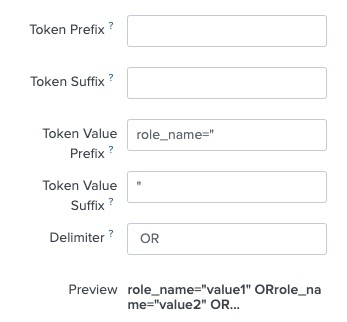
it means the interpolated clause looks like: `| where role_name="value1" OR role_name="value2"`, my second question is when `all` is selected, how can I either emit the whole `WHERE` clause, or make it trivial, means the `WHERE` clause is there but actually it doesn’t filter anything? I tried to give the `all` option an empty string, or a `*` but both don’t work.
3. When populating the dynamic options of multiselect from query, I want to reference other inputs as query parameters.
For example, I already added an input whose token name is `environment` and another time range input, I want to only get distinct values of a column from the given environment and time range, like this:
`from_index_distapps` sourcetype="xyz" "request=" earliest=$time_range$
| rex field=message "request=\"(?[^}]+})"
| eval arjson=replace(arjson, "\\\\\"", "\"")
| spath input=arjson
| where environment=$environment$
| table role_name
| dedup role_name
How to correctly reference other inputs here?
- Mark as New
- Bookmark Message
- Subscribe to Message
- Mute Message
- Subscribe to RSS Feed
- Permalink
- Report Inappropriate Content


Set your multi-select something like this
<input type="multiselect" token="roles">
<label>Select one or more roles</label>
<choice value="All">All</choice>
<search base="find_roles">
<query>dedup roles | table roles</query>
</search>
<fieldForLabel>roles</fieldForLabel>
<fieldForValue>roles</fieldForValue>
<prefix>(</prefix>
<valuePrefix>role="</valuePrefix>
<valueSuffix>"</valueSuffix>
<delimiter> OR </delimiter>
<suffix>)</suffix>
<default>All</default>
<change>
<eval token="form.roles">case(mvcount('form.roles')=0,"All",mvcount('form.roles')>1 AND mvfind('form.roles',"All")>0,"All",mvcount('form.roles')>1 AND mvfind('form.roles',"All")=0,mvfilter('form.roles'!="All"),1==1,'form.roles')</eval>
<eval token="multiselect_roles">if(mvfind('form.roles',"All")=0,"role=*",$roles$)</eval>
</change>
</input>Note that the eval with the case statement has to be all on one line. Also, note that the value for All is All since it is the value not the label that is held in form.roles not the label.
- Mark as New
- Bookmark Message
- Subscribe to Message
- Mute Message
- Subscribe to RSS Feed
- Permalink
- Report Inappropriate Content
PS why are the backquotes not covered into <code> </code> automatically?

Join the Splunk Community Slack to learn, troubleshoot, and make connections with fellow Splunk practitioners in real time!
Join Splunk User Groups to connect and learn in-person by region or remotely by topic or industry.
Index This | What travels the world but is also stuck in place?
Discover New Use Cases: Unlock Greater Value from Your Existing Splunk Data
Continue Your Journey: Join Session 2 of the Data Management and Federation Bootcamp ...
