
Join the Conversation
- Find Answers
- :
- Using Splunk
- :
- Dashboards & Visualizations
- :
- Re: How to place a panel drilldown on top of anoth...
- Subscribe to RSS Feed
- Mark Topic as New
- Mark Topic as Read
- Float this Topic for Current User
- Bookmark Topic
- Subscribe to Topic
- Mute Topic
- Printer Friendly Page
- Mark as New
- Bookmark Message
- Subscribe to Message
- Mute Message
- Subscribe to RSS Feed
- Permalink
- Report Inappropriate Content

Hi,
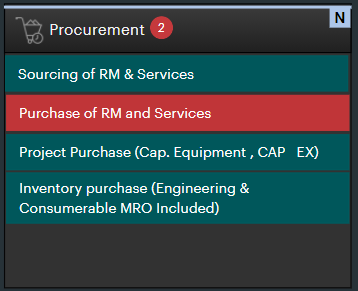
I want to place a panel on top of existing panel on the click of a cell.
First screen:
Second Screen:
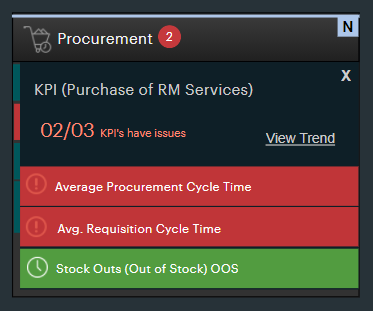
Is this feasible through Splunk?
- Mark as New
- Bookmark Message
- Subscribe to Message
- Mute Message
- Subscribe to RSS Feed
- Permalink
- Report Inappropriate Content


If you mean by 'on top of' = replacing the first panel with the second then yes, you can do it using tokens and depends attribute
Here's an example of how it works with two panels using depends/rejects and a token that is set/cleared on drilldown.
<dashboard>
  <label>Panels</label>
  <row>
    <panel rejects="$item$">
      <title>First Panel</title>
      <table>
        <search>
          <query>| makeresults
| eval Item=split("Sourcing,Purchase,Project,Inventory",",")
| mvexpand Item
| table Item</query>
          <earliest>-15m</earliest>
          <latest>now</latest>
          <sampleRatio>1</sampleRatio>
        </search>
        <option name="count">100</option>
        <option name="dataOverlayMode">none</option>
        <option name="drilldown">row</option>row
        <option name="percentagesRow">false</option>
        <option name="rowNumbers">false</option>
        <option name="totalsRow">false</option>
        <option name="wrap">true</option>
        <drilldown>
          <set token="item">$row.item$</set>
        </drilldown>
      </table>
    </panel>
    <panel depends="$item$">
      <title>Second Panel</title>
      <table>
        <search>
          <query>| makeresults
| eval DrillDownItem=split("Avg Procurement,Avg Requisition,Stock Out",",")
| mvexpand DrillDownItem
| table DrillDownItem</query>
          <earliest>-15m</earliest>
          <latest>now</latest>
          <sampleRatio>1</sampleRatio>
        </search>
        <option name="count">100</option>
        <option name="dataOverlayMode">none</option>
        <option name="drilldown">row</option>row
        <option name="percentagesRow">false</option>
        <option name="rowNumbers">false</option>
        <option name="totalsRow">false</option>
        <option name="wrap">true</option>
        <drilldown>
          <unset token="item"></unset>
        </drilldown>
      </table>
    </panel>

  </row>
</dashboard>- Mark as New
- Bookmark Message
- Subscribe to Message
- Mute Message
- Subscribe to RSS Feed
- Permalink
- Report Inappropriate Content
If you mean by 'on top of' = replacing the first panel with the second then yes, you can do it using tokens and depends attribute
Here's an example of how it works with two panels using depends/rejects and a token that is set/cleared on drilldown.
<dashboard>
  <label>Panels</label>
  <row>
    <panel rejects="$item$">
      <title>First Panel</title>
      <table>
        <search>
          <query>| makeresults
| eval Item=split("Sourcing,Purchase,Project,Inventory",",")
| mvexpand Item
| table Item</query>
          <earliest>-15m</earliest>
          <latest>now</latest>
          <sampleRatio>1</sampleRatio>
        </search>
        <option name="count">100</option>
        <option name="dataOverlayMode">none</option>
        <option name="drilldown">row</option>row
        <option name="percentagesRow">false</option>
        <option name="rowNumbers">false</option>
        <option name="totalsRow">false</option>
        <option name="wrap">true</option>
        <drilldown>
          <set token="item">$row.item$</set>
        </drilldown>
      </table>
    </panel>
    <panel depends="$item$">
      <title>Second Panel</title>
      <table>
        <search>
          <query>| makeresults
| eval DrillDownItem=split("Avg Procurement,Avg Requisition,Stock Out",",")
| mvexpand DrillDownItem
| table DrillDownItem</query>
          <earliest>-15m</earliest>
          <latest>now</latest>
          <sampleRatio>1</sampleRatio>
        </search>
        <option name="count">100</option>
        <option name="dataOverlayMode">none</option>
        <option name="drilldown">row</option>row
        <option name="percentagesRow">false</option>
        <option name="rowNumbers">false</option>
        <option name="totalsRow">false</option>
        <option name="wrap">true</option>
        <drilldown>
          <unset token="item"></unset>
        </drilldown>
      </table>
    </panel>

  </row>
</dashboard>- Mark as New
- Bookmark Message
- Subscribe to Message
- Mute Message
- Subscribe to RSS Feed
- Permalink
- Report Inappropriate Content
By on top I meant on top of existing panel ,both the panels should be visible but the second one should not completely overlap first. If that's possible???
- Mark as New
- Bookmark Message
- Subscribe to Message
- Mute Message
- Subscribe to RSS Feed
- Permalink
- Report Inappropriate Content
In Splunk _everything_ is possible 😁
The same technique of using tokens - but you don't need the reject= token part as that hides the top panel.
See this - there is a single <panel> element and inside that, there are two <table> elements - the second one uses depends= to only show it when you click in the top panel.
By only using a single panel with 2 tables, they will be displayed one above, one below.
Hope this helps
<dashboard>
  <label>Panels</label>
  <row>
    <panel>
      <title>First Panel</title>
      <table>
        <search>
          <query>| makeresults
| eval Item=split("Sourcing,Purchase,Project,Inventory",",")
| mvexpand Item
| table Item</query>
          <earliest>-15m</earliest>
          <latest>now</latest>
          <sampleRatio>1</sampleRatio>
        </search>
        <option name="count">100</option>
        <option name="dataOverlayMode">none</option>
        <option name="drilldown">row</option>row
        <option name="percentagesRow">false</option>
        <option name="rowNumbers">false</option>
        <option name="totalsRow">false</option>
        <option name="wrap">true</option>
        <drilldown>
          <set token="item">$row.item$</set>
        </drilldown>
      </table>
      <table depends="$item$">
        <title>Second Panel</title>
        <search>
          <query>| makeresults
| eval DrillDownItem=split("Avg Procurement,Avg Requisition,Stock Out",",")
| mvexpand DrillDownItem
| table DrillDownItem</query>
          <earliest>-15m</earliest>
          <latest>now</latest>
          <sampleRatio>1</sampleRatio>
        </search>
        <option name="count">100</option>
        <option name="dataOverlayMode">none</option>
        <option name="drilldown">row</option>row
        <option name="percentagesRow">false</option>
        <option name="rowNumbers">false</option>
        <option name="totalsRow">false</option>
        <option name="wrap">true</option>
        <drilldown>
          <unset token="item"></unset>
        </drilldown>
      </table>
    </panel>
  </row>
</dashboard>
Join the Splunk Community Slack to learn, troubleshoot, and make connections with fellow Splunk practitioners in real time!
Join Splunk User Groups to connect and learn in-person by region or remotely by topic or industry.
May 2026 Splunk Expert Sessions: Security & Observability
Network to App: Observability Unlocked [May & June Series]
SPL2 Deep Dives, AppDynamics Integrations, SAML Made Simple and Much More on Splunk ...
