
Turn on suggestions
Auto-suggest helps you quickly narrow down your search results by suggesting possible matches as you type.
Dashboards & Visualizations
×
Join the Conversation
Without signing in, you're just watching from the sidelines. Sign in or Register to connect, share, and be part of the Splunk Community.
Turn on suggestions
Auto-suggest helps you quickly narrow down your search results by suggesting possible matches as you type.
- Find Answers
- :
- Using Splunk
- :
- Dashboards & Visualizations
- :
- How to order the ranges display in tables and char...
Options
- Subscribe to RSS Feed
- Mark Topic as New
- Mark Topic as Read
- Float this Topic for Current User
- Bookmark Topic
- Subscribe to Topic
- Mute Topic
- Printer Friendly Page
- Mark as New
- Bookmark Message
- Subscribe to Message
- Mute Message
- Subscribe to RSS Feed
- Permalink
- Report Inappropriate Content

aryamehr360
New Member
03-03-2020
09:57 AM
I want to order range from low amount of min/hour to high,
like this :
1S-1M, 1M-30M, 30M-1H, 1H-2H, 2H-3H, 3H-4H, 4H-5H, 5H-8H, 8H-10H, 10H-15H, 15H-More
I use this command;
| rangemap field=duration 1S-1M=0-60 1M-30M=61-1800 30M-1H=1801-3600 1H-2H=3601-7200 2H-3H=7201-10800 3H-4H=10801-14400 4H-5H=14401-18000 5H-8H=18001-28800 8H-10H=28801-36000 10H-15H=36001-54000 15H-More=54001-9999999999
| chart count by range
and I get this order range;
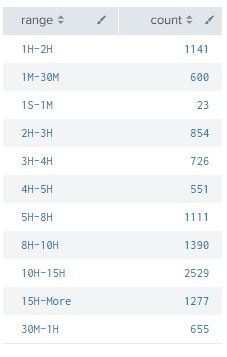
and I want to order them from 1S-1M, 1M-30M, 30M-1H, ... , 10H-15H, 15H-more.

1 Solution
- Mark as New
- Bookmark Message
- Subscribe to Message
- Mute Message
- Subscribe to RSS Feed
- Permalink
- Report Inappropriate Content

richgalloway

SplunkTrust
03-03-2020
10:38 AM
The range column looks to be sorted alphbetically, If you want a different sort, add a field to sort on.
| rangemap field=duration 1S-1M=0-60 1M-30M=61-1800 30M-1H=1801-3600 1H-2H=3601-7200 2H-3H=7201-10800 3H-4H=10801-14400 4H-5H=14401-18000 5H-8H=18001-28800 8H-10H=28801-36000 10H-15H=36001-54000 15H-More=54001-9999999999
| chart count by range
| eval sorter = case(range="1S-1M", 1, range="1M-30M", 2, range="30M-1H", 3, range="1H-2H", 4, range="2H-3H", 5, range="3H-4H", 6, range="4H-5H", 7, range="5H-8", 8, range="8H-10H", 9, range="10H-15H", 10, range="15H-More", 11, 1==1, 99)
| sort sorter | fields - sorter
---
If this reply helps you, Karma would be appreciated.
If this reply helps you, Karma would be appreciated.
- Mark as New
- Bookmark Message
- Subscribe to Message
- Mute Message
- Subscribe to RSS Feed
- Permalink
- Report Inappropriate Content
richgalloway
SplunkTrust
03-03-2020
10:38 AM
The range column looks to be sorted alphbetically, If you want a different sort, add a field to sort on.
| rangemap field=duration 1S-1M=0-60 1M-30M=61-1800 30M-1H=1801-3600 1H-2H=3601-7200 2H-3H=7201-10800 3H-4H=10801-14400 4H-5H=14401-18000 5H-8H=18001-28800 8H-10H=28801-36000 10H-15H=36001-54000 15H-More=54001-9999999999
| chart count by range
| eval sorter = case(range="1S-1M", 1, range="1M-30M", 2, range="30M-1H", 3, range="1H-2H", 4, range="2H-3H", 5, range="3H-4H", 6, range="4H-5H", 7, range="5H-8", 8, range="8H-10H", 9, range="10H-15H", 10, range="15H-More", 11, 1==1, 99)
| sort sorter | fields - sorter
---
If this reply helps you, Karma would be appreciated.
If this reply helps you, Karma would be appreciated.

Get Updates on the Splunk Community!
Enter the Agentic Era with Splunk AI Assistant for SPL 1.4
🚀 Your data just got a serious AI upgrade — are you ready?
Say hello to the Agentic Era with the ...
Stronger Security with Federated Search for S3, GCP SQL & Australian Threat ...
Splunk Lantern is a Splunk customer success center that provides advice from Splunk experts on valuable data ...
Accelerating Observability as Code with the Splunk AI Assistant
We’ve seen in previous posts what Observability as Code (OaC) is and how it’s now essential for managing ...
