
Join the Conversation
- Find Answers
- :
- Using Splunk
- :
- Dashboards & Visualizations
- :
- Re: How to hide x-axis values in chart?
- Subscribe to RSS Feed
- Mark Topic as New
- Mark Topic as Read
- Float this Topic for Current User
- Bookmark Topic
- Subscribe to Topic
- Mute Topic
- Printer Friendly Page
- Mark as New
- Bookmark Message
- Subscribe to Message
- Mute Message
- Subscribe to RSS Feed
- Permalink
- Report Inappropriate Content

| eval totaltime=mvindex(data,0)
| eval duration=mvindex(data,1)
| table totaltime duration
by using totaltime(first highlight in the below data) and duration(second highlight in the sample data below) from the below sample data and would like to striff off the values populating on x-axis. values say ()18.054, 18.250,1408.651,etc). Attached is the screenshot

18.054: [Full GC (System.gc()) 503347K->61384K(32156672K), 0.1963421 secs]
18.250: [Full GC (System.gc()) 61384K->60461K(32156672K), 0.2033912 secs]
1408.651: [GC (Metadata GC Threshold) 2828876K->81862K(32156672K), 0.0540273 secs]
1408.705: [Full GC (Metadata GC Threshold) 81862K->29711K(32156672K), 0.0434399 secs]
1412.793: [GC (Metadata GC Threshold) 1573326K->77878K(32156672K), 0.0172465 secs]
1412.810: [Full GC (Metadata GC Threshold) 77878K->67453K(32156672K), 0.1902059 secs]
- Mark as New
- Bookmark Message
- Subscribe to Message
- Mute Message
- Subscribe to RSS Feed
- Permalink
- Report Inappropriate Content


looks like there is an option -
charting.axisLabelsX.axisVisibility
charting.axisLabelsY.axisVisibility (show | hide) Depends on axis type Indicates whether or not the axis line is visible. For numeric axes, defaults to hide. For all other axes, defaults to show.
on the dashboard, click Edit ---> Edit Source, it will open the xml source of the dashboard.
on this xml, please update -
<param name="charting.axisLabelsY.majorLabelVisibility">hide</param>
one more option -
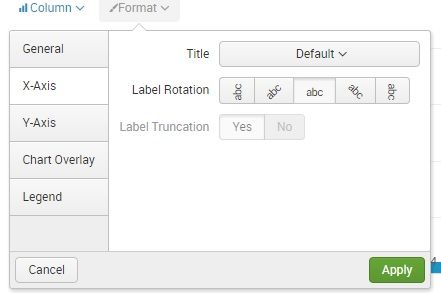
as you have long values, you can try the Label Rotation / Label truncation options.
- Mark as New
- Bookmark Message
- Subscribe to Message
- Mute Message
- Subscribe to RSS Feed
- Permalink
- Report Inappropriate Content
looks like there is an option -
charting.axisLabelsX.axisVisibility
charting.axisLabelsY.axisVisibility (show | hide) Depends on axis type Indicates whether or not the axis line is visible. For numeric axes, defaults to hide. For all other axes, defaults to show.
on the dashboard, click Edit ---> Edit Source, it will open the xml source of the dashboard.
on this xml, please update -
<param name="charting.axisLabelsY.majorLabelVisibility">hide</param>
one more option -
as you have long values, you can try the Label Rotation / Label truncation options.
- Mark as New
- Bookmark Message
- Subscribe to Message
- Mute Message
- Subscribe to RSS Feed
- Permalink
- Report Inappropriate Content

@inventsekar, I think you meant option not param. Advanced XML param is deprecated. Also it should be axisLabelsX which needs to be hidden not Y.
<option name="charting.axisLabelsX.majorLabelVisibility">hide</option>
PS: While this option should work and hide the x-axis labels, it is also deprecated. Following is the Splunk documentation for Chart Configuration reference: https://docs.splunk.com/Documentation/Splunk/latest/Viz/ChartConfigurationReference#Area.2C_Bubble.2...
| makeresults | eval message= "Happy Splunking!!!"
- Mark as New
- Bookmark Message
- Subscribe to Message
- Mute Message
- Subscribe to RSS Feed
- Permalink
- Report Inappropriate Content
thanks for both ...I realized that the param is for Advanced XML and option is for simple xml as @niketnilay mentioned. Accordingly i have changed and works fine,,@niketnilay...not sure how to accept your answer.kindly let me know



Join the Splunk Community Slack to learn, troubleshoot, and make connections with fellow Splunk practitioners in real time!
Join Splunk User Groups to connect and learn in-person by region or remotely by topic or industry.
Persistent Queue at TcpOut — One of Splunk's Most Practical Features
Skip the Awkward Silence: Have a .conf-ersation at .conf26
Rethinking Zero Trust: From Product Purchases to Logical Control Evidence
