
Join the Conversation
- Find Answers
- :
- Using Splunk
- :
- Dashboards & Visualizations
- :
- Re: How to dynamically change cell color based on ...
- Subscribe to RSS Feed
- Mark Topic as New
- Mark Topic as Read
- Float this Topic for Current User
- Bookmark Topic
- Subscribe to Topic
- Mute Topic
- Printer Friendly Page
- Mark as New
- Bookmark Message
- Subscribe to Message
- Mute Message
- Subscribe to RSS Feed
- Permalink
- Report Inappropriate Content
How to dynamically change cell color based on multi-select input token?

Hi,
I have a multi-select input with user permissions to change cell color ( colorPalette) based on values the user enters.
Here is the creation of my multi-select input :
<input type="multiselect" token="chosenAdmin" searchWhenChanged="true">
        <label>field1</label>
        <fieldForLabel>user</fieldForLabel>
        <fieldForValue>user</fieldForValue>
        <search>
          <query>my query
          <earliest>0</earliest>
          <latest></latest>
        </search>
        <delimiter> </delimiter>
      </input>
This is the color palette I tried:
<format type="color" field="user">
          <colorPalette type="expression">if (match(value, $chosenAdmin$),"#DC4E41", true())</colorPalette>
 </format>
The $chosenAdmin$ token can contain 1 or more users.
This changes the color of all cells of my "user" to red.
Any idea how to solve this problem?
- Mark as New
- Bookmark Message
- Subscribe to Message
- Mute Message
- Subscribe to RSS Feed
- Permalink
- Report Inappropriate Content

@marone besides applying the expression string from multiselect as token, you will also need to ensure that table visualization is refreshed every time multiselect value is changed (this can be done through JS). So, instead I am giving a Link input as submit button which resets the token so that search is re-run and table gets refreshed.
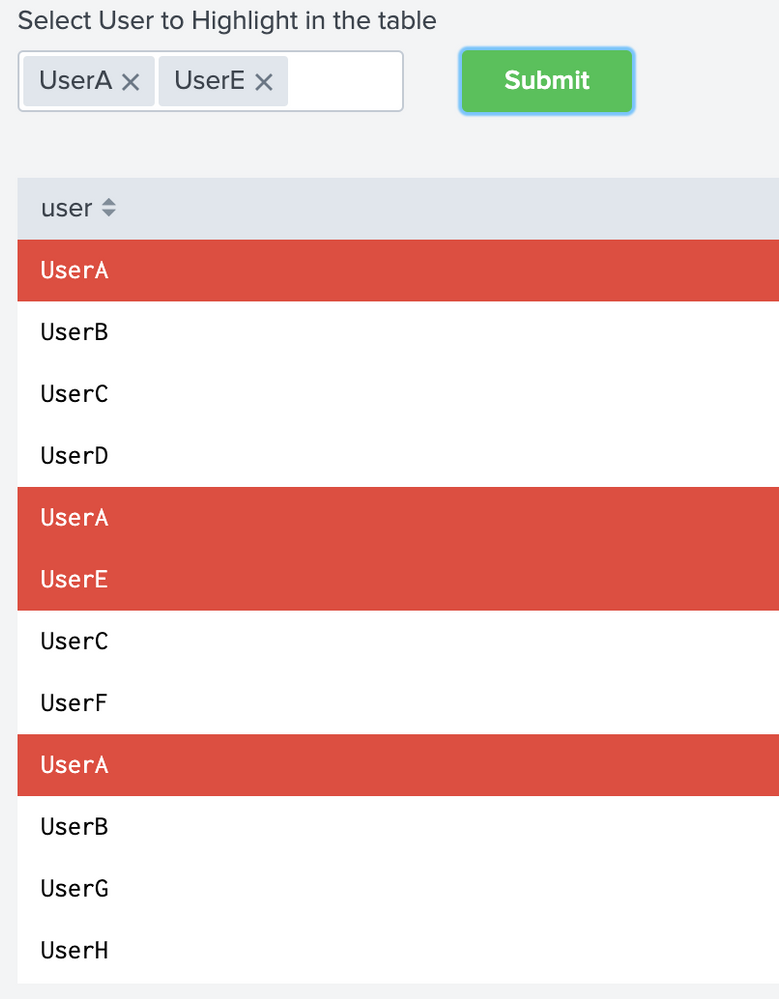
Following is the Simple XML run anywhere example which you can try and confirm!
<form>
  <label>Highlight Selected values in Table</label>
  <fieldset submitButton="false">
    <input type="multiselect" token="chosenAdmin" searchWhenChanged="true">
      <label>Select User to Highlight in the table</label>
      <delimiter> </delimiter>
      <change>
        <unset token="refresh"></unset>
      </change>
      <fieldForLabel>user</fieldForLabel>
      <fieldForValue>user</fieldForValue>
      <search>
        <query>| makeresults
| fields - _time
| eval user="UserA,UserB,UserC,UserD,UserE,UserF,UserG,UserH"
| makemv user delim=","
| mvexpand user</query>
      </search>
    </input>
    <input id="button_submit1" type="link" token="tokLinkSubmit" searchWhenChanged="true">
      <label></label>
      <choice value="submit">Submit</choice>
      <change>
        <condition value="submit">
          <set token="refresh">true</set>
          <unset token="form.tokLinkSubmit"></unset>
        </condition>
      </change>
    </input>
  </fieldset>
  <row>
    <panel>
      <html depends="$alwaysHideCSSPanel$">
         <style>
           div[id^="button_submit"] div[data-component="splunk-core:/splunkjs/mvc/components/LinkList"]{
               width:40% !important;
           }
           div[id^="button_submit"] button[data-test="option"]{
               padding: 6px 15px;
               font-weight: 500;
               background-color: #5cc05c;
               border: transparent;
           }
           div[id^="button_submit"] span[data-test="label"]{
               color: white !important;
           }
           div[id^="button_submit"] span[data-test="label"]:hover{
               color: #3c444d !important;
           }
         </style>
       </html>
      <table>
        <search depends="$refresh$">
          <query>| makeresults
| fields - _time
| eval user="UserA,UserB,UserC,UserD,UserA,UserE,UserC,UserF,UserA,UserB,UserG,UserH"
| makemv user delim=","
| mvexpand user</query>
          <earliest>-24h@h</earliest>
          <latest>now</latest>
        </search>
        <option name="count">20</option>
        <option name="drilldown">none</option>
        <option name="refresh.display">progressbar</option>
        <format type="color" field="user">
          <colorPalette type="expression">if (like("$chosenAdmin$",value),"#DC4E41","#FFFFFF")</colorPalette>
        </format>
      </table>
    </panel>
  </row>
</form>
| makeresults | eval message= "Happy Splunking!!!"



Join the Splunk Community Slack to learn, troubleshoot, and make connections with fellow Splunk practitioners in real time!
Join Splunk User Groups to connect and learn in-person by region or remotely by topic or industry.
Cisco Data Fabric from Architecture to Investigation, Better SOC Visibility, and More ...
The Trust Gap: Why a Data Foundation is Fundamental to an Agentic Enterprise
Data Management Digest – September 2026
