
Join the Conversation
- Find Answers
- :
- Using Splunk
- :
- Dashboards & Visualizations
- :
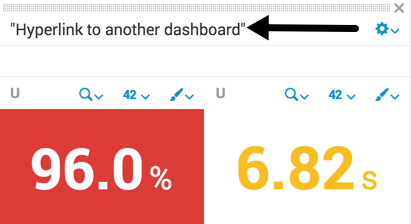
- How to drill down to another dashboard by clicking...
- Subscribe to RSS Feed
- Mark Topic as New
- Mark Topic as Read
- Float this Topic for Current User
- Bookmark Topic
- Subscribe to Topic
- Mute Topic
- Printer Friendly Page
- Mark as New
- Bookmark Message
- Subscribe to Message
- Mute Message
- Subscribe to RSS Feed
- Permalink
- Report Inappropriate Content


- Mark as New
- Bookmark Message
- Subscribe to Message
- Mute Message
- Subscribe to RSS Feed
- Permalink
- Report Inappropriate Content

I don't think there is a native way to create a drilldown from the panel title, but you can try this workaround where you create the title using a html and add redirection. (run anywhere sample, replace /app/search/seconddashboard with your app/dashboard name where you want to drilldown)
<dashboard >
  <label>Eval Tokens</label>
  <row>
    <panel>
      <html>
        <a href="/app/search/seconddashboard"><h3>Top sourcetypes for index=_internal</h3></a>
      </html>
      <chart>
        <search>
          <query>index=_internal |  top sourcetype</query>
          <earliest>-2h</earliest>
          <latest>now</latest>
        </search>
        <option name="charting.chart">bar</option>
      </chart>
     </panel>
  </row>
</dashboard>
- Mark as New
- Bookmark Message
- Subscribe to Message
- Mute Message
- Subscribe to RSS Feed
- Permalink
- Report Inappropriate Content
I don't think there is a native way to create a drilldown from the panel title, but you can try this workaround where you create the title using a html and add redirection. (run anywhere sample, replace /app/search/seconddashboard with your app/dashboard name where you want to drilldown)
<dashboard >
  <label>Eval Tokens</label>
  <row>
    <panel>
      <html>
        <a href="/app/search/seconddashboard"><h3>Top sourcetypes for index=_internal</h3></a>
      </html>
      <chart>
        <search>
          <query>index=_internal |  top sourcetype</query>
          <earliest>-2h</earliest>
          <latest>now</latest>
        </search>
        <option name="charting.chart">bar</option>
      </chart>
     </panel>
  </row>
</dashboard>
- Mark as New
- Bookmark Message
- Subscribe to Message
- Mute Message
- Subscribe to RSS Feed
- Permalink
- Report Inappropriate Content
Would you know how to set or unset tokens after clicking the title?
- Mark as New
- Bookmark Message
- Subscribe to Message
- Mute Message
- Subscribe to RSS Feed
- Permalink
- Report Inappropriate Content
Thanks somesoni2!!!! I think that work around might have done the trick
- Mark as New
- Bookmark Message
- Subscribe to Message
- Mute Message
- Subscribe to RSS Feed
- Permalink
- Report Inappropriate Content


the exact answer will differ depending on what you are using simple XML or HTML for your dashboard. What you will need is a custom piece of javascript.
In the meantime, here is some info on drilldowns in Splunk: http://dev.splunk.com/view/webframework-developapps/SP-CAAAESJ
- Mark as New
- Bookmark Message
- Subscribe to Message
- Mute Message
- Subscribe to RSS Feed
- Permalink
- Report Inappropriate Content
I'm using a simple XML dashboard

A Season of Skills: New Splunk Courses to Light Up Your Learning Journey
Announcing the Migration of the Splunk Add-on for Microsoft Azure Inputs to ...
Splunk Observability for AI
